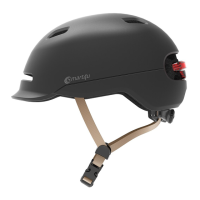
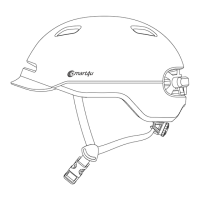
This document serves as a Quick Start Guide and Warranty Details for the Smart4u SH20 Smart Cycling Helmet. It provides an introduction to the product, packing list, wearing instructions, operating instructions, technical specifications, notice, warranty rules, and electronic functions troubleshooting.
Function Description:
The Smart4u SH20 is a smart cycling helmet designed to enhance the cycling experience with integrated electronic features. It includes built-in speakers and a microphone, allowing for audio playback and hands-free communication. The helmet supports Bluetooth pairing for connection to mobile phones, enabling functions such as answering/hanging up calls, redialing, and playing music. It also features an indicator light for status updates and a charging port for its internal battery. The helmet is designed with adjustable chinstraps and buckles to ensure a secure and comfortable fit, and it is intended to provide protection during cycling.
Important Technical Specifications:
- Voice: Mic-39dB, 8Ω Hi-Fi speaker
- Electricity Parameter: DC 5V/0.5A
- Charging Time: 3-4 hours
- Charging Port: Micro USB
- Battery Capacity: 3.7V/450mAh (1.665WH)
- Battery Life: Listening time for music is 3-6 hours
- Temperature:
- Storage Temperature: -20°C ~ 45°C
- Temperature for use: 0°C ~ 40°C
- Temperature while charging: 0°C ~ 40°C
- Bluetooth: Operating Frequency Range 2402 - 2480 MHz, Maximum RF Output Power 4.50dBm EIRP
- Performance Standards: USA: CPSC1203, Europe: EN 1078:2012+A1:2012
- Executive Standard: GB24429-2009
Usage Features:
- Power On/Off: Hold the power button for approximately 3 seconds until a voice prompt is heard and the indicator light turns on/off.
- Bluetooth Pairing: When the helmet is powered off, hold the power button until "Pairing" is heard. Enable Bluetooth on your phone, scan for "Helmetphone," and click to connect. A "Connected" voice prompt will confirm the connection.
- Answer and Hang Up Calls: A tone indicates an incoming call. Click the button to answer, or hold it for more than 1 second to reject. During a call, press the button to hang up.
- Redial Calls: When connected to a mobile phone, quickly double-click the button to redial the last outgoing call.
- Play Music: When connected to a mobile phone with a music app running, press the button to play/pause music. Hold the "-" button for 1 second for the previous song, and the "+" button for 1 second for the next song.
- Volume Control: Click "+" to increase volume, and "-" to decrease volume during music playback or calls.
- Switch Language: When powered on, first hold the "-" button, then press the "+" button to switch between English and Chinese. Release the "-" button to confirm the desired language.
Maintenance Features:
- Wearing Instructions:
- Choose the correct size for a secure and comfortable fit.
- Adjust the chinstrap and fasten the buckle to prevent the helmet from falling off during cycling.
- Ensure the helmet is positioned to protect the forehead and not pushed too far back on the head.
- Post-Impact: If the helmet has suffered a major impact or structural changes, it should not be used further for safety reasons. A helmet subjected to a severe impact should be discarded and destroyed.
- Cleaning: Wipe the helmet surface with water only. Do not use alcohol, gasoline, organic solvents, acids, alkalis, or other corrosive liquids.
- Storage: Store the helmet in a cool, ventilated place to prevent moisture and mildew.
- Battery Life: The helmet's valid time for normal use is 3 years. To maintain efficient battery life, fully charge the helmet before any long-term storage (six months to one year).
- Charging: Plug in the USB charger. The red indicator light will turn on during charging and automatically turn off when fully charged. Do not place the product near inflammable materials when charging.
- Battery Safety: The product contains batteries. Do not dispose of them with general waste; follow local recycling regulations. Do not put batteries into fire or high-temperature conditions, as this may cause electrolyte leaks, overheating, cracks, or fire. Do not disassemble, extrude, heat up, or burn the batteries. Do not puncture or pry batteries with sharp items.
- Modifications: Do not modify or remove any original component parts of the helmet unless recommended by the manufacturer. Helmets should not be adapted for fitting accessories in ways not recommended by the manufacturer.
- Troubleshooting: If issues like inability to charge, turn on, or electronic functions not working, or automatic power-off occur, charge the product (which can reset it). If problems persist, contact the after-sales service center at riding@smart4u.ai.
- FCC Compliance: This device complies with Part 15 of the FCC Rules. It must accept any interference received and not cause harmful interference. Changes or modifications not expressly approved by the responsible party could void the user's authority to operate the equipment.

 Need help?
 General

 To Next Page