smartgyro.es
27
Xtreme XD- Manual
EN
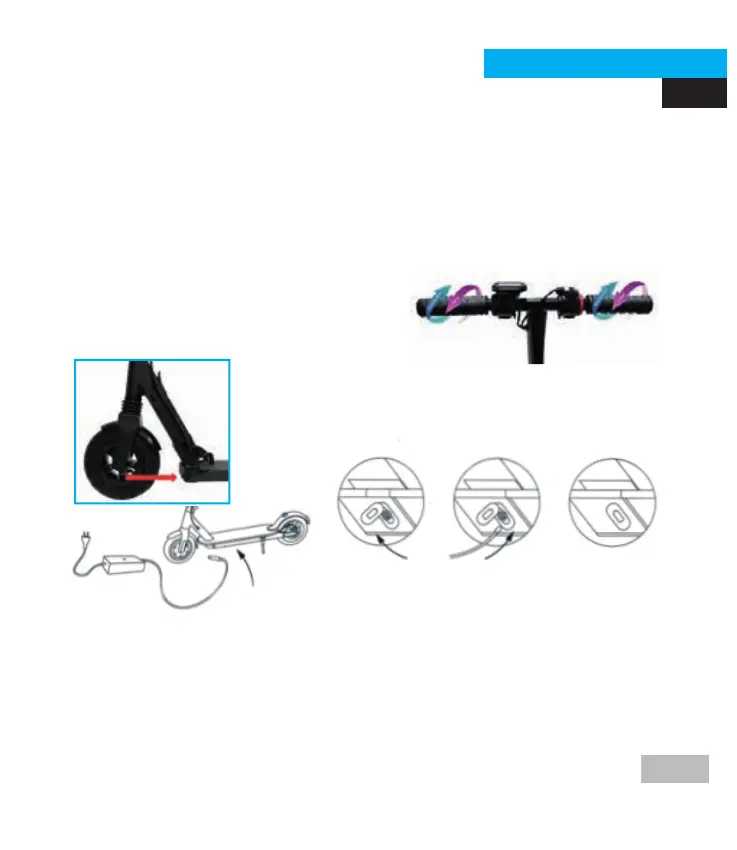
Charge Port:
Remove the rubber cap, insert the charging cable. Once
the loading is done, put the rubber cover back in its
place.
Charging your Smartgyro
Make sure that your smartGyro's charger is in optimal condition. Please
check that there is no dust or dirt in the connector and if so, clean it and
make sure it is always dry.
Handlebar assembly
1) Parts inside the packaging: two handlebars.
2) Assembly methods: Loosen the screw on the handlebar, rotate the
axle to make the meter screen upwards while the handlebar and display
screen turn inwards in a horizontal level.
3) Before operating the E-scooter, turn the handlebar grips and carefully
check all the components to make sure that the steering is correctly
installed as described above, and that all connecting parts are secure
and fully functional.



 To Next Page