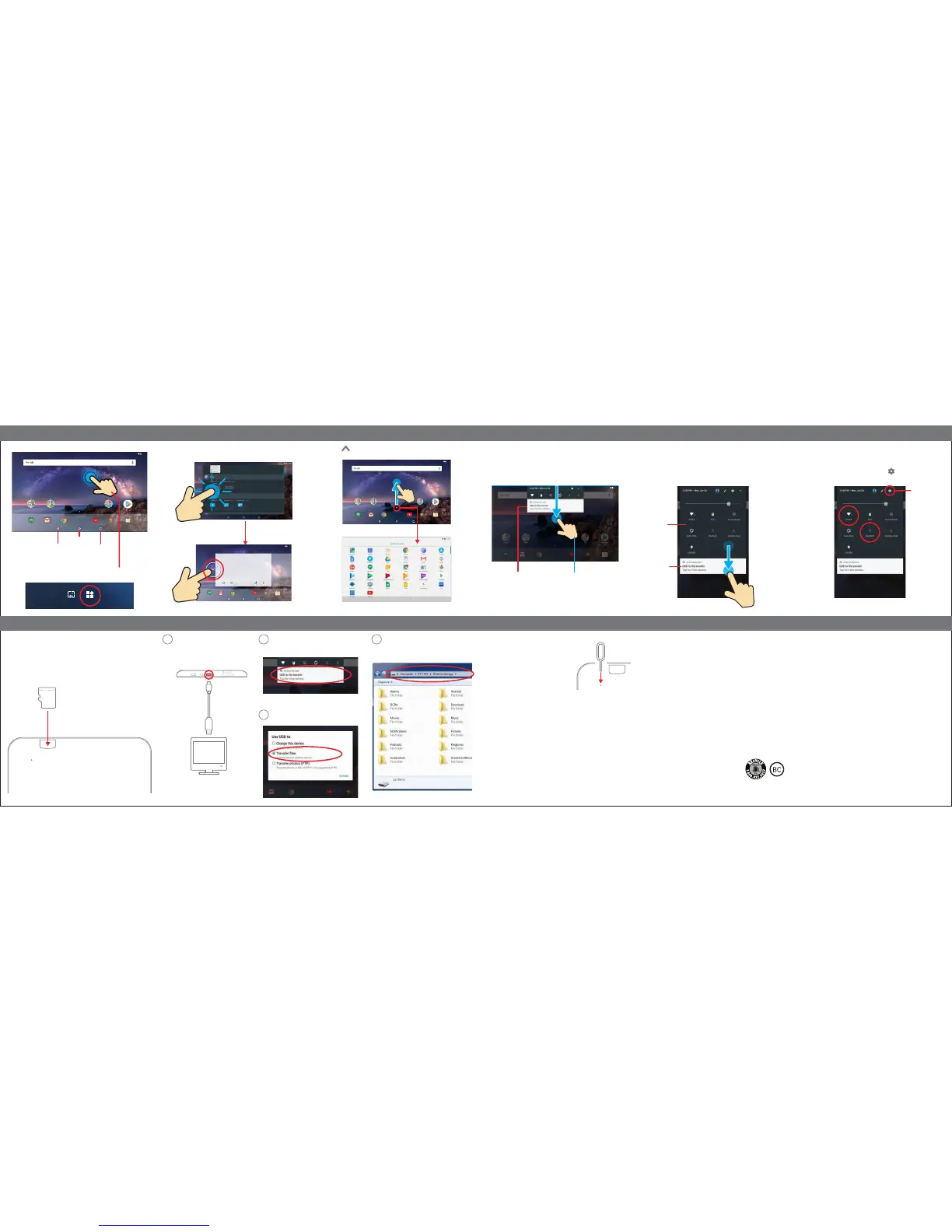
To enable/disable Wi-Fi or Bluetooth
®
, simply tap the icons on the Quick
Settings panel as shown below.
To access more settings options, select the icon.
Wi-Fi and Bluetooth
®
Swipe down twice from the top edge of the screen to expand and access
the Quick Settings panel, where you can easily enable/disable Wi-Fi,
Bluetooth, Airplane mode and other settings.
Quick Settings panel
Swipe down from the top edge of the screen to display the Notifications
panel where you can browse and reply to your emails, check software
updates, reminders and more.
Notifications panel
To add a widget, press and hold anywhere on the home screen, and
select the “Widgets” option.
Widgets
Press and hold widgets to place them on the home screen as shown below. Swipe up indicator on the home screen to access the Apps Screen.
1
Reset
If the tablet malfunctions or freezes, you can
use the Reset button to restart it.
To reset the tablet, take a metal pin (such as
the end of a paper clip) and gently push the
recessed Reset button on the back of the
tablet as shown below.
The tablet will restart.
Text-To-Speech
Google Text-to-speech powers applications to read the text on your screen
aloud. For example, it can be used by:
• Google Play Books to 'Read Aloud' your favorite book
• Google Translate to speak translations aloud so that you can hear the
pronunciation of a word
• TalkBack and accessibility applications for spoken feedback across your device
• ... and many other applications in Play Store
To use Google Text-to-speech on your Android device, go to Settings>
Language & Input>Text-to-speech output. Select Google Text-to-speech
Engine as your preferred engine.
Regulatory information
To view FCC regulatory information for this tablet, go to Settings>About
Tablet>Regulatory Information.
Tablet (TOP)
Micro USB
cable
Expanding the storage
To install a Micro SD card into the tablet, carefully insert the card as
shown below into the card slot until it clicks and locks into place.
To remove the Micro SD card, gently press it inward to eject.
Micro SD card is not included.
Inserting a Micro SD card
Transferring files
Connect the tablet to the computer
using the included Micro USB cable
as shown below.
2
Tap the notification on the tablet screen.
4
The internal storage of the tablet will appear
on your PC.
3
Select “Transfer files”.
Micro SD
card
Tablet (BACK)
Tablet (BACK)
LIMITED WARRANTY TO ORIGINAL CONSUMER
This Product (including any accessories included in the original packaging) as supplied and distributed new by an authorized retailer is
warranted by Southern Telecom, Inc. to the original consumer purchaser against defects in materials and workmanship (“Warranty”)
as follows:
Product Type: Tablet, Territory: United States/Canada, Parts Warranty: 1 Year, Labor Warranty: 1 Year
To obtain warranty service:
• Call the Customer Support number located below, or go to our website portal to receive an SRO number.
• Provide proof of the date of purchase within the package (Dated bill of sale).
• Prepay all shipping costs to the authorized service center, and remember to insure your return.
• Include a return shipping address (no P.O. Boxes), a telephone contact number, and the defective unit within the package.
• Describe the defect or reason you are returning the product.
Customer Support:
1-877-768-8481 (Toll Free) www.southerntelecom.com
Monday - Friday: 8AM - 10PM (EST) Click on “Product Support”
Your product will be repaired or replaced, at our option, for the same or similar model of equal value if examination by the service center
determines this product is defective. Products received damaged as a result of shipping will require you to file a claim with the carrier.
The shipping address of the authorized service center is:
Customer Service Dept. 36
c/o Southern Telecom
400 Kennedy Drive
Sayreville NJ 08872
Warranty service not provided
This warranty does not cover damage resulting from accident, misuse, abuse, improper installation or operation, lack of reasonable
care, unauthorized modification including software modifications such as the installation of custom firmwares. This warranty is voided
in the event any unauthorized person opens, alters or repairs this product. All products being returned to the authorized service center
for repair must be suitably packaged.
NO WARRANTIES, WHETHER EXPRESS OR IMPLIED, INCLUDING, BUT NOT LIMITED TO, ANY IMPLIED WARRANTIES OF
MERCHANTABILITY OR FITNESS FOR A PARTICULAR PURPOSE, OTHER THAN THOSE EXPRESSLY DESCRIBED ABOVE SHALL
APPLY. DISTRIBUTOR FURTHER DISCLAIMS ALL WARRANTIES AFTER THE EXPRESS WARRANTY PERIOD STATED ABOVE.
NO OTHER EXPRESS WARRANTY OR GUARANTY GIVEN BY ANY PERSON, FIRM OR ENTITY WITH RESPECT TO THE PRODUCT
SHALL BE BINDING ON DISTRIBUTOR. REPAIR, REPLACEMENT, OR REFUND OF THE ORIGINAL PURCHASE PRICE - AT
DISTRIBUTOR’S SOLE DISCRETION - ARE THE EXCLUSIVE REMEDIES OF THE CONSUMER. IN NO EVENT WILL DISTRIBUTOR
OR ITS MANUFACTURERS BE LIABLE FOR ANY INCIDENTAL, DIRECT, INDIRECT, SPECIAL, PUNITIVE OR CONSEQUENTIAL
DAMAGES (SUCH AS, BUT NOT LIMITED TO, DAMAGES FOR LOSS OF PROFITS, BUSINESS, SAVINGS, DATA OR RECORDS)
CAUSED BY THE USE, MISUSE OR INABILITY TO USE THE PRODUCT. EXCEPT AS STATED HEREIN, NO OTHER WARRANTIES
SHALL APPLY. NOTWITHSTANDING THE FOREGOING, CONSUMER’S RECOVERY AGAINST DISTRIBUTOR SHALL NOT EXCEED
THE PURCHASE PRICE OF THE PRODUCT SOLD BY DISTRIBUTOR. THIS WARRANTY SHALL NOT EXTEND TO ANYONE OTHER
THAN THE ORIGINAL CONSUMER WHO PURCHASED THE PRODUCT AND IS NOT TRANSFERABLE.
Some countries, states or provinces do not allow the exclusion or limitation of incidental or consequential damages or allow limitations
on warranties, so limitation or exclusions may not apply to you. This warranty gives you specific legal rights, and you may have other
rights that vary from state to state or province to province. Contact your authorized retailer to determine if another warranty applies.
Limited WarrantyLegal information
FCC Part 15:
This equipment has been tested and found to comply with the requirements for a Class B digital device under Part 15 of the Federal
Communications Commission (FCC) rules. These requirements are intended to provide reasonable protection against harmful interference
in a residential installation. This equipment generates, uses and can radiate radio frequency energy and, if not installed and used in
accordance with the instructions, may cause harmful interference to radio communications. However, there is no guarantee that
interference will not occur in a particular installation. If this equipment does cause harmful interference to radio or television reception,
which can be determined by turning the equipment off and on, the user is encouraged to try to correct the interference by one or more
of the following measures:
• Re-orient or relocate the receiving antenna.
• Increase the separation between the equipment and receiver.
• Connect the equipment into an outlet on a circuit different from that to which the receiver is connected.
• Consult the dealer or an experienced radio/TV technician for help.
Do not attempt to repair or modify this equipment. Warning: Changes or modifications to this equipment not expressly approved by
the party responsible for compliance could void the user’s authority to operate the equipment.
“This device complies with Part 15 of the FCC Rules. Operation is subject to the following two conditions:
(1) this device may not cause harmful interference, and
(2) this device must accept any interference received, including interference that may cause undesired operation.”
Shielded USB cables must be used with this unit to ensure compliance with the Class B FCC limits.
Information Regarding Exposure to Radio Frequency Energy
Your device is designed and manufactured not to exceed the emission limits for exposure to RF energy set by the Federal Communications
Commission of the United States (FCC). Information on your Device is on file with the FCC and can be found under the Display Grant
section of http://www.fcc.gov/oet/ea/ after searching on the FCC ID for your Device, which can be found on the back of the Device.
If your electronic device has internal memory on which personal or other confidential data may be stored, you may want to perform
a data sanitization process before you dispose of your device to assure another party cannot access your personal data. Data sanitization
varies by the type of product and its software, and you may want to research the best sanitization process for your device before
disposal. You may also check with your local recycling facility to determine their data sanitization procedures during the recycling process.
Specific Absorption Rate (SAR)
This device meets the government’s requirements for exposure to radio waves. The Specific Absorption Rate (SAR) limit set by the FCC is
1.6W/kg. The highest SAR value reported to the FCC for this device is 1.207W/kg and complies with this limit.
Designed and distributed by Southern Telecom Inc. Brooklyn, NY 11220 © 2017 All Rights Reserved. Made in China.
SmarTab is a registered trademark of Southern Telecom Inc.
Android, Google, Google Play and other marks are trademarks of Google Inc.
The Bluetooth word mark and logos are owned by the Bluetooth SIG, Inc.
All other trademarks and trade names are those of their respective owners.
Battery Disposal & Recycle
This device contains a Lithium-ion battery. The battery must be recycled or disposed of
properly. Contact your local waste management office for information on battery recycling
or disposal. 1-800-822-8837
Computer
Home Screen
Home Screen
Home
Previous
Multitasking
Swipe down onceNotifications panel
WIDGETSWALLPAPERS
12:00
PlayCreate Play StoreGoogle
Metal pin


 To Previous Page
 Loading...