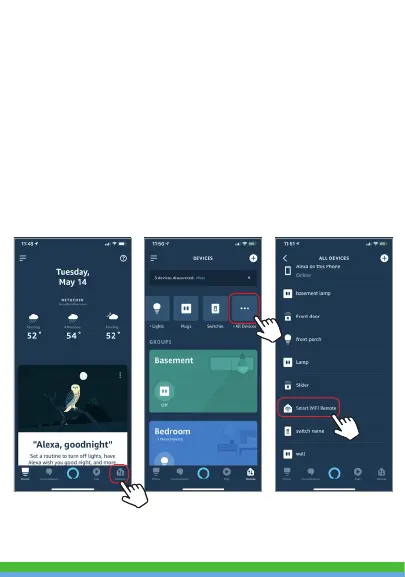
Step E. Wait a few seconds for Alexa to detect the Smart Wi-Fi
Remote from the Smartpoint Home app and you will find the
device named “Smart Wi-Fi Remote” has been paired to Alexa
app from “Smartpoint Home” app.
If you already have your Smartpoint Home account linked with
Alexa, Alexa will automatically detect the new device. To
rename the device press “Devices” in the bottom right corner.
Then press “All Devices” at the top right. On the next page scroll
down to “Smart Wi-Fi Remote” and press “Edit Name”. You can
now name it whatever name you chose.



 To Next Page