Instruction Manual
Temperature and Humidity Monitor
Model Number: SC42
Temperature Humidity
Know Your Devic
A1
A6
A7
OC/OF
Backlight
All
FRONT
• A1. Highest Humidity Record
• A2. Record Time Span
Indicates viewing records for last 24 hours or
all-time.
• A3. Lowest Humidity Record
• A4. Humidity Level Indicator
Indicates a high, low or ideal humidity
comfortable level
• A5. Low Battery Indicator
• A6. Highest Temperature Record
• A7. Lowest Temperature Record
• A8. Current Humidity
Arrow icon indicates trend of humidity.
• A9. CALIBRATED Indicator
• AIO. Current Temperature
Arrow icon indicates trend of temperature
• All. Backlight
Touch the -Ä- button to temporarily activate
the backlight.
33
o
DOWN
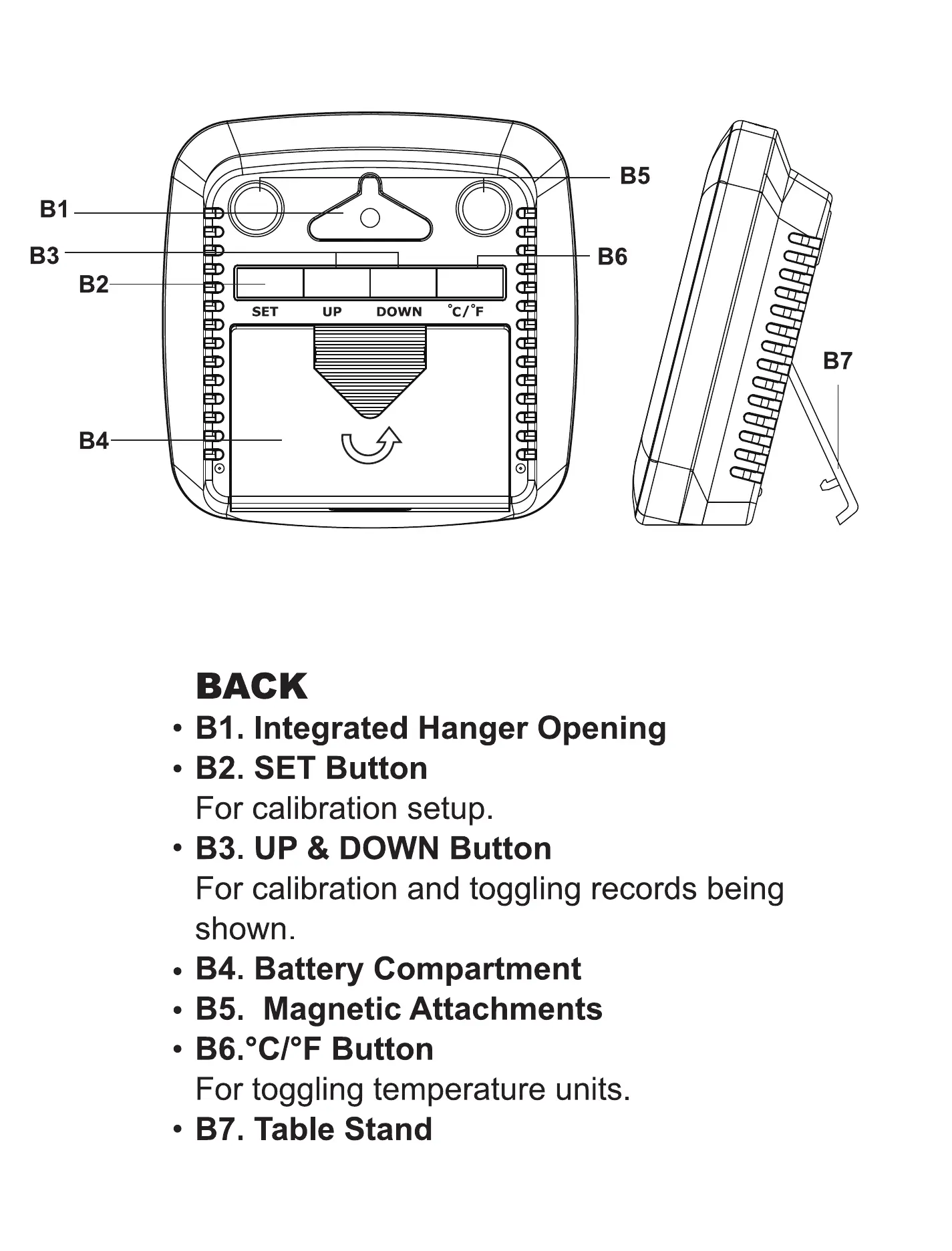
BACK
85
86
B7
LOW HIGH
A9
AIO
CALIBRAIED
• Bl. Integrated Hanger Opening
• B2. SET Button
For calibration setup.
• B3. UP & DOWN Button
For calibration and toggling records being
shown
• B4. Battery Compartment
• B5. Magnetic Attachments
• B6.OC/OF Button
For toggling temperature units.
87. Table Stand


 To Next Page
 Loading...