30
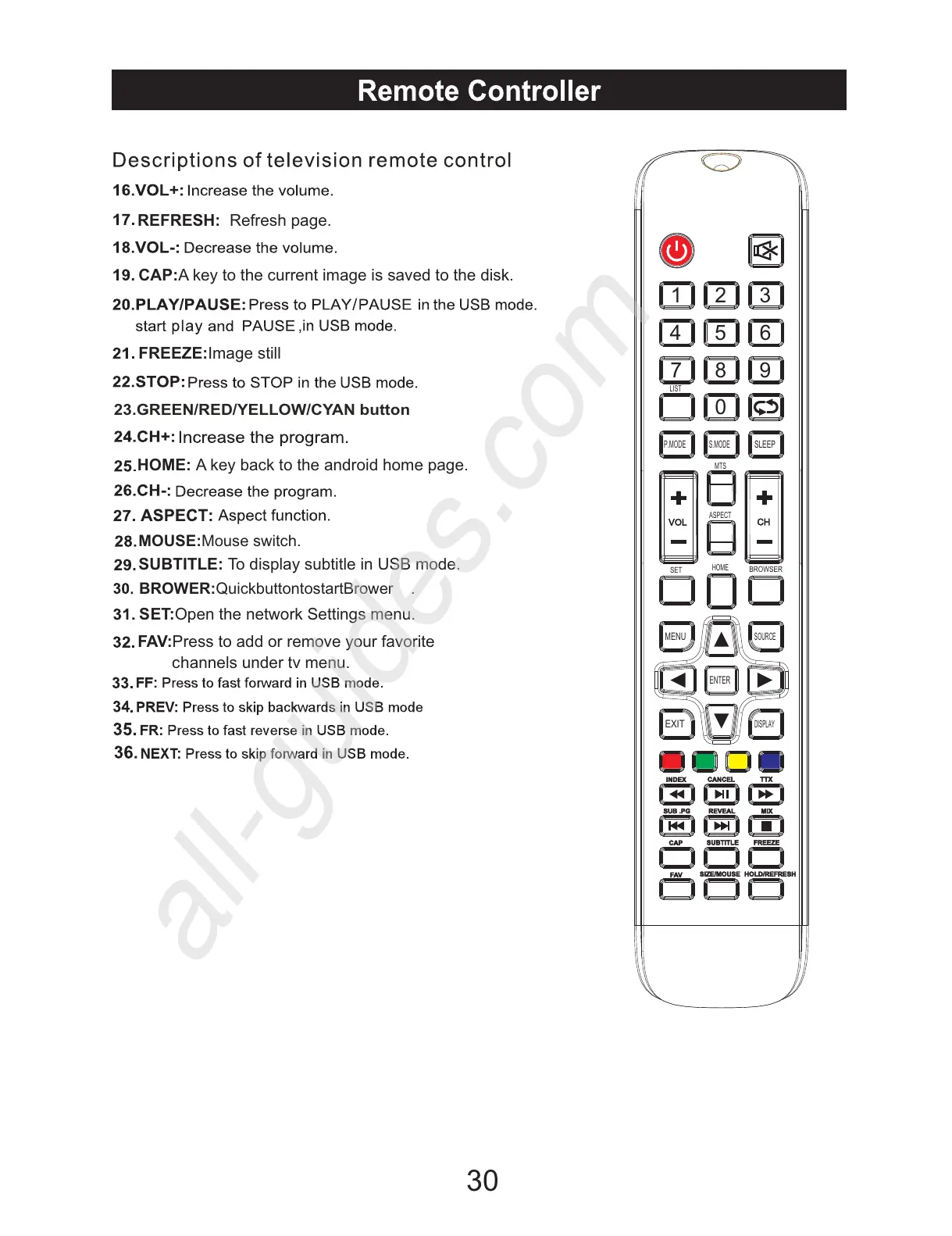
REFRESH:
HOME: A key back to the android home page.
FREEZE:Image still
23.GREEN/RED/YELLOW/CYAN button
Refresh page.
MOUSE:Mouse switch.
SUBTITLE: To display subtitle in USB mode.
BROWER:
QuickbuttontostartBrower .
S ET:Open the network Settings menu.
F AV:Press to add or remove your favorite
CAP:A key to the current image is saved to the disk.
c hannels under tv menu.
INDEX
REVEAL
CANCEL
MIX
SUB .PG
TTX
EXIT
DISPLAY
ENTER
MENU
SOURCE
BROWSER
CH
1 2
3
5
6
4
97 8
0
SLEEP
MTS
LIST
ASPECT
HOME
P.MODE
S.MODE
SET
VOL
SUBTITLE
CAP
FREEZE
FAV
SIZE/MOUSE HOLD/REFRESH


 To Previous Page