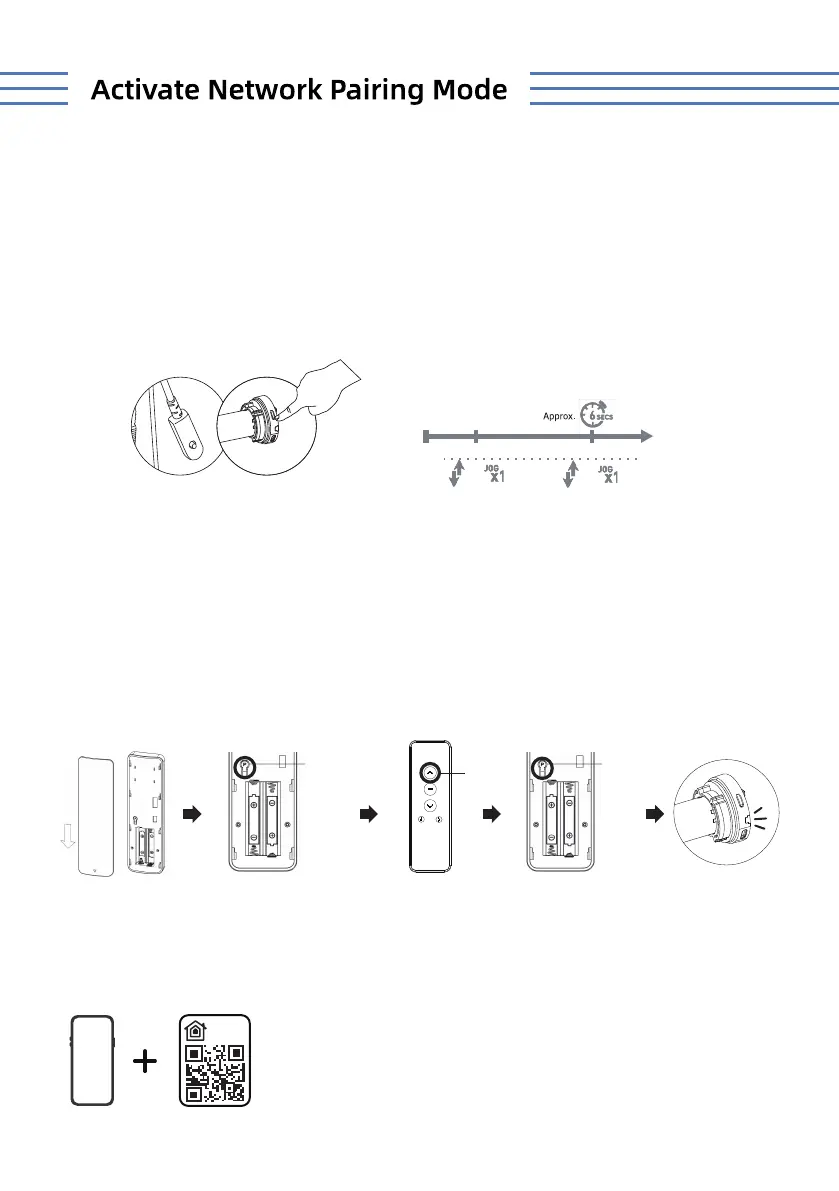
Enter the pairing mode
UP
SETTING
(P)
SETTING
(P)
Press and hold the P1 button on the motor head for 6 seconds. The motor will jog
twice, and a red LED light will flash three times, indicating the motor is in pairing
mode and ready for app connection.
1. Remove the back cover of the remote.
2. Briefly press the P button until the motor jogs once.
3. Press the UP button until the motor jogs again.
4. Press the P button once more until the motor jogs once.
5. A red LED light will flash three times, indicating the motor is in pairing mode
and ready for app connection.
· Pairing Method 1:
· Pairing Method 2:
0000
0000
Add HomeKit Device
1
Scan the QR code stick on the shade to add it.
Note: Ensure that the operations are performed on the correct channel corresponding to
the motor you wish to pair.
Exterior shade or interior shade.
Compatible with the following shades: roller, zebra, woven wood, dual,and outdoor.



 To Next Page