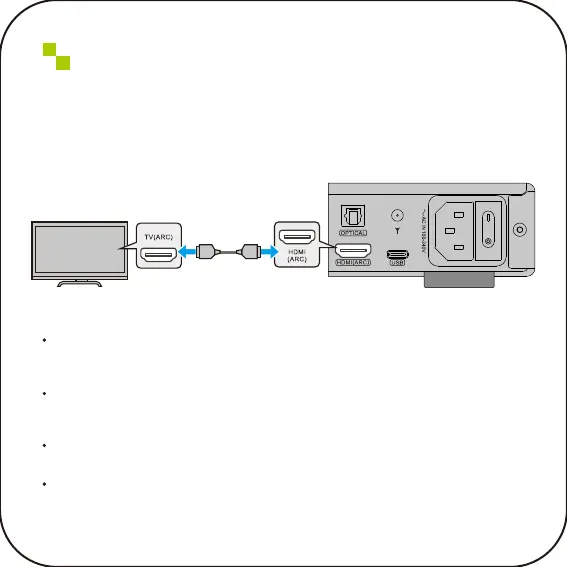
Connect to an ARC compatible
TV through HDMI
Connect an ARC compatible TV to this product using a commercially available HDMI cable.
TIPS:
Connect to an HDMI IN port labeled "ARC" or "eARC/ARC" on the TV. This type of label
indicates that the port supports "only ARC" or "both eARC and ARC". If connected to a port
that does not support ARC, the ARC input function of this product cannot be used.
For this type of connection, please use an HDMI cable (19 pin) with the HDMI logo
indicating compatibility with ARC. You may need to change the settings on your TV. Please
refer to the user manual for the TV.
This product cannot output videos.(Meaning that it’s HDMI ARC, not HDMI. Supports
digital signal input, not video input.)
If you play audio from a TV that does not support ARC, please connect the TV's audio
output port to the audio IN port (OPTICAL, COAXIAL, orAUX) of this product.
Back panel
TV(ARC) port HDMI port
TV



 To Next Page