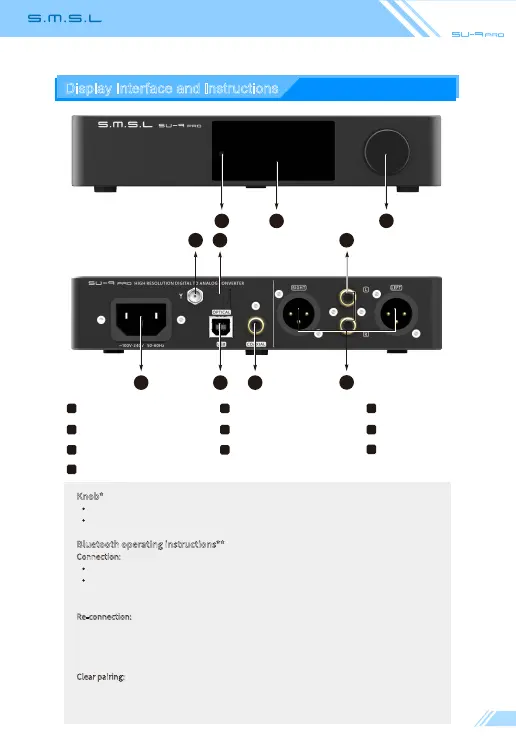
Display Interface and Instructions
Knob*
Konb: Volume/Menu up or down
Button: Press to Menu/Enter;Hold to Return or Power ON/OFF
Bluetooth operating instructions**
Connection:
Step 1: Switch the input source in the SETTING MENU or press the Bluetooth button of the remote;
Step 2: Turn on the Bluetooth function of the mobile phone, search for "SMSL SU-9 PRO", and tap to
pairing. When the mobile phone displays "connected", it has been successfully connected.
Re-connection:
When you had lost the connection with the SU-9 PRO, for example,going out,and back home, some
phones will not re-connect the SU-9 PRO if the SU-9 PRO has not been re-boot, so you can press the
Bluetooth button on the remote to Re-connect.
Clear pairing: Long press the "Bluetooth" button on the remote control. After clearing the pairing, some
phones may no longer be able to search for "SMSL SU-9 PRO". In this case, you need to delete the
Bluetooth device "SMSL SU-9 PRO" which saved in the phone, and then search and pairing again.
Optical input RCA output
5 6
Coaxial input
9
7
Balanced output
8
Knob* Remote windowDisplay
Bluetooth antenna**
1 2 3
4
USB input
AC IN
10
4 5 6
9
7
810
23
1



 To Next Page