10
• Speed Mode: Average Speed (AVG SPEED), Maximum Speed (MAX SPEED), Real-
time Speed (RT SPEED).
• Speed Display: It shows the speed value in KM/H or MPH
• Power Indicator: It shows the power level of the battery. The corresponding
voltage for each level can be adjusted by the user.
• Lamp Indicator: When the headlight is on, this symbol will show up.
• PAS Level: It shows the current pedal-assist level (0 ~ 5), with 0 being no pedal-
assist, 5 being the highest pedal-assist
• Error Indicator: When the system detects a fault, this symbol will show up.
• Mileage: It shows the mileage value (Trip, Odo, or Running Time)
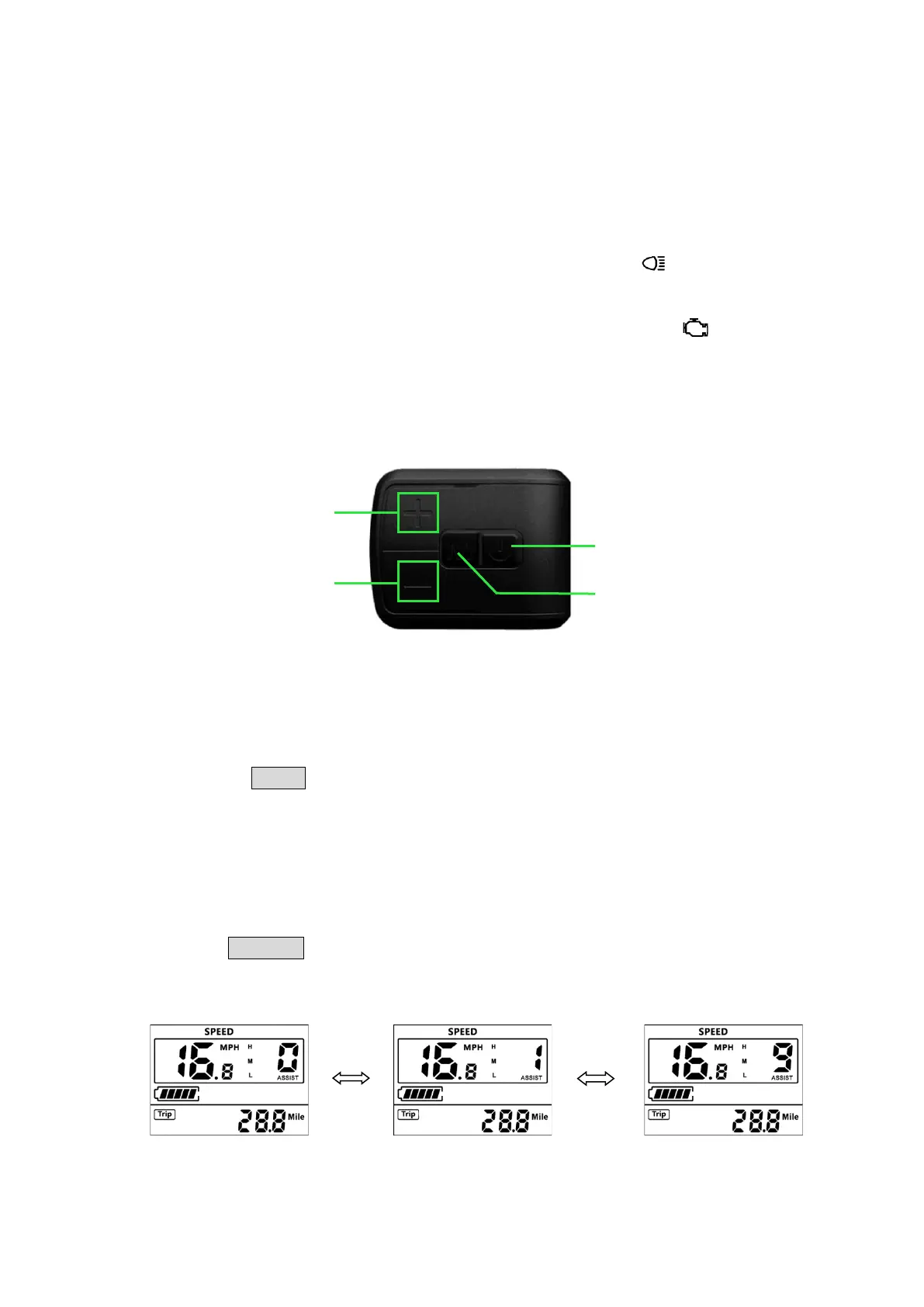
4.4.2 Display Control Pad
Power On/Off
Press and hold POWER button for 2 seconds to turn on/off the display. The control system will
automatically shut down if there is no operation and riding by the user for X minutes (X could
be between 0~9 and can be set by the user).
Pedal-Assist Levels
Short Press UP/DOWN buttons to change the pedal-assist level with 5 being the highest pedal-
assist level, and 0 being no pedal-assist.


 To Next Page