CAUTION: INSTRUMENT FINISHES. READ
THIS BEFORE USING THE SNARK TUNER.
The general rule is: Do not leave any item
attached to your instrument longer than necessary.
We recommend you remove the Snark tuner from
your instrument as soon as you finish tuning.
Please be aware that any lacquer type finish can be
adversely affected if the rubber pad of tuner is left in
contact with the finish for a period of time.
Some finishes are more likely to be damaged by
attaching a tuner to them, hence it is important that
you DET ERMINE WHAT FINISH IS USED ON
YOUR INSTRUMENT...BEFORE using the SNARK.
SNARK advises NOT to use its tuner with any
instruments having these types of finishes:
Nitrocellulose Lacquer, Polyurethane, French Polish
or Oil Finish unless you are willing to accept the
possibility there could be denting of the finish on
some instruments.
Please do not leave the Snark attached to your
instrument if your instrument will be sitting in direct
sunlight.
ATTACHING THE TUNER TO
YOUR INSTRUMENT
Use the clamp to attach the Snark to your
instrument. Take care to avoid damaging the finish
of your instrument. Do not attach the tuner to your
instrument if any of the rubber pads are broken or
missing.
For guitars, attach the clamp to the headstock
(placing the body of the tuner either in front of or
behind the headstock). For other instruments, find
the location that allows best pick up of sound while
allowing you to view the display easily.
After attaching the tuner to your instrument,
adjust the “banana” shaped arm that connects the
tuner to the clamp for optimum viewing of the tuner
display. Also, the tuner body rotates 360 degrees so
the display can be placed right where you want it.
POWER UP & PITCH CALIBRATION
Once you have attached the Snark to your
instrument, turn it on by pressing the power
switch on the face of the tuner.
The Snark defaults to the tuning reference of
A-440Hz. To set the Snark to another tuning
reference, push the round “PITCH CAL” button on
the back side of the tuner and immediately press
either the up or down triangular buttons to choose
a new tuning reference. The pitch reference can
be set anywhere from 415 – 466Hz. Pressing the
power switch on the front of the tuner resets the
tuner to A-440.
TUNING
The Snark is now ready to help you tune your
instrument. As soon as you play a note, the
Snark’s color display will indicate the note you are
playing and how close to pitch you are. The left
side of the display (red) indicates flat, the right of
the display (yellow) indicates sharp.
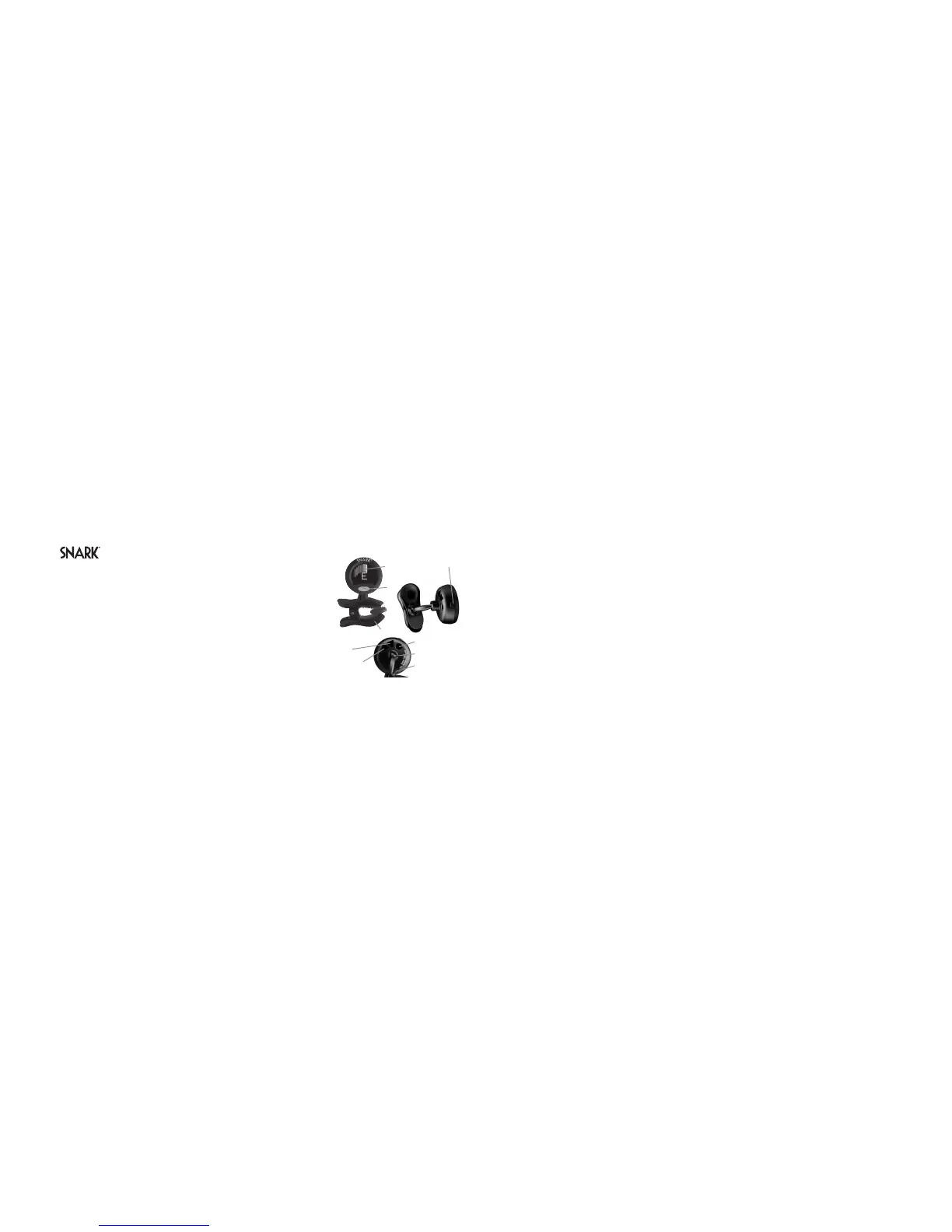
Tap/Met
Pitch Calibration
Battery Door
Ball Joint
LCD
Readout
Power
Down Arrow
and
Instrument Clamp
Up Arrow
If a red needle is lit, it means the note played is
flat. If a yellow needle is lit, it means the note
played is sharp.
You are in tune if the green needle (at center of
meter) is lit.
If the green needle is lit and the adjacent red or
yellow needle flashes just briefly, it means the
note is very slightly out of tune. Adjust instrument
pitch just a bit to dial in a a perfect tune.
As the Snark is chromatic, you can easily deal
with non-standard tunings. The Snark will read any
note you play.
TRANSPOSE FEATURE
For guitar players using a capo, you can use the
Snark’s flat tuning feature, engaged by pushing the
“” triangular button on the back of the Snark. Press
the “” triangular button once and the front display
will indicate a single “”, which corresponds to
having a capo on the first fret of your guitar. In this
setting, the lowest note on the guitar is an “F”, but
the Snark will read it as the standard “E”, making
tuning appear to be standard. If the capo is on the
second fret, hit the “” button twice, and the display
will show “”. Additional pushes of the “” button
will give you up to four flats, corresponding to
putting the capo on the fourth fret.
To return to standard tuning, continue to press
the “” button until the flat symbols disappear
from the front of display. Or turn the tuner off and
on again to return to standard tuning.
TAP TEMPO METRONOME
The Snark has a built-in visual metronome
which is activated by the “TAP-MET” switch on
the side of the tuner. One tap activates the
metronome to a default setting of 100 bpm,
indicated by the flashing red heart on the front
panel display. The tempo can be adjusted in two
ways – first by tapping on the “TAP-MET” switch
at the desired tempo. The Snark will calculate the
tempo between two taps. Or the up / down


 To Previous Page
 Loading...