CONNECTING THE SUBWOOFER TO DIGITAL HOME THEATER SYSTEMS
Digital 5.1, 6.1 and 7.1 home theater electronics dedicate one channel (the .1) to reproduce the
special low-frequency (LFE) information (such as explosions and thunder) contained in digitally-
encoded sound tracks.
Select subwoofer-yes from your receiver’s set-up menu. Hooked up this way, the receiver’s ampli-
fier is relieved of having to reproduce the difficult low bass signals that can drive the receiver into
audible distortion.
Use an RCA cable (not included) to connect your digital receiver’s subwoofer output to the sub-
woofer. Connect the other end to the Basis 150 jack labeled ext crossover underneath int crossover.
If you do not wish to run RCA cables to your subwoofer, you may use speaker wire to connect the
subwoofer in parallel with your main speakers. The subwoofer does not present any additional
load to your receiver.
Select subwoofer-no from your receiver’s set-up menu. This sends the LFE signal to the main left and
right speakers, and thus, to the subwoofer. Consult your receiver’s owner’s manual for more details.
When using the speaker wire hookup, the subwoofer’s built-in crossover is engaged. As a starting
point, set the crossover control on the subwoofer about 10Hz higher than the lower limit of your
main speakers’ bass response. Fine tune the crossover setting by ear for the smoothest blend with
your main speakers. The best setting of the crossover control will depend on speaker placement
and personal preference.
CONNECTING THE SUBWOOFER TO STEREO OR DOLBY® PRO
LOGIC
®
SYSTEMS
For stereo or Dolby Pro Logic systems, the easiest method is to use the same speaker wire connec-
tions as shown on page 4.
You may also use the sub out connection from your receiver to the input on the subwoofer marked
int crossover. When using speaker wire or the use crossover control input, the subwoofer’s built-in
crossover is engaged. As a starting point, set the crossover control on the subwoofer about 10Hz
higher than the lower limit of your main speakers bass response. Fine-tune the crossover setting by
ear for the smoothest blend with your main speakers. The best setting of the crossover control will
depend on speaker placement and personal preference.
CONNECTING
5
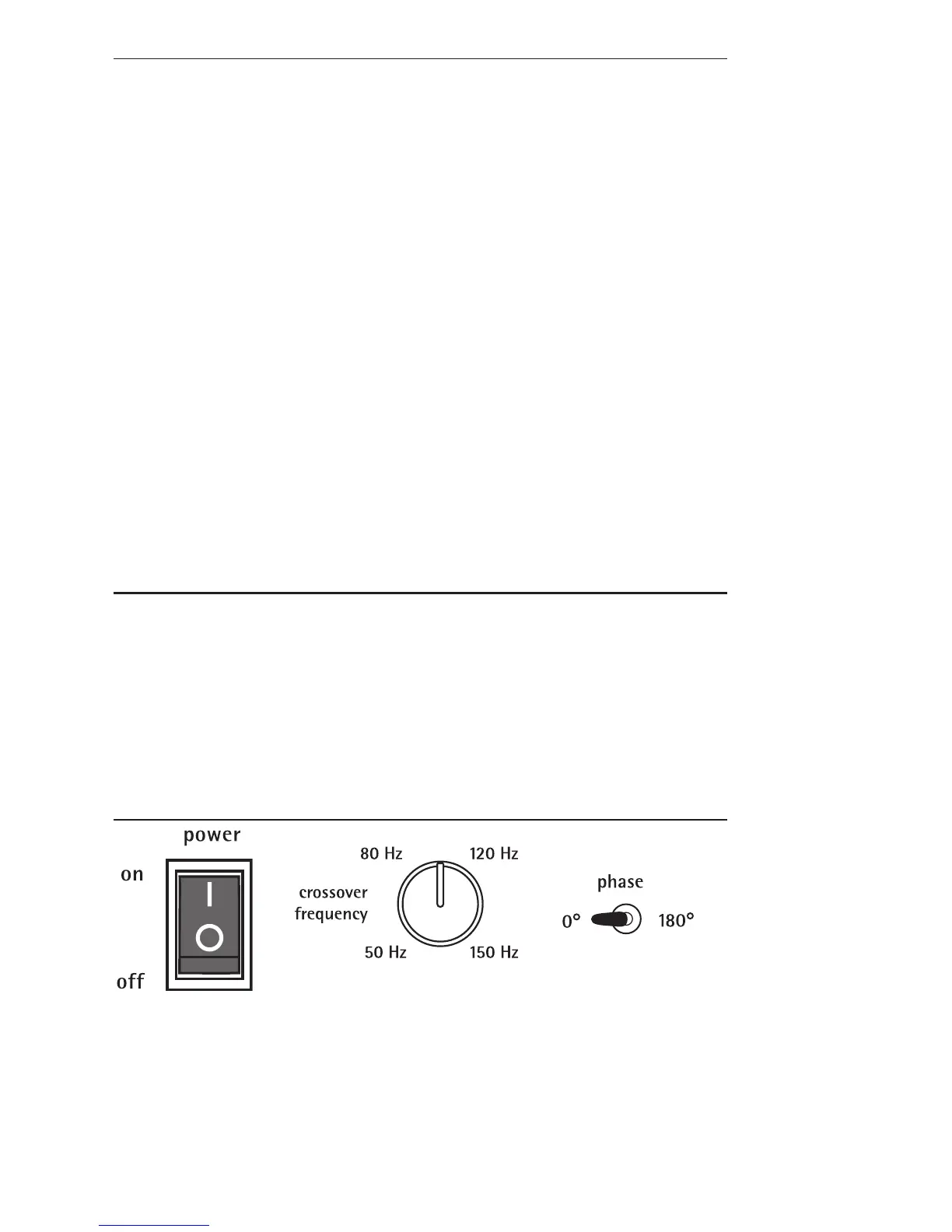
Main power switch
Completely turns all power
to the amplifier either on or
off and over-rides the power
mode switch. This switch
must be turned on before
setting the power mode
switch (see next page).
Crossover (Hz)
Adjusts the frequency of the low-
pass filter for the subwoofer. This
control is inactive when using the
ext crossover control input jack.
Polarity (0 or 180)
Selects regular (0°) or inverted (180°)
polarity for the subwoofer. Set this
switch to provide the fullest, most
dynamic bass. The effect of phase will
be most audible on low-frequency
percussion instruments or music with a
continuously repeating bass line.



 To Next Page