5
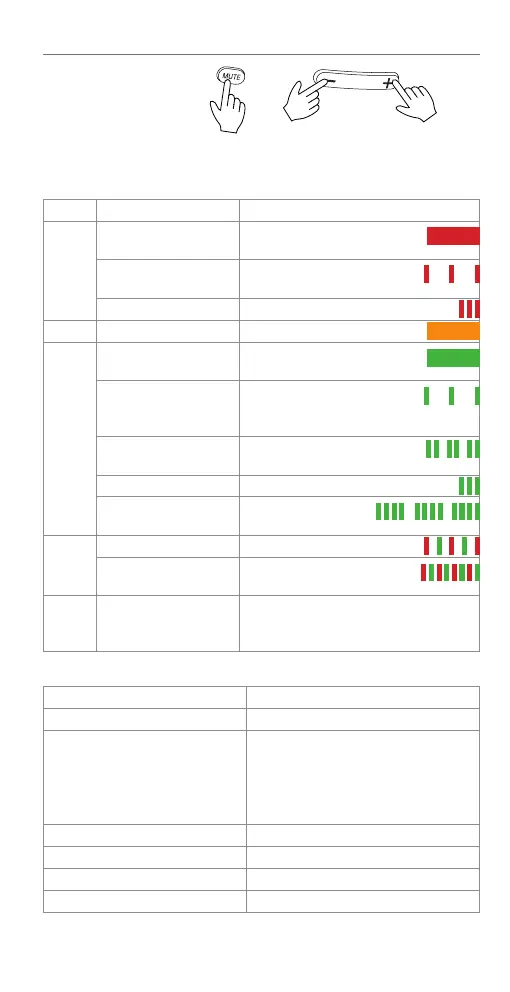
Mute/unmute mic
·
Mik. stumm-/einschalten ·
Désactiver/activer le mic ·
Disattivare/attivare il mic ·
Desactivar/activar el mic
Volume - / +
Lautstärke
- / +
Volumen - / +
Headset LED indications
Color Pattern Status description
Red Steady light The headset is charging in the
base station‘s charging cradle.
Flashing every 10
seconds
when headset is not in
charging cradle: Low battery.
Flashing 3 times Powering o.
Orange Steady light Headset is charging, > 50% full
Green Steady light Headset is on charger, battery
is fully charged.
Flashing every 10
seconds
when headset is not in
charging cradle: Headset is
turned on, battery is charged.
Double flash every
3 seconds
The headset is in a call.
Flashing 3 times Powering on.
Flashing 4 times every
4 seconds
Incoming call.
Red
and
green
Blinking alternatingly The headset is not registered.
Flashing alternatingly The headset is trying to
register at a base station.
O
• The battery is depleted.
• No battery is installed.
• The headset is powered o.
Headset alert tones
Signal Description
One short beep every 30 sec. The microphone is muted.
Two beeps
• Error alert
• The speaking volume has reached
its highest or lowest setting.
• Any key is pressed while the
headset is out of range.
Two low beeps Call waiting
Two rapid beeps every 20 sec. Low battery warning
Three rapid beeps every 20 sec. The headset is out of range.
Three rapid beeps The headset is powering on or o.


 To Next Page