8
Date/Time Function
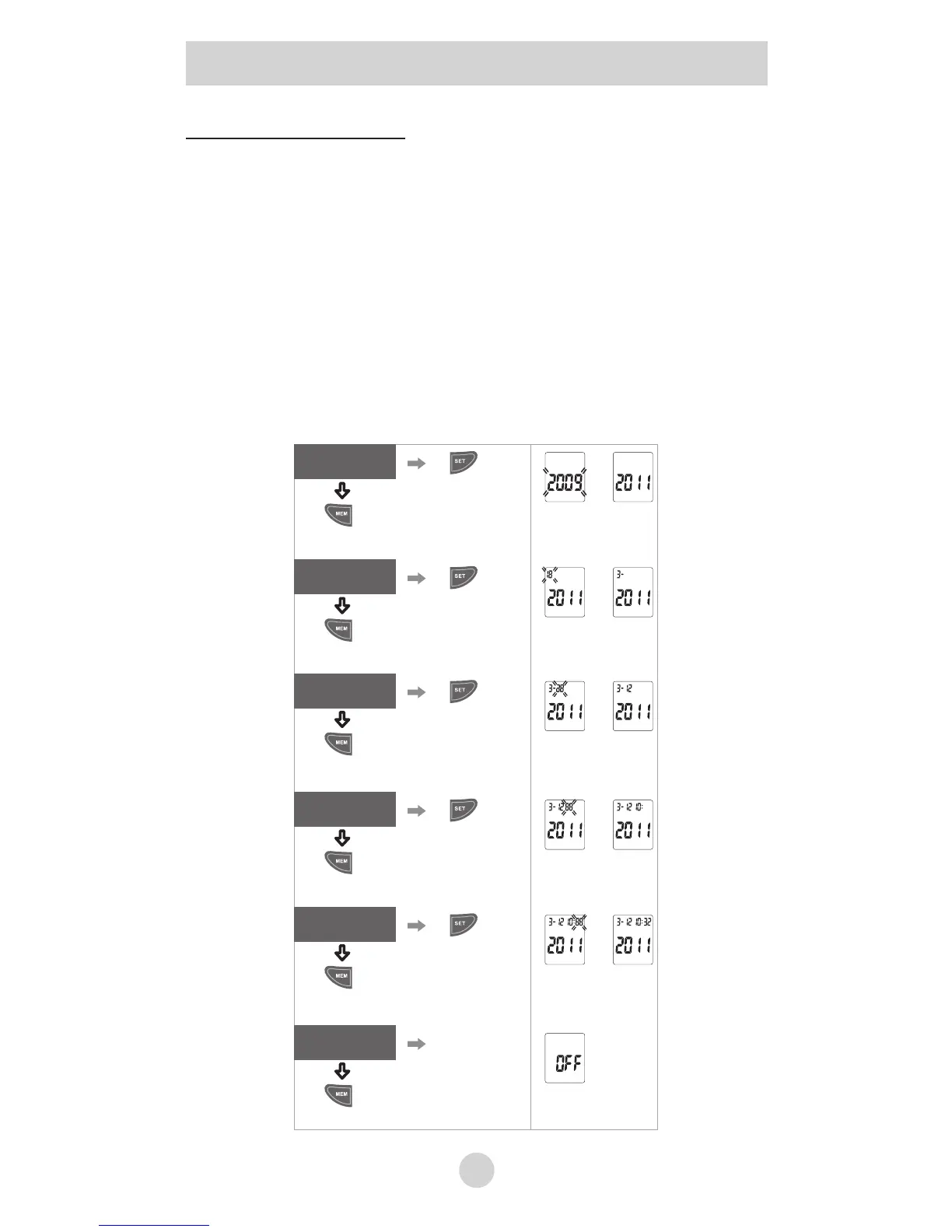
1. Press the “SET” button to change.
2. Press the “MEM” button to confirm entry.
3. The blinking Date, followed by Year, Hour and
Minutes will display. Repeat steps 2 and 3 to adjust
the date/time setting.
4. Your unit is now ready to take a reading, or press the
“MEM” button to turn the unit off.
5. After this process, the thermometer shows the word
“OFF” in the display and switches off automatically.
Change the Year
Save the setting and
Confirm the entry
Date/Time
Change the Month
Save the setting and
Confirm the entry
Month
Change the Date
Save the setting and
Confirm the entry
Date
Change the Hour
Save the setting and
Confirm the entry
Hour
Change the Min
Save the setting and
Confirm the entry
Min
Save the setting
End setting loop,
turn off the unit
Setting Volume, °C/°F and Date/Time


 To Next Page