COMMON PROBLEMS & SOLUTIONS
The mobile phone cannot find the bluetooth earbuds.
Solution:
Check whether the bluetooth earbuds' power is switched on or not Is there
a status LED light or does it flicker red & blue alternatively? If the bluetooth
earbuds still haven't been searched after switching power on, please restart
the bleutooth earbuds and the phone as well
There is something wrong with the earbuds while using.
Solution:
Please reconnect with the mobile phone after turning off and restarting the
earbuds. Check the charging status of the earbuds by putting them into the
charging box until the red LED indicator is on. Then take them out and
reconnect them to the mobile phone, then it will return to norma
Earbuds always disconnect or make noise when connected.
Solution:
The bluetooth earbuds' power status is low, please charge it. Or there are
obstructions between the mobile phone and the earbuds or the distance is
beyond signal range. Please do not cover the bluetooth earbuds with your
hands in order to maintain the continuous stability of the signal; please try
to keep the bluetooth earbuds and the mobile phone in the same direction
What's the maximum distance between phone and earbuds?
Solution:
The effective working range is generally up to 30 feet (10 meters). Generally
speaking, the optimal connection happens when there are no obstacles
between the bluetooth earbuds and the mobile phone. A slight noise during
the call will be heard when the mobile phone reaches its maximum distance
from the bluetooth earbuds
What's the password for bluetooth pairing?
Solution:
The bluetooth pairing password is "0000". Most mobile phones are able to
input the password automatical y while a minority of mobile phones ask for
the password manual y.
@2019PrimeBrandsGroup.All rights reserved. All trade namesare
registered trademarks Ofthe respective manufactures listed. Madein China.
prime BrandsGroup • ClarkNJ,07066 • 732.876.5350
BLUETOOTH
mug WIRELESS
EARBUDS
WITH CHARGING CASE
TRUE WIRELESS EARBUDS
O
O
O
Power On/Off
Play/Pause
Answer/End Cal
MFB (Multi-Function Button)
Charging Connectors
LED Indicator
CHARGING CASE
(5
O
Power Button
Charging Port
LOR
O
O
LED Charging Case
Indicator
Thank you for choosing our True Wireless Stereo (T WS) earbuds
For long lasting enjoyment, please read the following instructions
careful y. Keep this manual for future information.
What's inside the box: TWS earbuds with charging case, charging
cable and manual
• Keep it away from children: this product is not a toy.
• Do not throw this product to avoid any damage.
• Do not disassemble, repair or reform this product.
• For charging, please use a charger with DC 5V output
• Do not clean this product with any chemical solvents.
• Keep or use this product at normal temperature
• Do not throw it away or expose it to temperature above 140 OF
• Dispose the device properly at the end of its life cycle.
QUICK START GUIDE
1) Connect the charging station (earbuds inserted) to the power
supply with the included cable and charge it completely (4
white LEDs light up)
2) Remove both earbuds (indicator light on both earbuds: red) at
the same time and insert them into your ears. The automatic
connection between the two earbuds is confirmed (you will
hear "Connected" or a soft tone in both ears)
3) Activate Bluetooth on your mobile device. Find the pairing
name "Prime Sports" and connect it. This will again be
confirmed ("Connected")
4) If the two earbuds do not connect automatically as described in
step 2, double click on the left earbud and wait 5 seconds. If
this does not work, switch off both buds by pressing and
holding the MFB and insert them in the charging case. If the
LEDs on the buds light up, proceed to step 2
5) To ensure a good voice and listening experience when making it
a call, it is essential that the earbuds are as tight and secure as
possible in the ear cana
HOW TO RECONNECT
The earbuds will be reconnected with the last device after restart
If your earbuds do not to reconnect the last
connection, please press the MFB lightly or connect manually
using the Bluetooth settings on your mobile device.
SPECIFICATIONS
USER MANUAL
4,
Function
Power on
Power off
Pairing Mode
Pick up incoming call
Hang up incoming ca
Reject incoming ca
Recall last number
Operation
Remove buds and press the MFB for 2 seconds
Press the MFB for 5 seconds
Long press MFB for 5 seconds in power off mode.
Single press MFB on any earbud
Single press MFB on any earbud
Single press MFB on any earbud
Long press MFB on any earbud for 1 second
Doub e press the MFB on any earbud
Bluetooth Version
Wireless Distance
Frequency Response
Playtime
Battery (box / earbuds)
5.0
up to 30 ft / 10 m
20 Hz - 20 kHz
2-3 hours
300 mAh / 40 mAh each


 To Next Page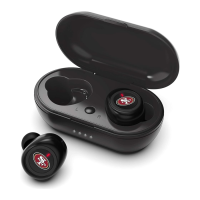


 General