14
SPOTTER
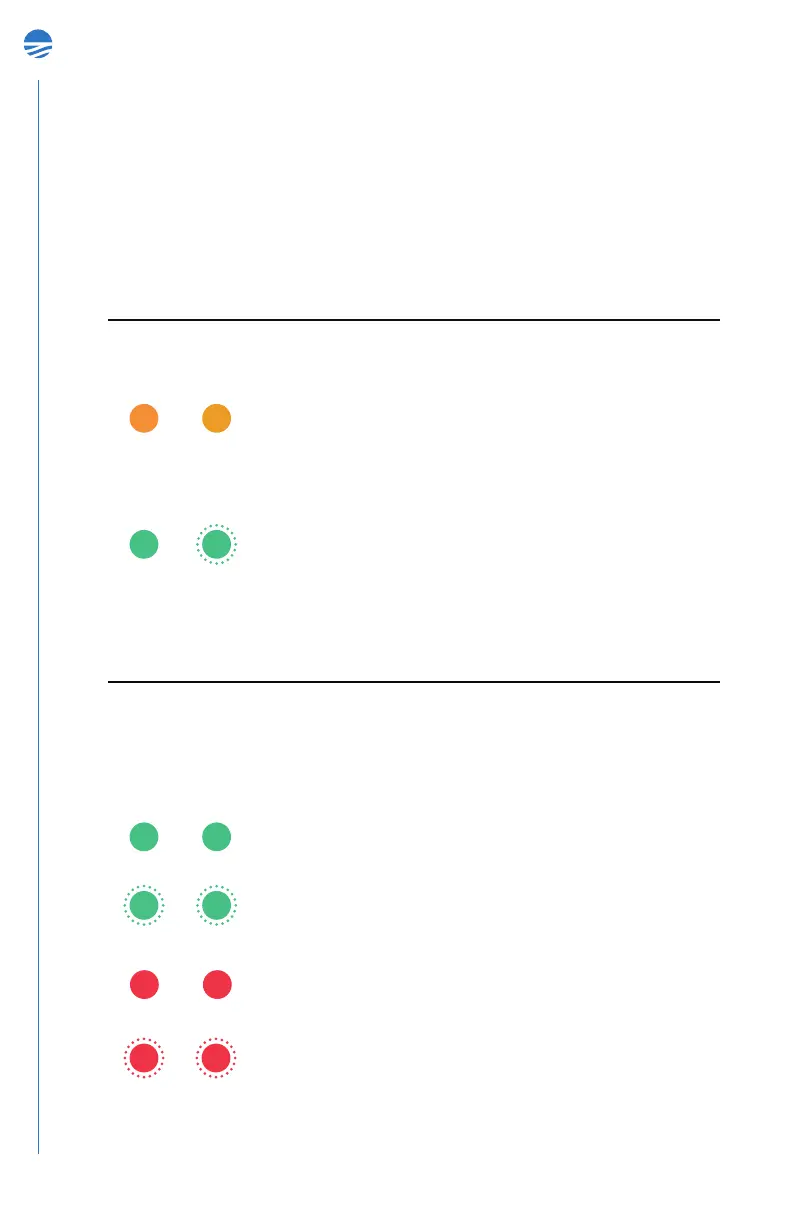
Explanation of user LEDs
CHARGING mode
In case DC charger is connected and the Spotter is turned OFF, the following
charging light sequence can be monitored to track the charging status of the
device. Please note that charging the Spotter can take as long as 8 hours.
Both solid green. System is fully charged.
Blinking green. System is charging. Blinks in sync with
GO LED.
Both solid red. Battery error. Indicates battery is not
connected.
Both blinking red. Charging error. Indicates device is
connected to DC power but not charging properly.
IDLE mode
Both solid orange. System is booting up and running
self-check.
SYSTEM GO
Blinking green. The system is in IDLE mode. Flashes in
alternating pattern between LEDs for 3 minutes and then
turns off.
At Startup
After Startup


 To Next Page