8 ©2014, SolidSignal.com Reproduction is permitted provided copyright information is intact.
In order to prepare your DIRECTV system
for coax networking, the first step is to install
band stop filters on any equipment that is not
designed for networking, or any equipment
you do not want to network.
The Connected Home signal that is used in
coax networking is very strong compared to
other signals on the line and can overpower
that signal, possibly leading to damaged
receivers. In order to keep these receivers from getting damaged, we use band stop filters. The band
stop filter stops the Connected Home signal from reaching the receivers. It can also be used in a room
such as a child’s bedroom that you want to shield from the rest of the home.
You will need the following:
DIRECTV Band Stop Filter (BSFR01) from Solid Signal)
The following receivers should have a band stop filter in place before you start
using coax networking:
• D10/D11/D12
• R10/R15/R16
• H10/H20
• Any non-DIRECTV-branded receiver
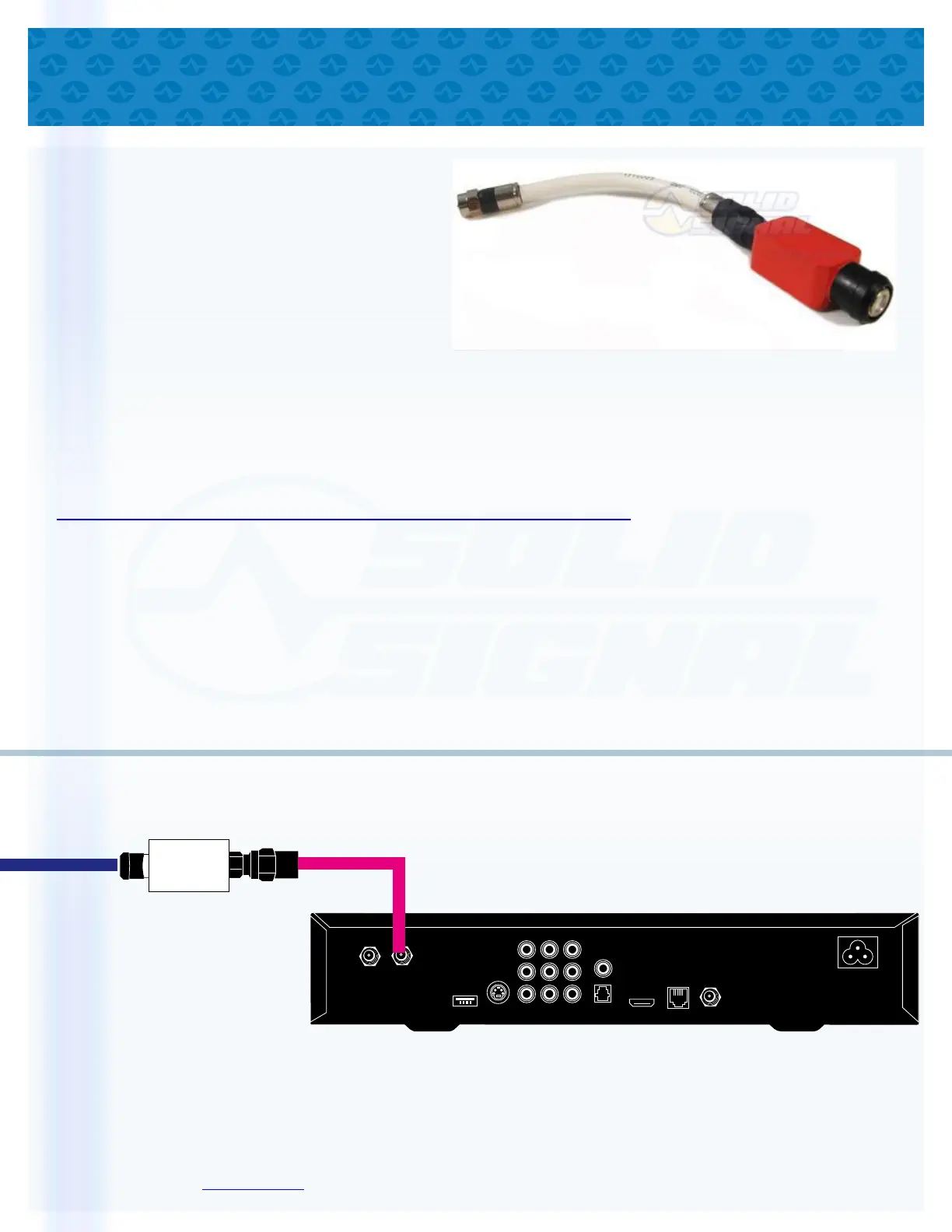
Installation is simple. Disconnect the satellite cable from the receiver and connect it to the band stop
filter. Then, connect the attached coaxial cable on the filter to the receiver. The following diagram
shows installation of a band stop filter.
BAND STOP
FILTER
SATELLITE IN
OFF-AIR IN
REMOTE
ANTENNA
VIDEO/AUDIO OUT
HDMI
PHONE
USB
Use the band stop filter between
the satellite line and the receiver
to protect receivers that are
not designed for
coax networking
Satellite Line
Some cables are shown longer than actual size. Use the coaxial cable attached to the filter for connection.
The layout of your receiver may vary slightly depending on model.
INSTALLING THE BAND STOP FILTERS
(if necessary)


 To Next Page
 Loading...