3
.............................................................
....................................................
.................................
...............
......................................................................
..............................................................................
.............................................................
......................................
......................................
............................
...
.......
.........
................
........................
...................
.......................
......
3
4
5
6
7
8
9
10~11
12
13
14
15
16
17
18~19
20
21
22
$POUFOUT
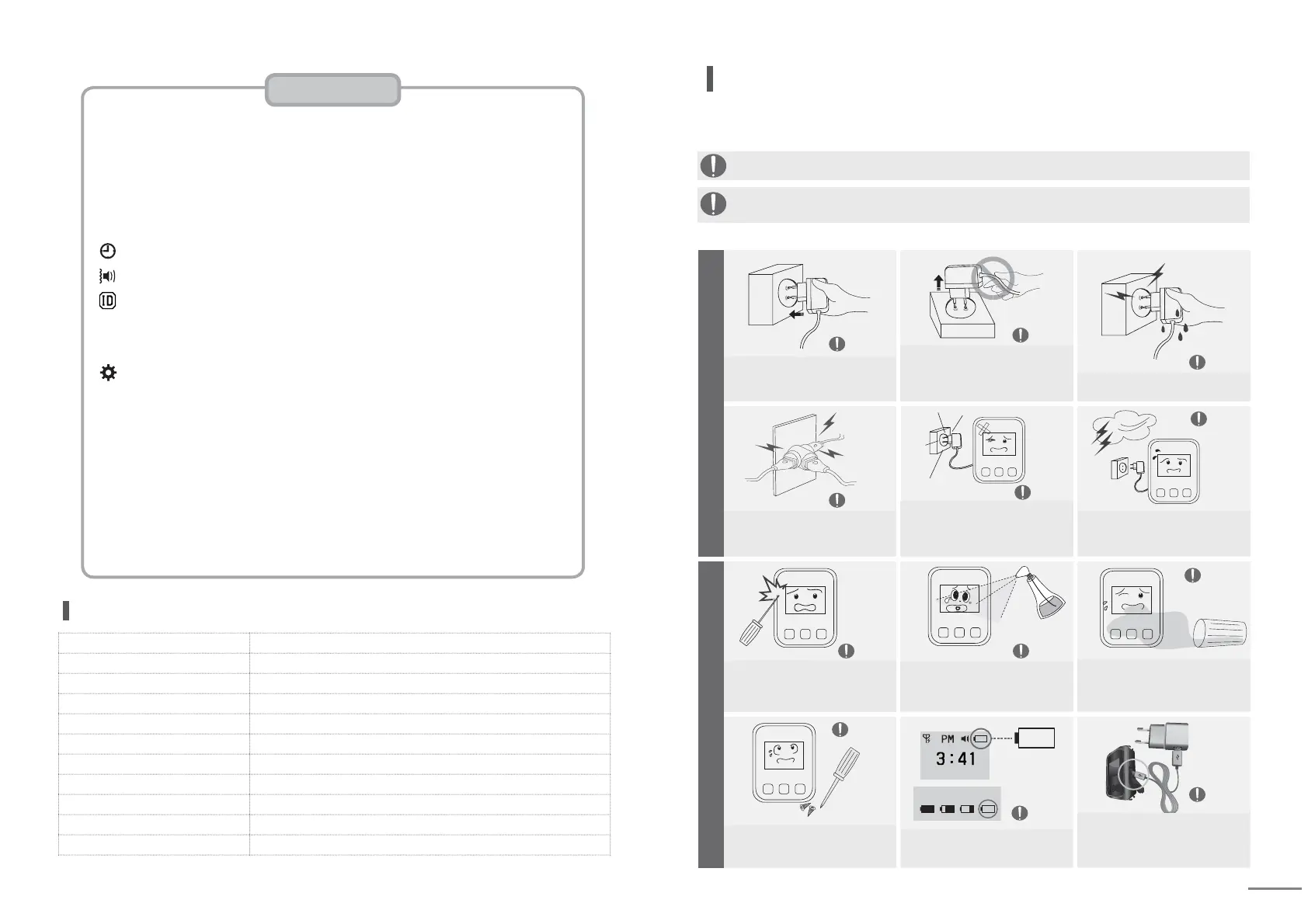
Be sure to unplug the power plug while
holding it firmly. If cord is unplugged
by pulling out, some parts of the cord
can be disconnected and it may cause
risky situation. [
It may cause fire.]
Do not touch the power plug with wet hand.
[There is a risk of electric shock.]
Important Safety Instructions
Warning
Caution
Warning
Caution
Caution
Caution
Caution
Caution
Caution
CautionCaution
Caution
Warning
Warning
Be sure to insert the power plug to
the end of the inner part.
[If the connection is unstable, it may
cause fire.]
Do not use one socket for multiple
devices at the same time. [It may cause
fire due to overheating of the socket.]
Do not disassemble or modify the
unit. If repair of the unit is required,
please contact the service center.
Do not harm or damage the unit with
sharp object such as nail, pencil, or pen.
[It will damage the surface of the unit
and cause malfunction.]
This is for the case with the possibility of serious injury or death if this is not observed.
This is for the case with the possibility of minor injury or damage to the product
if this is not observed.
If power plug is dropped or case is
broken, unplug the power cord. [If it is
used as it is, it may cause fire or
elec-
tric shock. Please contact service center.]
Do not clean the unit with water,
benzene or paint thinner.
[Damage to the insulation of electrical
parts may cause malfunction.]
When the battery icon indicates as
marked in a circle, use it after
recharging for more than 2 hours.
If foreign object enters the unit,
please contact service center.
[This may cause damage to the
internal parts.]
In case of thunderstorm or lighting or
if the power plug is not used for long
time, unplug the power cord. [There
is the risk of electric shock or fire.]
Power precautions
Safety Instruction contains the information to prevent the unexpected risk or damage in
advance by using the product in correct way and it should always be observed all the times.
Use the supplied adapter.
[Malfunctioning of supplied adapter
during its use is not covered by
manufactures' warranty.]
Specification
Model SP7-100
Frequency (MHz) 433.0500 ~ 434.7900
Freq Stability ±5 ppm
Data Rate 1800 bps
Channel space 12.5 KHz
Modulation FSK (±3KHz)
Sensitivity -118dBm (at Direct)
Power Supply DC 3.7V/250mA Li-Polymer Battery (Rechargeable)
Dimension (mm) 37W × 49L × 13.5H
Standby Time about 30 hours
Antenna Helical (Internal)
Use precautions
Battery charging level.
Important Safety Instructions
Contents / Recharging Instructions
Name of each part / Screen Layout (Idle screen)
Screen Layout (Receiving Screen / Cancel receiving screen )
List of setting modes
Time Setting
Sound / Vibration Setting
Bell ID Setting
Other Settings
(1) New bell ID registration
(2) Calling number change
(3) Whole calling number deletion
(1) STAT : Checking the detail set by Other Settings
(2) CONT : Adjusting the contrast of LCD screen
(3) DUPT : Duplicated receiving prevention time
(4) SOND : Number of call alarm repetition
(5) COPY : Registration transmission
(6) NORX : Receiving restriction number
(7) RSSI : Receiving sensitivity check
(8) REMD : Unchecked calling number notification


 To Next Page
 Loading...