EN
3
OPERATION
● Connect the bed to an electrical outlet using the power
cord.
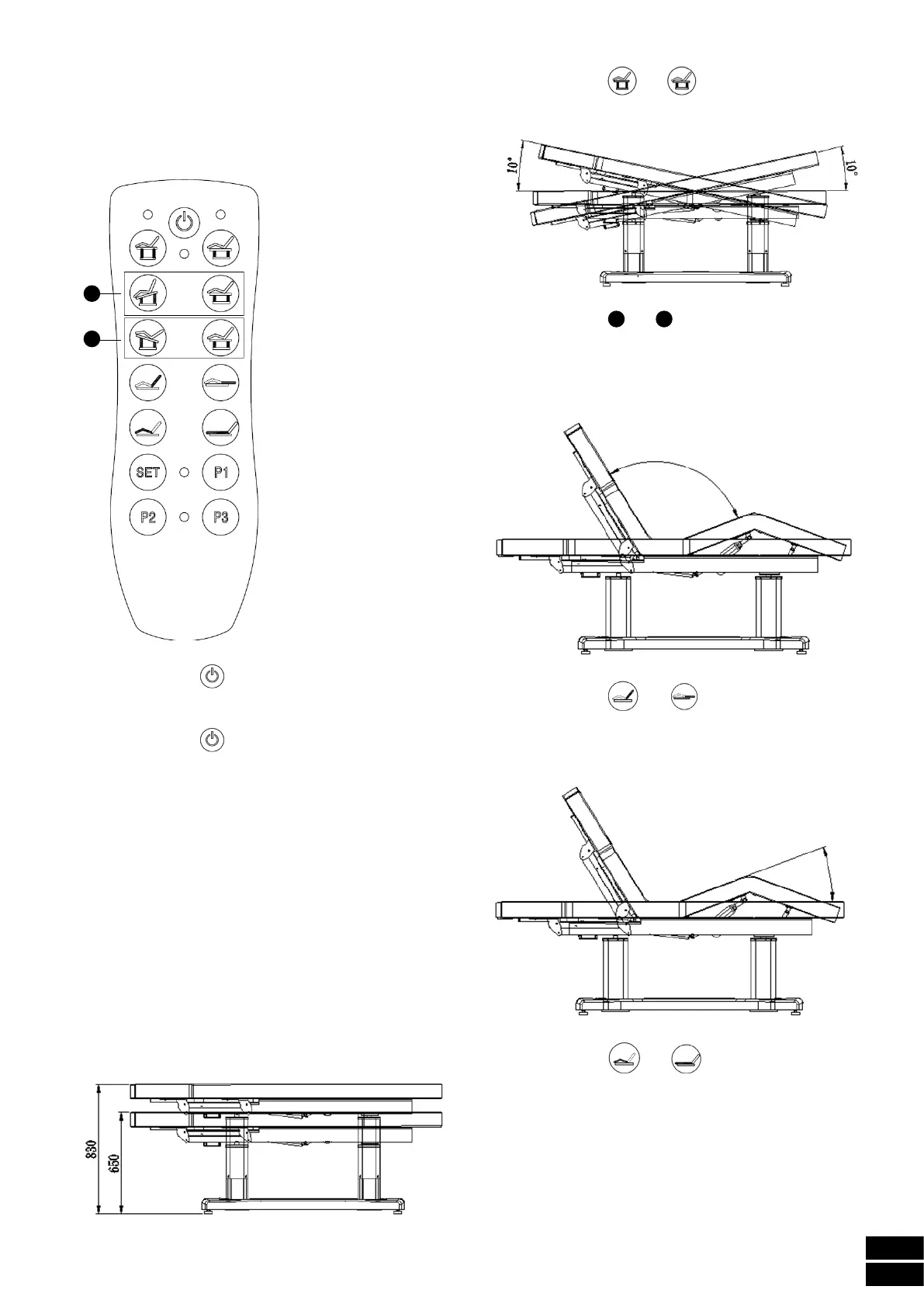
Hand controller
1
2
- Press the button to activate the control knob. The
red indicator will light up and all its functions can be
used.
- Press the button
again and the red indicator will
turn off at the same time as the bed remains flat and in
the lowest position possible.
- Press the buttons P1, P2, P3 to place the bed in one of
the 3 factory-stored positions.
- Set any of the 3 factory-stored positions to a new
position:
• Once the bed is in the desired position, press the SET
button until the blue indicator lights up.
• While the blue indicator is lit, press one of the three
buttons (P1, P2, P3) for where you want to memorise
the new position.
• The new position will be memorised in the selected
button.
● Adjusting height and tilt
- Use the buttons and of the hand controller to
adjust the height of the bed, and the motors inside each
column will move at the same time.
- Use the buttons
1
and
2
of the hand controller to
adjust the height and/or tilt of the bed, and the motors
inside each column will move independently.
● Adjusting backrest tilt
- Use the buttons and of the hand controller to
adjust the tilt of the backrest.
● Adjusting footrest tilt
- Use the buttons and of the hand controller to
adjust the tilt of the footrest.


 To Next Page
 Loading...