Multi-Function-Input Jack:
Located on the left side of the DB Sensor, this input jack is for
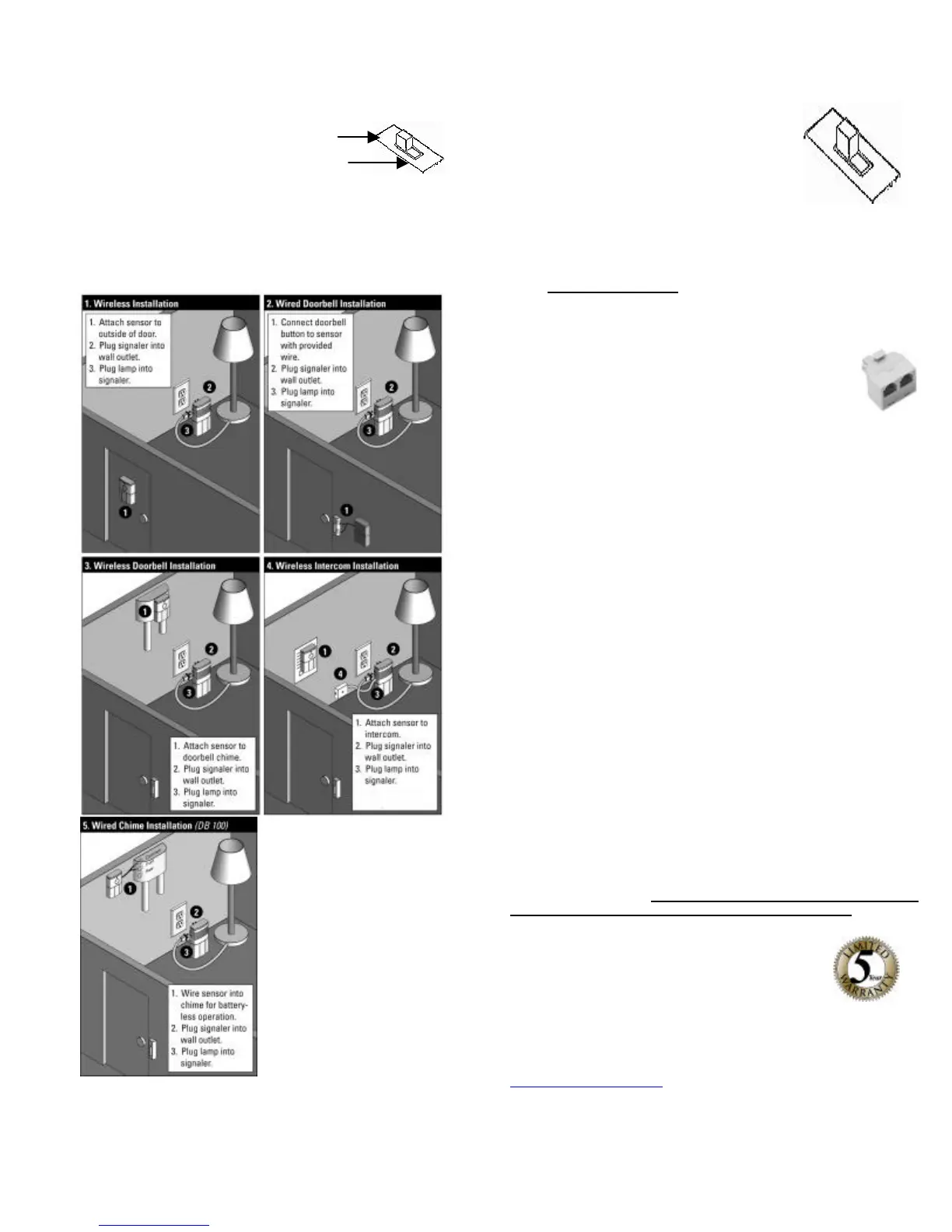
installations as shown below in diagram 2 & 5. .
Setting The Speaker Switch:
Top - OFF
Bottom - ON
Located on the DB200 Signaler, larger of the 2 units:
The speaker switch allows you to turn the Audio Alarm ON or
OFF. ON is down and OFF is up
DB200 INSTALLATION DIAGRAMS
Battery free
installation: Use wire
Provided, plug into
jack outlet on side of
Transmitter. Remove
chime cover and
connect the red and
white wires to chime
box terminal screws
common and front.
Setting The Function Switch:
Top position -Intercom/Buzzer System/ Wireless Chime
box Installation see (3&4).
Center - Doorbell Button only see
diagram 1 & 2.
Bottom - Hard Wired to Existing
Doorbell Chime Box Installation see (5).
The function switch on the back of DB sensor (smaller unit)
should be set depending on which installation application you
need. See diagram on back.
Telephone Signaler Installation:
See figure 4 for telephone ringer cord installation. It
is necessary to use a 2 to 1 telephone adapter (can
be purchased at Radio Shack or hardware stores) if
plugging in a telephone or tty in same modular outlet.
Troubleshooting & Help:
If you’ve followed the directions and are still having problems please try the
following suggestions:
1) Check battery in the sensor must be a 9-volt alkaline type.
2) Check dip switch settings both the sensor and the signaler must match as
shown in figure 1.1 above.
3) Check outlet for power.
4) Move the Signaler to an outlet closer to the sensor unit.
5) If using the Multi-Function input jack make sure that the wires are not
touching each other. See diagram number 2 & 5 for proper installation.
6) Check Function setting switch for proper position.
7) Check that sensor is not further than 40 feet from the receiver.
8) For intercom installation, its important to line up the speaker icon on back of
sensor located just above the battery cover to the right of the small screw. This
must be centered over the speaker of the intercom. Check function switch must be
set in the top position (Intercom/Buzzer System).
9) For Technical help call 1-248-577-5400, M-F 7:30 a.m.- 6:00 p.m. Eastern
time. Or e-mail us with your questions at
sonic-info@sonicalert.com
Warranty:
Thank you for purchasing this high quality Sonic Alert product. We hope you
will have many years of satisfied use. This Sonic Alert product comes with a
limited 5-year warranty so please retain your receipt in safe place for possible
future reference; you will need in the event of warranty service.
Sonic Alert, Inc.
1050 East Maple Rd.
Troy, MI 48083
V/TTY 1-248-577-5400 fax 248-577-5433
e-mail: sonic-info@sonicalert.com
Web Site: www.SonicAlert.com
See all our product offerings at:
www.SonicAlert.com
Or call for a free catalogue 1-248-577-5400 V/TTY
REV 1.3


 To Previous Page
 Loading...