Snoozing and Turning the Alarm Off
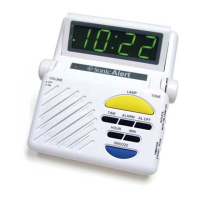
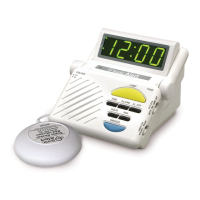
Pressing the blue SNOOZE button will turn the alarm signals off for nine minutes. After
nine minutes, the alarm will go on again.
Pressing the AL. OFF (alarm off) button will turn the alarm off and automatically reset
the alarm to go on at the same time the next day.
Setting the OUTLETS switch to OFF turns off the alarm. The alarm will not go off again
until you set the OUTLETS switch back to LAMP, VIB or BOTH.
Adjusting the LED Time Display Angle
You can adjust the clock’s display by simply moving it forward and backward.
Testing the Alarm
You can use the TEST button, located on the bottom of the alarm, to check your settings
of the audio alarm, lamp, and vibrator. Pressing and holding the TEST button will cause
the alarm to go off. Releasing the TEST button will end the test.
Battery Backup
In the event of a power interruption, the Sonic Boom alarm clock can use battery backup
to save your time and alarm settings until power is restored.
To use battery backup, you can install a 9V battery (not provided) in the clock.
Note: Please use only an Alkaline battery with the Sonic Alert Boom Clock.
To install a battery, use a small screwdriver or key to remove the battery compartment
access door from the bottom of the clock. Once you’ve installed the battery, the cover
clips back into place.
Note: During a power interruption, the clocks display will turn off, but time and alarm
settings will be saved.
Using a Lamp With the Alarm Clock
To use a lamp that is connected to the Sonic Boom alarm clock, follow these steps:
1. Plug the lamp into the AC outlet on the back of the clock.
2. Make sure the ON/OFF switch on the lamp is in the ON position.
3. Press the large yellow LAMP button on the front of the clock to turn the lamp on.


 To Next Page