Page 5
Using your Rio
• 7: Reverse; the left navigation button. In play mode, press and release 7 to skip to the
beginning of the track currently playing on your Rio. Press and hold
7 to fast-rewind
through the current track. In menu mode, press
7 to navigate through menu options.
• + and - (Volume): Press + to increase the volume; press - to decrease the volume. Vol-
ume level ranges from 0-20.
• Menu: Press the Menu button to display the Rio menu options. Press
4/;, 8, 7, and
< to navigate through menu options. Press Select to choose a menu option. Generally,
pressing Menu while in menu mode before saving any changes returns the Rio to play
mode without saving.
• Rec: The Record button on the Rio. Press Rec to display the Recorder options menu,
where you can choose to record your voice or play a recording. See the section on
Recording and Playing Voice
for instructions and more information.
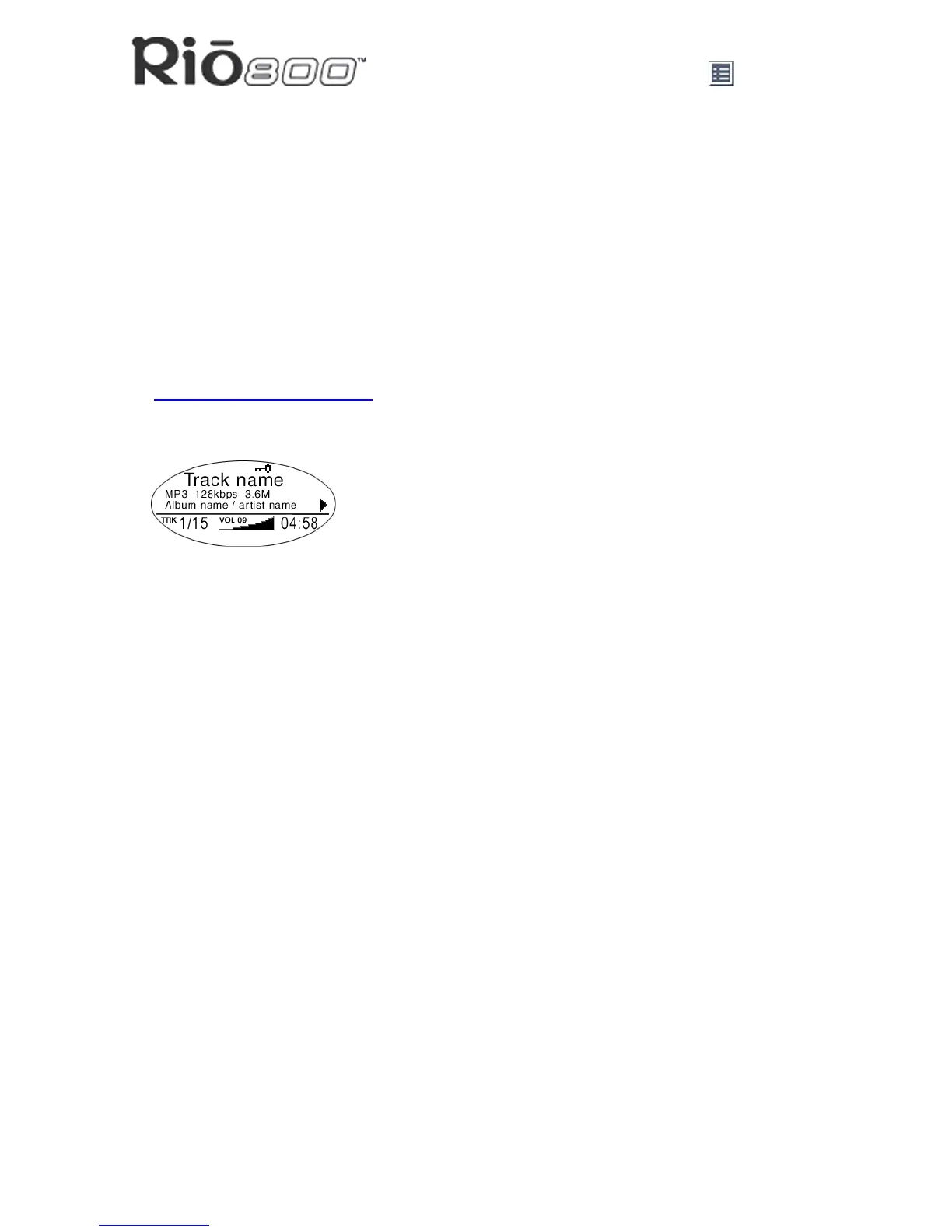
• Display (LCD): In play mode, the LCD or Liquid Crystal Display provides the following
information—clockwise from the right:
• Play/Pause icon: Displays either a Play icon (triangle) or a Pause icon (two vertical
bars), to show the current action of the Rio.
• Divider line: Graphically organizes the display.
• Current song position: Displays the play location in the current track in
minutes:seconds (mm:ss) form. For Audible content the display includes hours
(hh:mm or hh:mm:ss).
• Volume level: Displays the volume setting in both digital and graphic form. The bar-
graph disappears as volume is reduced and re-appears as volume is increased.
Volume level ranges from 0-20.
• Track display: Displays the number of the currently selected track and the total
number of tracks on your Rio. If a playlist is active, the track count shows the number
of tracks in a playlist.
• Album name/artist name: Album name displays in this field for a few seconds,
followed by artist name. If the name is longer than the width of the display, the name
scrolls.
• Track information: Track information includes the codec type (MP3, WMA, and so on),
the bitrate (XXX kbps), and the track time (XX:XX min:sec).
• Track name: Displays the title of the currently selected track. Song name scrolls if the
name is longer than the width of the display.
• Hold icon (key): Appears if the Rio is set to Hold mode. Hold locks all settings except
the Power switch on the Rio.
Rio 800 display



 To Next Page