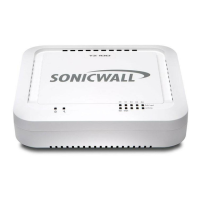
Rear Panel
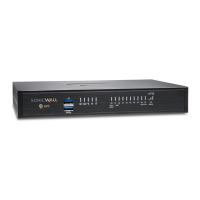
Front Panel
SonicWall TZ300 W
X0W0 X1 X2 X3 X4
1000/act
10/100/actsecurity
on / act
wlan
lan wan
U0
ss
1000
(wan) X0X1X2X3X4 (lan)
power
console
Ethernet Port Status (X0-X4)
Top - Provides 10/100 Mbps Ethernet port status
Bottom - Provides 1 Gbps Ethernet port status
Wireless (W0) LED
(TZ 300 W only) Indicates
802.11 b/g/n/ac security
status
USB / SSD port
External USB and SSD hard
drive support
Power LED
Test LED
Fast blinking - Initializing
Slow blinking - SafeMode
For future use
Service LED
Indicates Power Supply status
Wireless LAN LED
(TZ 300 W only) Indicates 802.11
b/g/n/ac activity
Reset Button
Press and hold for several
seconds to set the appliance
into Safe Mode
Power Supply
Provides power to
the SonicWall
appliance
Antenna Screws (3)
Center Antenna Screw
(TZ 300 W only) Provides 802.11 wireless capabilities
to the SonicWall appliance
(TZ 300 W only) The center antenna screw is only
compatible with the enclosed center antenna
X1 Port
X0 Port
For WAN access
For LAN access
X2 - X4 Ports
Console Port
Access the SonicOS Command
Line Interface (CLI) using a
compatible CLI cable
Congurable ports
TIP:YourcomputershouldbeusingDHCPIPaddressing.
• Clickonthelinkin“TolaunchtheSonicWallSetup
Wizard,clickhere.”
• TheSonicOSStartupGuideopens.
• ClickNextandfollowthepromptsintheStartup
Guidepagesthatfollow.
• EntertheTZapplianceadministratorcredentialsto
changethepassword,ifyouwish.ClickNext.
• TheautomaticWANIPsettingsaredisplayed.Click
Next.
• ThenewIPConfigurationisdisplayed.ClickDone.
ConfiguringWirelessLANsettings
• LogintoyourTZapplianceandclicktheWizards
icon.
NOTE:Thedefaultadministr atorcredentialsare
Username:adminPassword:password
NOTE:Formanualconfiguration,refertothelatest
SonicOSAdministrationGuide.
SonicWall™TZ300/TZ300
Wireless
QuickStartGuide
RegulatoryModelNumbers:
APL28-0B4 TZ300
APL28-0B5 TZ300 W
Copyright©
2017SonicWallInc.Allrightsreserved.
SonicWallisatrademarkorregisteredtrademarkofSonicWallInc.and/oritsaffiliatesin
theU.S.A.and/orothercountries.Allothertrademarksandregisteredtrademarksare
propertyoftheirrespectiveowners.
TheinformationinthisdocumentisprovidedinconnectionwithSonicWallInc.and/orits
affiliates'products.Nolicense,expressor
implied,byestoppelorotherwise,toany
intellectualpropertyrightisgrant edbythisdocumentorinconnectionwiththesaleof
SonicWallproducts.EXCEPTASSETFORTHINTHETERMSANDCONDITIONSASSPECIFIED
INTHELICENSEAGREEMENTFORTHISPRODUCT,SONICWALLAND/ORITSAFFILIATES
ASSUMENOLIABILITYWHATSOEVERANDDISCLAIMSANYEXPRESS,IMPLIEDOR
STATUT ORYWARRANTYRELATINGTOITSPRODUCTSINCLUDING,BU TNOTLIMITEDTO,
THEIMPLIEDWARRANTYOFMERCHANTABILITY,FITNESSFORAPARTICULARPURPOSE,
ORNON‐INFRINGEMENT.INNOEVENTSHALLSONICWALLAND/ORITSAFFILIATESBE
LIABLEFORANYDIRECT,INDIRECT,CONSEQUENTIAL,PUNITIVE,SPECIALORINCIDENTAL
DAMAGES(INCLUDING,WITHOUTLIMITATION,DAMAGESFORLOSSOFPROFITS,
BUSINESSINTERRUPTIONORLOSSOFINFORMATION)ARISINGOUTOFTHEUSEOR
INABILITYTOUSETHISDOCUMENT,EVENIFSONICWALLAND/ORITSAFFILIATESHAVE
BEENADVISEDOFTHEPOSSIBILITYOFSUCHDAMAGES.SonicWalland/oritsaffiliates
mak enorepresentationsorwarrantieswithre specttotheaccuracyorcompletenessof
thecontentsofthisdocumentandreservestherighttomak echangestospecifications
andproductdescriptionsatanytimewithoutnotice.SonicWallInc..and/oritsaffiliatesdo
notmakeanycommitmenttoupdatetheinformationcontainedinthisdocument.
Formoreinforma tion,visithttps://www.sonicwall.com/legal/.
TZ300/TZ300WirelessQuickStartGuide
Updated‐January2017
232‐003785‐50RevA
Legend
WARNING:AWARNINGiconindicatesapotentialforpropertydamage,
personalinjury,ordeath.
CAUTION:ACAUTIONiconindicatespotentialdamagetohardwareorlossof
dataifinstructionsarenotfollowed.
IMPORTANT,NOTE,TIP,MOBILE,orVIDEO:Aninformationiconindicates
supportinginformation.


 To Next Page
 Need help?

 General