This document provides user manuals for the Sonik SKS Bite Alarm, SKS Receiver, and SKS Bivvy Light, all designed for angling.
Sonik SKS Bite Alarm
Function Description:
The Sonik SKS Bite Alarm is a device used in angling to detect when a fish bites the line. It provides visual (LEDs) and audible (speaker) indications of line movement, including distinct tones for forward and drop-back movements.
Important Technical Specifications:
- Battery Type: R03P/AAA (2 x 1.5V)
- Working Current: 100mA
- Standby Current: 0.040mA
- Wireless Transmission Type: AM
- Radio Transmitter Operating Frequency: 433MHz
- Maximum Battery Voltage: Should not exceed 5V.
Usage Features:
- Battery Fitting/Replacement: Remove the battery compartment cover by sliding it down. Insert 2 x AAA 1.5V batteries, observing polarity. The speaker will sound when batteries are correctly fitted.
- Switching On/Off:
- On: Press and hold the 'V' button. LEDs will flash three times, and a high ascending tone sequence will sound.
- Off: Press and hold the 'V' button. LEDs will flash once, and a low descending tone sequence will sound.
- Volume Control: Briefly press and release the 'V' button to cycle through 6 volume settings. The speaker will sound the selected level. The lowest setting is silent.
- Tone Control: Briefly press and release the 'T' button to cycle through 7 tone settings. The speaker will sound the selected tone.
- Sensitivity Control: Briefly press and release the 'S' button to cycle through 4 sensitivity settings. The speaker will sound 1-4 times to confirm selection. Setting 4 is the highest, triggering with only 3.5mm of line movement.
- Extension Out Socket: A 2.5mm jack plug output socket is located on the underside, compatible with most illuminated indicators.
- Memory Function: The alarm remembers its volume, tone, and sensitivity settings unless the battery is disconnected or changed.
- LED Illumination: LEDs remain illuminated for 15 seconds after activation for both forward and drop-back movement. A white LED illuminates for drop-back movement, accompanied by an alternative tone.
- Night Glow LED:
- Activate: Press and hold the 'T' button. LEDs under the roller wheel will illuminate at a low brightness.
- Deactivate: Press and hold the 'T' button again.
Maintenance Features:
- Low Battery Warning: When low battery voltage is detected, the main alarm LED will flash quickly 5 times every 10 minutes.
- Care: All SKS alarm products are weather-proof. After use in extreme wet conditions, allow the unit to dry out indoors.
- Battery Removal: Remove batteries when the unit is not being used for extended periods to save battery life.
- Warnings: Do not trigger LED or speaker close to human or animal eyes and ears. Store out of reach of children. Avoid dropping or impacting the equipment.
Sonik SKS Receiver
Function Description:
The Sonik SKS Receiver works in conjunction with SKS Bite Alarms to receive signals when a fish bites. It replicates the alarm head activation with visual (LEDs) and audible (speaker) indications, and offers a vibration mode.
Important Technical Specifications:
- Battery Type: 6F22/PP3 (1 x 9V)
- Battery Voltage: 9V
- Power Off Current Consumption: 0mA
- Working Current: 100mA
- Wireless Transmission Type: AM
- Radio Transmitter Operating Frequency: 433MHz
- Maximum Battery Voltage: Should not exceed 10V.
Usage Features:
- Battery Fitting/Replacement: Remove the battery compartment cover by sliding it down. Insert 1 x PP3 9V battery, observing polarity. Replace the cover.
- Switching On/Off:
- On: Slide the rear power switch to 'on'. Four LEDs will flash in sequence, and the speaker will sound 5 times.
- Off: Slide the rear power switch to 'off'.
- Volume Control: Press the 'V' button to cycle through 6 volume settings. The speaker will sound the selected level. The lowest setting is silent.
- Tone Control: Press the 'T' button to cycle through 7 tone settings. The speaker will sound the selected tone.
- Vibration Mode Selection: Press the Vibration mode button to cycle through:
- Light + Sound
- Light + Sound + Vibration
- Light + Vibration
- Last Memory Recall: Press the 'M' button to indicate the last recorded alert received from an alarm transmitter.
- Alarm Replication: When activated by an alarm head, the receiver's channel LED will latch and flash for 20 seconds for both forward and drop-back movement. A lower speaker tone indicates drop-back.
- Memory Function: The receiver remembers its channel, volume, tone, and mode settings even if the battery is disconnected or removed.
- Pairing SKS Alarms to the Receiver:
- Remove the S-button cover and use a thin, blunt instrument to reach the S-button.
- Press the S-button to cycle through four channel positions (Bright LED = channel free, Low LED = channel in use).
- To erase a paired channel: Select the channel with the S-button, then press and hold the S-button until the LED changes from low to high brightness. To erase all channels: Press and hold the S-button longer until all channel LEDs flash bright.
- When a free channel is selected, activate the desired alarm head by rotating its roller wheel. The receiver will bleep, indicating successful pairing.
- Repeat steps 3 and 4 for other alarm heads.
- Turn the receiver off/on or wait 15 seconds for it to return to normal function.
- Replace the rubber S-button cover.
Maintenance Features:
- Low Battery Warning: When low battery voltage is detected on turn-on (after start-up LED sequence), all LEDs will flash 5 times. This repeats every 10 minutes.
- Battery Removal: Remove the battery when the unit is not being used for extended periods to save battery life.
- Battery Quality: Use good quality alkaline batteries for best performance.
- Warnings: Store out of reach of children. Avoid dropping or impacting the equipment.
Sonik SKS Bivvy Light
Function Description:
The Sonik SKS Bivvy Light is a lamp designed for use in an angling bivvy. It can function as a standard lamp and also sync with SKS Bite Alarms to illuminate when an alarm is triggered, replicating the alarm head activation.
Important Technical Specifications:
- Battery Type: AA (3 x 1.5V)
- Nominal Voltage: 1.5V x 3
- Power Off Current Consumption: 0mA
- Standby Current Consumption: 0.025mA
- Peak Working Current: 160mA
- Wireless Transmission Type: AM
- Radio Transmitter Operating Frequency: 433MHz
Usage Features:
- Battery Fitting/Replacement: Twist the magnetic and hook lamp back casing anti-clockwise to remove. Unhinge the battery compartment cover clip. Insert 3 x AA 1.5V batteries, observing polarity. Replace the cover and back case.
- Switching On/Off:
- On: Press and hold the on/off button for 3 seconds. The LED indicator will flash red-green-blue, and white LEDs will flash three times. The lamp enters standby mode.
- Off: In standby mode, press and hold the on/off button for 3 seconds. White LEDs will flash once.
- LED Illumination (Standard Lamp): Press the LED on/off button to turn the lamp on/off for standard use.
- Brightness Control: In standby mode, press the brightness button to cycle through 6 brightness levels. The centre LED will flash to indicate the chosen level.
- Syncing Lamp to Alarms:
- In standby mode, press the S-button to cycle through 6 colour channels (red/green/blue/yellow/purple/white). Bright LED = channel free, Low LED = channel in use. An alarm can only be paired to a free channel.
- To erase a paired channel: Use the S-button to select the channel. Press and hold the S-button until the LED changes from low to high brightness. To quickly erase all channels: Press and hold the S-button for a longer time until the centre LED flashes multiple colours.
- When a free channel is selected, activate the desired alarm head by rotating its roller wheel. The lamp will illuminate, indicating successful pairing.
- Repeat steps 2 and 3 for other alarm heads.
- The lamp will return to normal standby mode after the set delay time.
- Setting Light Delay Time (Latching Time): In standby mode, press the delay time button to cycle through 6 delay time settings. The centre blue indicator LED will illuminate to show the selected mode.
- Levels 1-3: Lamp flashes for 5, 10, or 20 seconds, respectively.
- Levels 4-6: Lamp remains constant for 5, 10, or 20 seconds, respectively.
- Alarm Replication: When activated by an alarm head, the bivvy lamp replicates the alarm head activation with the user-selected brightness and delay time. After activation, it returns to standby mode.
- Memory Function: The lamp remembers its channel, colour, brightness, and delay settings even if the battery is disconnected or removed.
Maintenance Features:
- Low Battery Warning: The unit auto-detects battery voltage in standby mode. When low voltage is detected, the lamp will flash a red LED at 1-minute intervals until the battery is replaced.
- Compatibility: The Alarm sync feature is compatible only with other selected Sonik bite alarms.
- Battery Removal: Remove the battery when the unit is not being used for extended periods to save battery life.
- Battery Quality: Use good quality alkaline batteries for best performance.
- Warnings: Store out of reach of children. Avoid dropping or impacting the equipment.

 Need help?
 General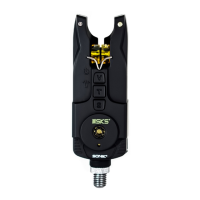

 To Next Page