Note
Trouble Connecting?
Try using the Cradlepoint
firmware version 5.3.0
http://resource.sonitrol.com/library/
asset/document/cradlepoint-ibr600-
firmware-version-530
12VDC
Figure 4
Questions? | Contact the DASH Line
M-F 8:30AM – 7:00PM EST
P: 800.654.6061
Email: Support@Sonitrol.com
Requirements:
Quick Install Guide
Cradlepoint IBR600
FlexIP, iBase & FlexiBase
1
Cradlepoint® IBR600E-SP or IBR600LE2-SP Modem (Fig. 1)
Sonitrol FlexIP, iBase, or FlexiBase control panel with Keypad (Fig. 2)
1.5A @ 12VDC available power
Personal computer with LAN adapter (Fig. 3)
Cradlepoint® configuration files:
· ”192 IBR600 dual LAN Rev A.bin”
· ”192 iBase ONLY alternate config Rev C.bin”
· “10 iBase ONLY alternate config Rev C.bin”
UL Required Hardware:
Altronix® Power Supply PN: AX-300ULXPD8
Figure 2
Figure 3
Figure 1
Pre-Install Signal Check:
2
q Insert the activated SIM card, if applicable (IBR600LE2-SP only)
q Power up the IBR600 and connect to PC via Ethernet cable. See Figure 4.
q On your PC, open a web browser and Go to the URL 192.168.0.1
q Enter the default password; found on the bottom of the IBR600. (CASE SENSITIVE)
q From the Dashboard, confirm that the Internet State = Connected.
Recommended Version Requirements:
-FlexIP 0A.07 (Boot A.03) or higher
-iBase 0A.57 (DAS “Blackfin” 0A.09) or higher
-FlexiBase 0A.17 (Boot A.03) or higher
-Keypad 0A.27 or higher
-SONIP version 3.1.47.1 or higher
Gerry Portela: Technical Support Lead
Email: sonitrolsupport@pcsorders.com
(888) 215-1005
Josh Brown: Regional VP Sales
Email: JBrown@pcsorders.com
(603) 422-2658
Wireless Innovations (Sprint™ Partner)
Cell connectivity, service and device technical support, and general questions.
For more information on service plans, see: PB14-0021 . Sonitrol Cell Backup and Primary with Cradlepoint IBR600
Router Configuration:
3
q Log into the IBR600. (see Step 2)
q Find the System Settings drop down.
q Select System Software.
q In the ‘System Config Save/Restore’ field, select Upload from file button.
q Select the Choose File button.
q Browse your PC for the Cradlepoint® router configuration file, named: ”192 IBR600 dual LAN.bin”
q Click the Restore Settings button.
Mounting the IBR600:
4
1. Install the two included modem antennas to the top antenna ports (marked with ▲) of the IBR600.
(Figure 7). Ensure they are NOT parallel to the ground; they should point towards the sky or ground.
2. With the IBR600 powered, the IBR600’s signal strength LED’s shall be used to verify signal
strength. (Figure 5)
3. Mount the IBR600 in a secure location with strong signal strength using the mounting bracket
hardware that comes included. (Figure 6)
Extra Antennas: The bottom antenna ports are for Wi-Fi
and don’t need to be installed. Leave
these antennas inside of the enclosure
so they may be used in the future if needed.
Location: DO NOT mount the IBR600 inside of the
alarm panel enclosure; signal strength will be
greatly reduced!
Figure 7
Both modem antennas shall be
connected to the top facing
ports “▲”, pointed towards the
ground or sky
Figure 6
Figure 5
Minimum of 2
bars required!
SGNL
After completing this step:
Ø IBR600 Gateway (login
URL) is changed to
192.168.0.17
Ø IBR600 password is
changed to 65535
1/13/2015 19810075 Rev A . Cradlepoint IBR600 Quick Guide 1/3


 To Next Page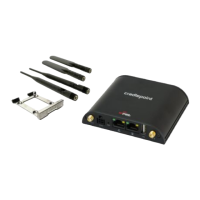


 General