*The functional characteristics depend on the functionality of Zigbee gateway.
Compatible Voice Assistants
Water consumption
statistics
6-month history Scene linkage
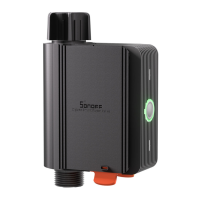
①
Inlet
②
Outlet
③
Button
•
Single press: Turn on/off the smart device.
•
Press and hold for 5 seconds: The device
enters the pairing mode.
④
LED indicator
(Green)
•
Steady on: Normal connection with the
gateway.
•
Slow flash: The device is in pairing mode.
•
Fast flash: Abnormal connection with the
gateway.
⑤
Battery slot


 To Next Page