ILCE-7SM3
5-060-467-41(1)
EN
17
\\Win-473\camera\CX85000(OT)UUD_IM\Multi\04_Compose\5060467411_14lang\5060467411ILCE7SM3CEC\01EN-ILCE7SM3CEC\030BAS.indd
DTP data saved: 2023/12/27 17:47
PDF file created: 2024/01/19 12:00
EN
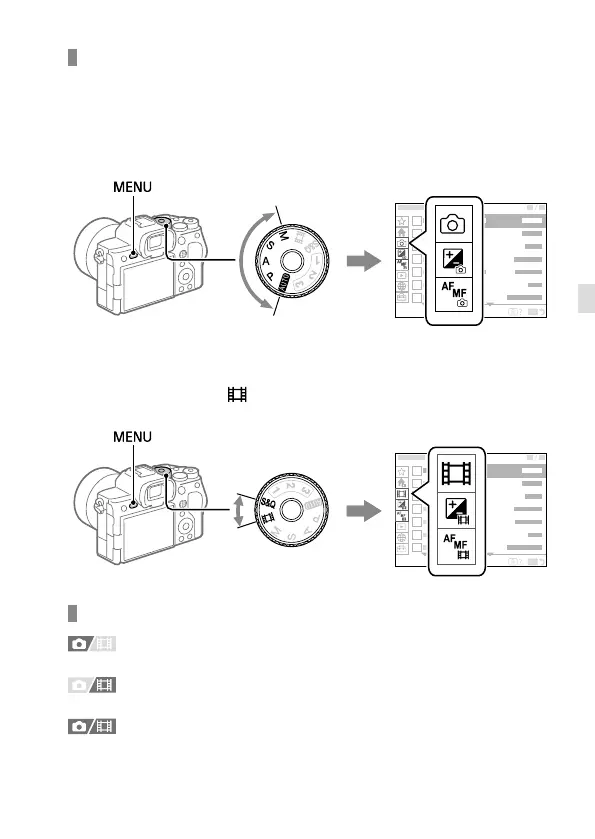
Relationship between the mode dial and menu screen
The menu groups and menu items displayed in the [Main], [Shooting],
[Exposure/Color], and [Focus] tabs vary depending on the mode dial
setting.
Still image shooting modes (AUTO/P/A/S/M)
• Menu items for shooting still images are displayed.*
1
2
3
4
5
6
7
* Since you can record movies with the MOVIE (Movie) button even in the still
image shooting mode, some basic movie menu items are also displayed.
Movie recording modes ( /S&Q)
• Menu items for recording movies are displayed.
1
2
3
4
5
6
7
Icons used in this manual
:
Menu items displayed in the still image shooting modes
(AUTO/P/A/S/M)
:
Menu items displayed in the movie recording modes
(Movie/S&Q)
:
Menu items displayed in both the still image shooting modes
and movie recording modes



 To Next Page