ILCE-7SM3
5-060-467-41(1)
EN
22
\\Win-473\camera\CX85000(OT)UUD_IM\Multi\04_Compose\5060467411_14lang\5060467411ILCE7SM3CEC\01EN-ILCE7SM3CEC\030BAS.indd
DTP data saved: 2023/12/27 17:47
PDF file created: 2024/01/19 12:00
1
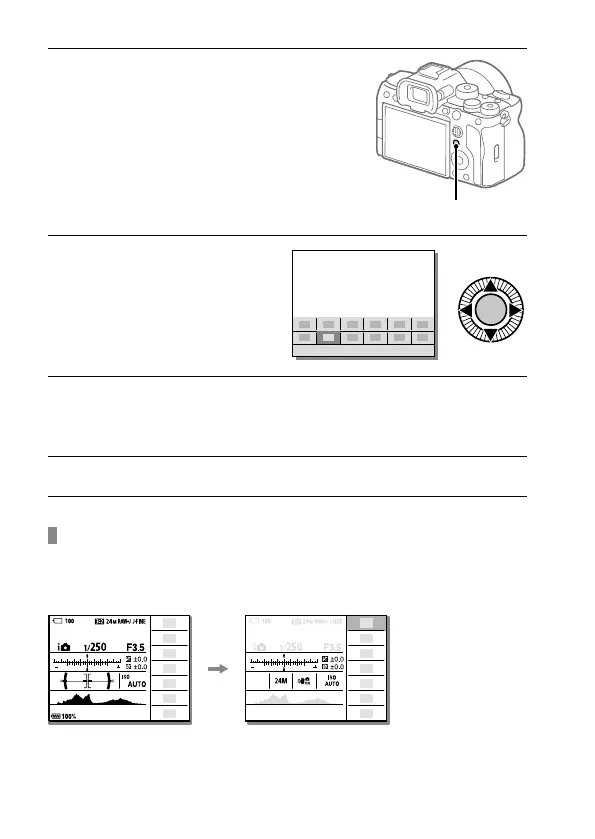
Press the Fn (Function) button.
• On the shooting screen,
press DISP on the control
wheel repeatedly to display
a screen mode other than
[For viewfinder], and then press
the Fn button.
Fn (Function) button
2
Press the top/bottom/left/
right side of the control
wheel to select a function
to set.
3
On the shooting screen, turn the front dial to select the desired
setting.
• Some functions can be fine-tuned using the rear dial.
4
Press the center of the control wheel.
Using the Fn button in the [For viewfinder] display
If you press the Fn button while the monitor display is set to
[For viewfinder], you can directly operate items you want to change.
In the auto mode



 To Next Page