ILCE-7SM3
5-060-467-41(1)
EN
74
\\Win-473\camera\CX85000(OT)UUD_IM\Multi\04_Compose\5060467411_14lang\5060467411ILCE7SM3CEC\01EN-ILCE7SM3CEC\090PAR.indd
DTP data saved: 2023/12/27 17:47
PDF file created: 2024/01/19 12:01
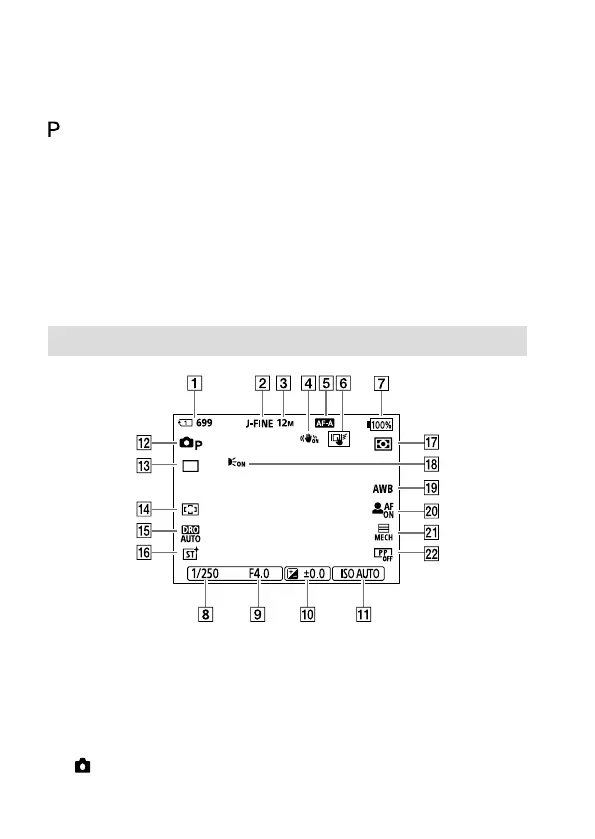
Basic icons
This section describes the screen display when the shooting mode is
(Program Auto).
• The following is an example of the display when [DISP (Screen Disp) Set]
is set to [Display All Info.] and the touch function icons are hidden.
• The displayed content and positions are for reference only, and may
differ from the actual display. Some icons may not be displayed
depending on the camera settings.
• For information on how to show/hide the touch function icons and
examples of the touch function icon display, refer to “Touch function
icons” (page 8).
• For other icons, refer to the “Help Guide.”
During still image shooting
Slot number of the memory card recording the shooting data and
recordable number of still images
[JPEG/HEIF Switch] is set to [JPEG].
[JPEG Quality] is set to [Fine].
[JPEG Image Size] is set to [L: 12M].
[ SteadyShot] is set to [On].



 To Next Page