ILCE-7M4
5-031-523-32(1)
GB
6
C:\Users\gotanda\Desktop\5031523321\5031523321ILCE7M4CEC\01GB-ILCE7M4CEC\01GB.indd
DTP data saved: 2021/07/20 15:20
PDF file created: 2021/07/20 15:20
4 Select the desired geographic location, set [Daylight Savings], and then
press the center.
• [Daylight Savings] can be switched on/off using the top/bottom of
the control wheel.
5 Set the date format (year/month/day), and press the center.
6 Set the date and time (hour/minute/second), and press the center.
• To set the date and time or geographic location again at a
later point, select MENU
(Setup) [Area/Date]
[Area/Date/Time Setting].
Hint
• By connecting the camera and a smartphone via the Bluetooth function,
you can operate the camera using the smartphone and transfer
images from the camera to the smartphone. To connect the camera to
a smartphone, set the date and time, and then follow the on-screen
instructions to perform pairing.
Shooting
Shooting still images
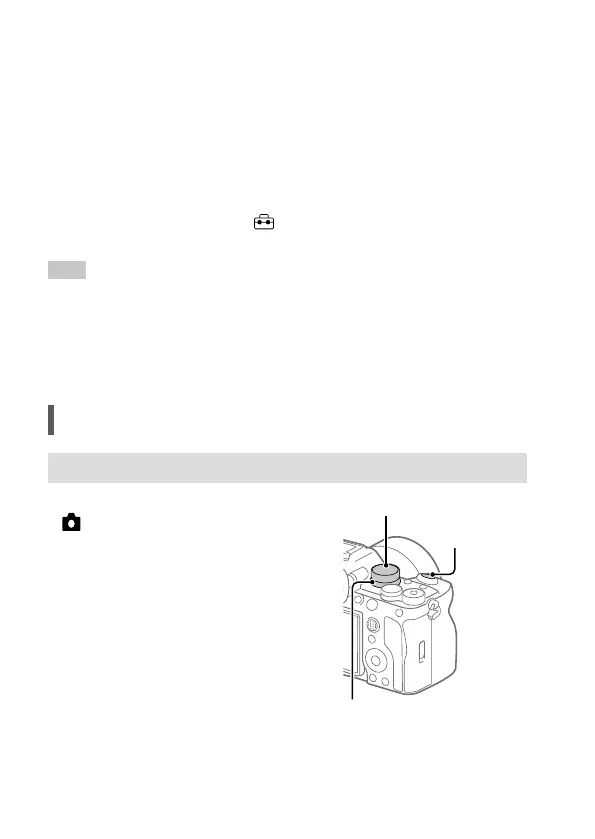
1 Set the Still/Movie/S&Q dial to
(Still) to select the still image
shooting mode.
2
Turn the mode dial and select the
desired shooting mode.
3 Press the shutter button halfway
down to focus.
4 Press the shutter button all the way
down.
Shutter button
Still/Movie/S&Q dial
Mode dial



 To Next Page