Charging Battery Packs
Charging Battery Packs
21
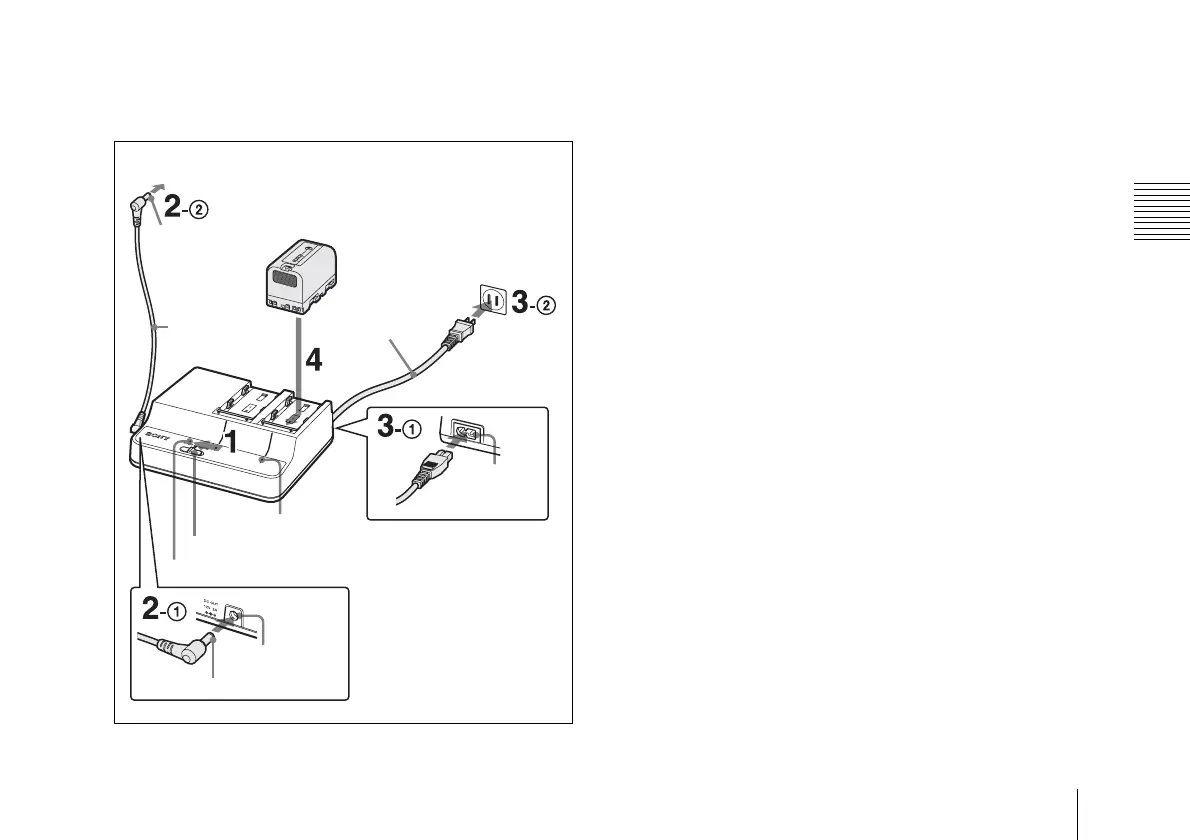
Charging in DC OUT mode
You can charge a battery pack on channel 2 while supplying power
to a connected device.
1 Set the mode select switch to DC OUT.
2 Connect the supplied DC output cable 1 to the DC OUT
connector and 2 to the DC powered device.
3 Connect the AC power cord 1 to the AC input connector
and 2 to an AC power source.
DC power is supplied to the device connected in step 2, and the
DC OUT indicator lights in green.
4 Attach a battery pack to channel 2.
See step 3 in “Charging in CHARGE mode” for information about how
to attach a battery pack.
Detaching a battery pack
Slide the attached battery pack in the opposite direction to that when
attaching then pull it up.
When an error is detected
When one of the following conditions is detected during charging,
the CHARGE indicator flashes in orange and green alternately:
• After the start of charging, quick charging does not begin.
• Charging does not finish within a specified period.
• The voltage for battery charging has exceeded the specified level.
• The internal voltage has exceeded the specified level.
• The internal voltage has dropped below the specified level.
Action to take if an error is detected
Immediately disconnect the AC power cord from the AC power
source, remove the battery packs, and contact the vendor from whom
you purchased the apparatus.
To DC powered device
Yellow
DC output cable
(supplied)
Mode select switch
Lithium-ion battery pack
AC input
connector
AC power cord
To AC power source
CHARGE indicator
Black
DC OUT indicator
DC OUT
connector


 To Next Page