9
Diag Menu (Wireless LAN Test) <only Wireless Model>
Outline:
Activate Wireless LAN Tests
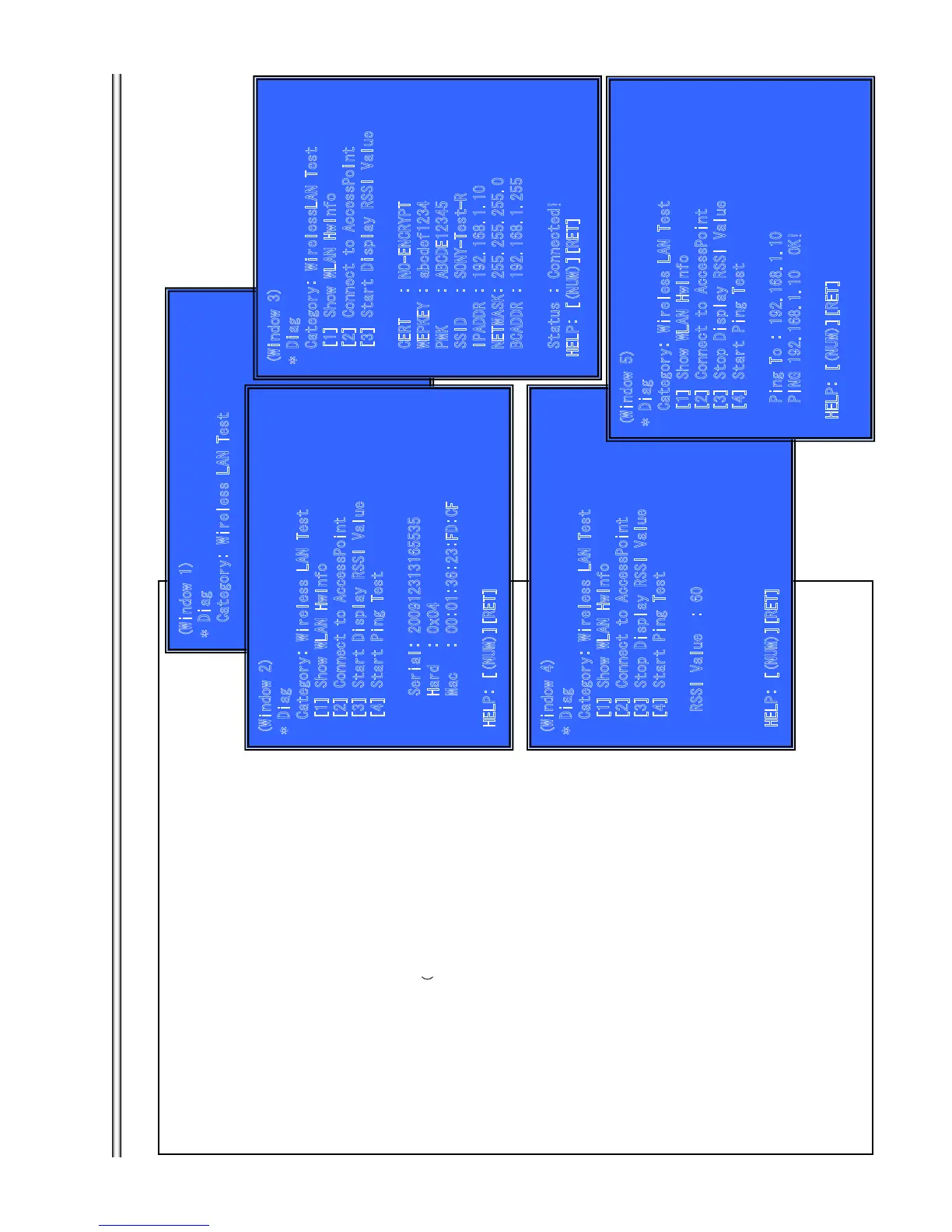
(Window 1)Select Wireless LAN Test Category
Operation:
[LEFT] [RIGHT] Select Category
[DOWN][ENT] Activate the selected Category.
[RET] Return to Service Top Menu.
(Window 2) Select Wireless LAN Test
Operation:
[1] Show Wireless LAN module Information
[2] Connect Access Point
[3] Start display RSSI value.
[4] Start Ping Test
[UP][DOWN] Select Test
[ENT] Activate and Start Test
[RET] Return to test category selection.
> Show WLAN HwInfo (
See Window 2)
Serial : Serial Number
Hard : Hardware Version
Mac : Mac Address
> Connect to Access Point (See Window 3)
Connect Access Point only with the following AP settings.
Authentication method: NO-ENCRYPT
WEP key: abcdef1234
SSID: SONY-Test-R
PMK: ABCDE12345
IP: 192.168.1.10
Net mask: 255.255.255.0
Broadcast: 192.168.1.255
・When connect to AP, Status is “Connected!”
When cannot connect to AP, Status is “can’t Connect!”
> Start Display RSSI Value (See Window 4)
Display RSSI value.
> Start Ping Test (See
Window 5)
Ping Test.
IP address use the value of “192.168.
1.10”.
(
)
(
)
t r
r
t
f
t t t
t rt
f
t
t t t
(
)
(
)
g
r
t
f
t t t
t
0
(
)
g
r
r
f
t
t
t
r
t
g
t
)
7-8
BX58/S480/S483/S580






 To Next Page