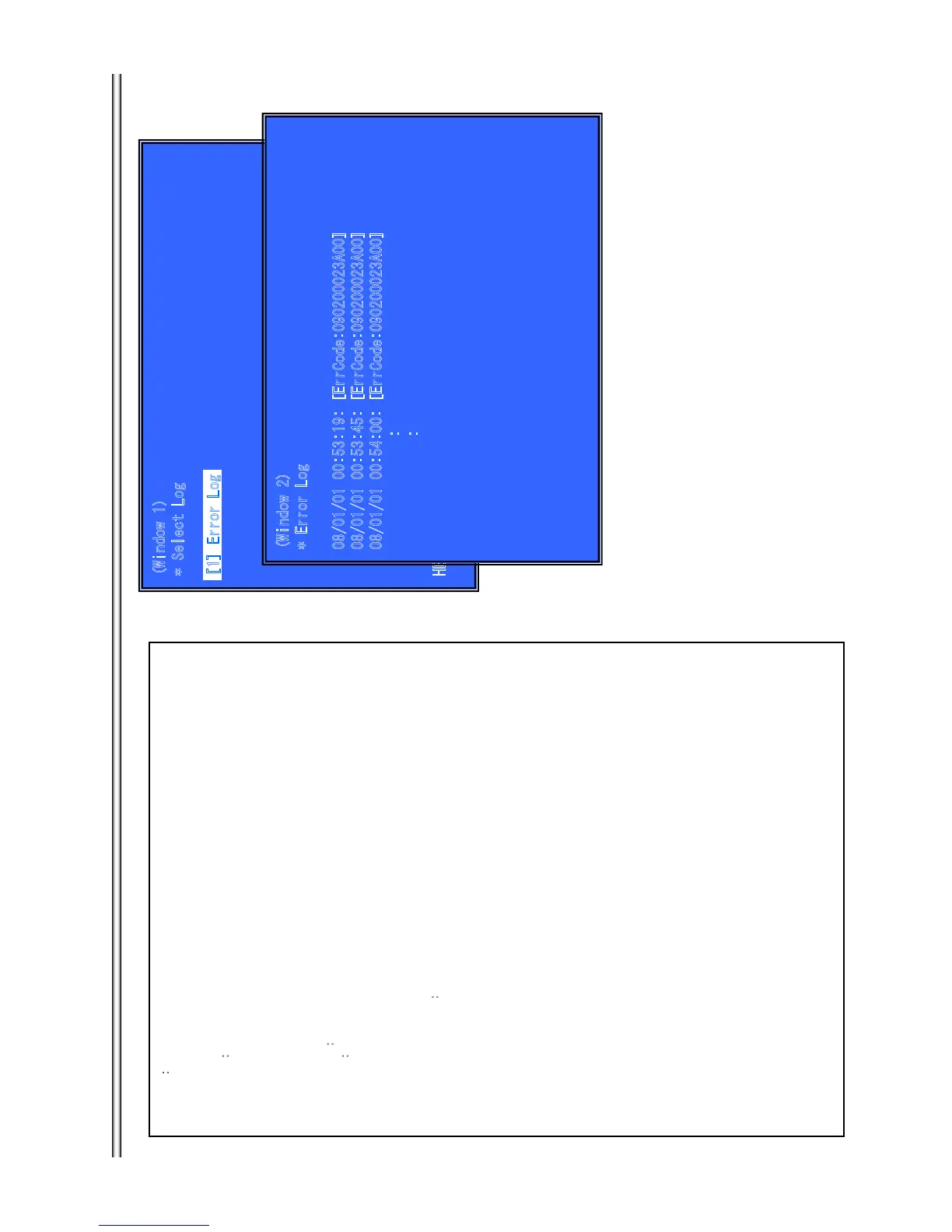
Log: Error Log
(
Outline
Display each contents of the Error log,
(Window 1) select log.
Operation
[1] Activate and Display Error log
[UP] Move Up cursor
[DOWN] Move Down cursor
[ENT] Activate the selected cursor.
[RET] Return to Service Top Menu.
(Window 2)
Display Error Log
Operation
[LEFT] Next Page
[RIGHT] Previous Page
[RET] Return to select log (window 1)
[RED] Write the contents of an error log on a USB memory.
Front Panel Display
select log Error Log: S-ELOG
Display Page display page ex) 001/050
>Log contents
Error Log:
08/01/01 00:53:19: [ErrCode:080400000000]
[Date] [Time] [ErrCode]
**Write the contents of a log on a USB memory**
[RED] is pushed where a USB memory is inserted in a set in log display screen.
Please do not push the RED button immediately after USB memory is inserted.
Please do not pull out USB memory immediately after the RED button was pushed.
Error Log:
“getErrLogFile.trm” file is out
putted in a USB memory.
(
1 1 1
1 1
1 1
r
r r
7-10
BX58/S480/S483/S580






 To Next Page