3
Enable wireless transmission/
Activación de la transmisión inalámbrica
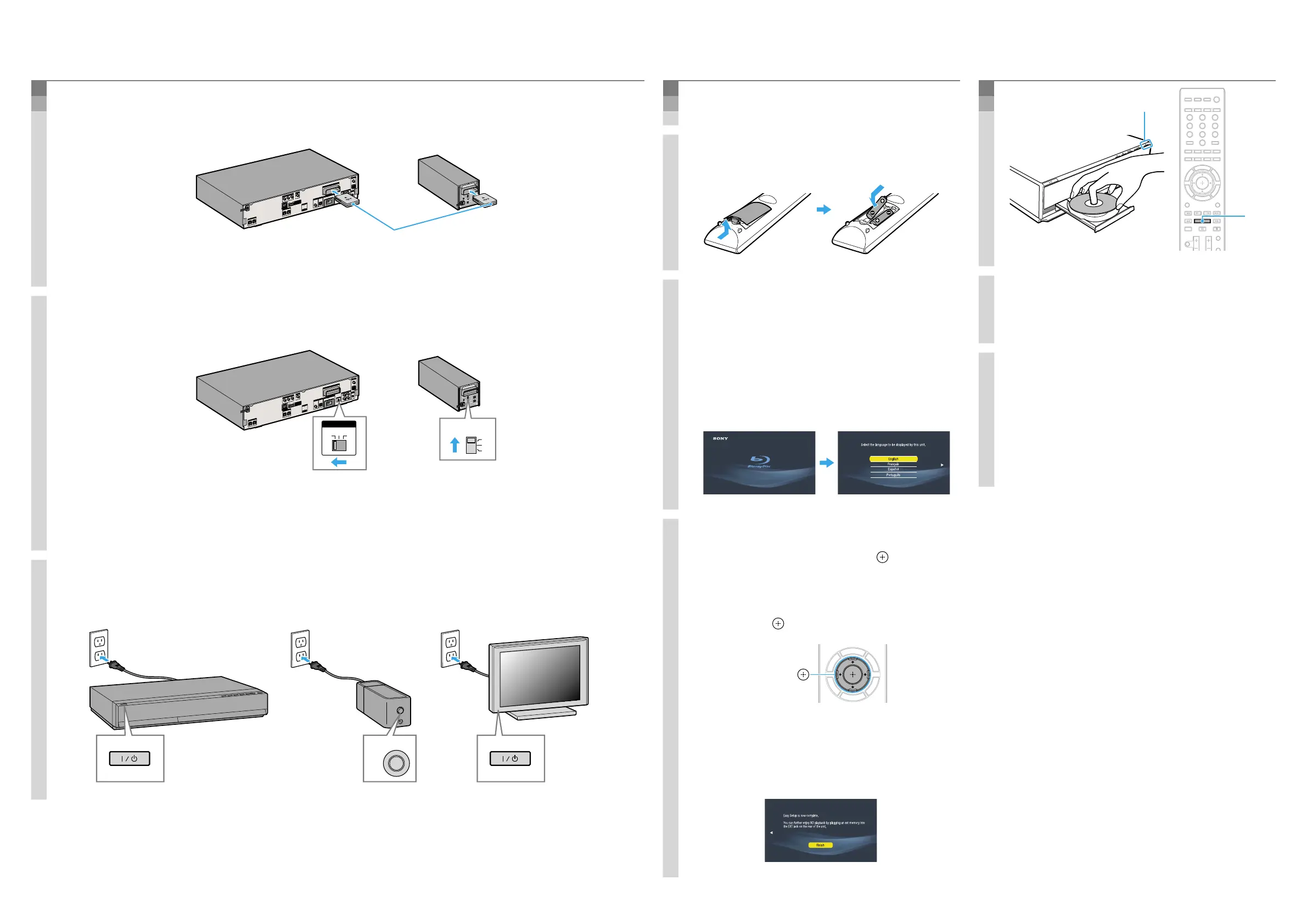
1. Insert the wireless transceivers into both the main unit and surround amplifier.
Inserte los transceptores inalámbricos en la unidad principal y en el amplificador de
sonido envolvente.
ANTENNA
AUDIO
DIGITAL IN
DMPORT
HDMI OUT
COMPONENT VIDEO O
UT
VIDEO OUT
S-AIR
ID
AUDIO IN
AUDIO IN
A. CAL MIC
ECM-AC2
SPEAKER
Y
P
B
/ C
B
P
R
/ C
R
FM
AM
COAXIAL
75
COAXIAL
OPTICAL
R
L
R
L
FRONT R
FRONT L
CENTER
SUBWOOFER
EXT
DC5V
700mA MAX
EZW-RT10
TV
TV
DIGITAL IN
SAT/CABLE
A
B
C
DC5V
500mA MAX
SPEAKER
LAN(100)
R
SURROUND SELECTOR
S-AIR ID
SPEAKER
SURROUND
PAIRING
C
B
A
SURROUND
BACK
L
EZW-RT
10
Insert securely until they click.
Insértelos firmemente hasta que encajen
con un clic.
2. Set the S-AIR ID switches to “A.”
Ajuste los interruptores S-AIR ID en “A”.
ANTENNA
AUD
IO
DIGITAL IN
DMPORT
HDMI OUT
COMPON
ENT VIDE
O OUT
VIDEO OUT
S-AIR ID
AUDIO IN
AUDIO IN
A. CAL MIC
ECM-AC2
SPEAKER
Y
P
B
/ C
B
P
R
/ C
R
FM
AM
COAXIAL
75
COAXIAL
OPTICAL
R
L
R
L
FRONT R
FRONT L
CENTER
SUBWOOF
ER
EXT
DC5V
700mA MAX
EZW-RT10
TV
TV
DIGITAL IN
SAT/CABLE
A
B
C
DC5V
500mA MAX
SPEAKER
LAN(100)
R
SURROUND SELECTOR
S-AIR ID
SPEAKER
SURROUND
PAIRING
C
B
A
SURROUND
BACK
L
EZW-RT
10
S-AIR ID
A B C
S-AIR ID
C
B
A
The S-AIR IDs on the main unit and surround amplifier are set to “A” at the factory.
Los S-AIR ID de la unidad principal y del amplificador de sonido envolvente están ajustados en “A” de manera
predeterminada de fábrica.
3. Connect the AC power cords (
), and turn on the power (
).
Conecte los cables de alimentación de ca (
) y, a continuación, encienda la
alimentación (
).
4
Perform “Easy Setup”/
Realización de la “Conguración fácil”
Do not insert a disc before performing the “Easy Setup”.
No inserte ningún disco antes de llevar a cabo la “Configuración fácil”.
1. Insert batteries into the remote.
Inserte las pilas en el mando a distancia.
2. Switch the input selector on your TV
so that system screens like the ones
below appear on the TV screen.
Cambie el selector de entrada del
televisor de manera que aparezcan
pantallas similares a las que aparecen
en la pantalla del televisor.
“Easy Setup” screen/
Pantalla “Configuración fácil”
Starting up/
Inicio
3. Perform basic settings by following
the on-screen instructions in “Easy
Setup” using
/
/
/
and .
Siga las instrucciones en pantalla para
realizar los ajustes básicos en
“Configuración fácil” mediante
/
/
/
y .
/
/
/
,
[Easy Setup is now complete.] appears when “Easy
Setup” is complete.
Aparece el mensaje [Ha completado la configuración
fácil.] cuando finaliza la “Configuración fácil”.
5
Play a disc/
Reproducción de discos
1. Press , and place a disc on the tray.
Pulse
y coloque un disco en la
bandeja.
2. Press
to close the disc tray.
Playback starts. When playback does not start,
press .
Pulse para cerrar la bandeja de
discos.
Comienza la reproducción. Si la reproducción no
comienza, pulse .
Enjoying more BD functions
Refer to “Enjoying BonusView/BD-Live” in the
Operating Instructions.
Más funciones de BD
Consulte “Utilización de BonusView/BD-Live” en el
manual de instrucciones.


 To Previous Page
 Loading...










