5
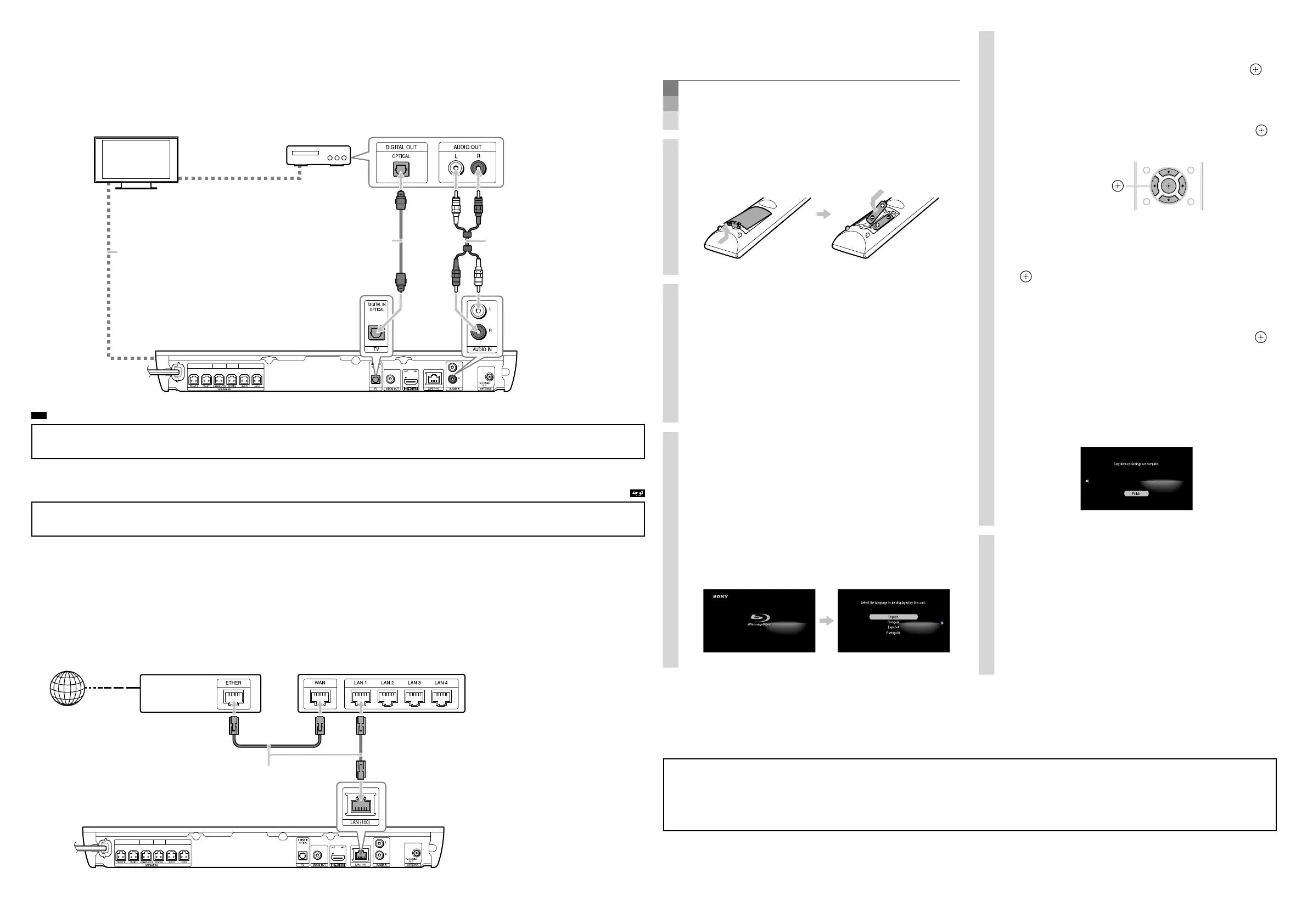
Perform Easy Setup
Do not insert a disc before performing the Easy Setup.
.ﺪﯿﻫﺪﻧ راﺮﻗ هﺎﮕﺘﺳد رد ﮏﺴﯾد ،Easy Setup یاﺮﺟا زا ﻞﺒﻗ
1. Insert batteries into the remote.
.ﺪﯾراﺬﮕﺑ رود هار زا لﱰﻨﮐ هﺎﮕﺘﺳد رد ار ﺎﻫ یﺮﺗﺎﺑ
2. Connect the AC power cords of the
main unit and your TV to the AC power
outlet, and then turn on the power of
the main unit and your TV.
ار نﻮﯾﺰﯾﻮﻠﺗ و ﯽﻠﺻا هﺎﮕﺘﺳد AC بوﺎﻨﺘﻣ قﺮﺑ یﺎﻫ ﻢﯿﺳ
و ﯽﻠﺻا هﺎﮕﺘﺳد ﺲﭙﺳ ،ﺪﯿﻨﮐ ﻞﺻو
AC قﺮﺑ ﯽﺟوﺮﺧ ﻪﺑ
.ﺪﯿﻨﮐ ﻦﺷور ار دﻮﺧ نﻮﯾﺰﯾﻮﻠ
3. Switch the input selector on your TV
so that system screens like the ones
below appear on the TV screen.
ﻪﺑ ﺪﯿﻨﮐ ﻦﺷور ار دﻮﺧ نﻮﯾﺰﯾﻮﻠﺗ یور یدورو ﺮﮕﺑﺎﺨﺘﻧا
ﻪﺤﻔﺻ رد ،ﺮﯾز تﺎﺤﻔﺻ ﺪﻨﻧﺎﻣ ﻢﺘﺴﯿﺳ تﺎﺤﻔﺻ ﻪﮐ یرﻮﻃ
.ﺪﻧﻮﺷ ﺮﻫﺎﻇ نﻮﯾﺰﯾﻮﻠ
“Easy Initial Settings” screen
"Easy Initial Settings" ﻪﺤﻔﺻ
Starting up
3
Connect your set-top box/
لﺎﺘﯿﺠﯾد یﺎﻬﻟﺎﻨﮕﯿﺳ ﺖﻓﺎﯾرد ﻪﺒﻌﺟ ندﺮﮐ ﻞﺻو
Make either or connection to enjoy set-top box sound via the system. If you do not use a set-top box, skip this Step.
ﻦﯾا زا ،ﺪﯿﻨﮐ ﯽ هدﺎﻔﺘﺳا لﺎﺘﯿﺠﯾد یﺎﻬﻟﺎﻨﮕﯿﺳ ﺖﻓﺎﯾرد ﻪﺒﻌﺟ زا ﺮﮔا .ﺪﯿﻨﮐ راﺮﻗﺮﺑ ار ȏ ﺎﯾ Ȏ لﺎﺼﺗا ،ﻢﺘﺴﯿﺳ ﻖﯾﺮﻃ زا لﺎﺘﯿﺠﯾد یﺎﻬﻟﺎﻨﮕﯿﺳ ﺖﻓﺎﯾرد ﻪﺒﻌﺟ یاﺪﺻ زا ندﺮﺑ تﺬﻟ یاﺮﺑ
.ﺪﯾﻮﺷ در ﻢﯿﻈﻨﺗ
TV
Video input
This connection is
completed in Step 2.
2 ﻪﻠﺣﺮﻣ رد لﺎﺼﺗا ﻦﯾا
.دﻮﺷ ﯽﻣ
Rear of the main unit
Set-top box
ﺖﻓﺎﯾرد ﻪﺒﻌﺟ
لﺎﺘﯿﺠﯾد یﺎﻬﻟﺎﻨﮕﯿﺳ
Digital optical cord*
*Not supplied.
Audio cord*
Video output
To enjoy set-top box sound, press FUNCTION repeatedly to select “TV” for a digital optical cord connection, or “AUDIO” for an audio
cord connection.
To enable this connection, set [Control for HDMI] in [HDMI Settings] of [System Settings] to [Off ]. For details, refer to “Using the
Setup Display” in the supplied Operating Instructions.
ً
ارﺮﮑﻣ ار ˎ"AUDIO" ،ﯽﺗﻮﺻ ﻢﯿﺳ لﺎﺼﺗا یاﺮﺑ ﺎﯾ ،FUNCTION ،لﺎﺘﯿﺠﯾد یرﻮﻧ ﻢﯿﺳ لﺎﺼﺗا یاﺮﺑ "TV" بﺎﺨﺘﻧا ﺖﻬﺟ ،لﺎﺘﯿﺠﯾد یﺎﻬﻟﺎﻨﮕﯿﺳ ﺖﻓﺎﯾرد ﻪﺒﻌﺟ یاﺪﺻ زا ندﺮﺑ تﺬﻟ یاﺮﺑ
.ﺪﯿﻫد رﺎﺸﻓ
ﻪﺑ ،تﺎﯿﺋﺰﺟ زا عﻼﻃا صﻮﺼﺧ رد .ﺪﯿﻨﮐ ﻢﯿﻈﻨﺗ
ˎ[O] یور [System Settings] رد دﻮﺟﻮﻣ [HDMI Settings] رد ار [Control for HDMI] ،لﺎﺼﺗا ﻦﯾا ندﺮﮐ لﺎﻌﻓ یاﺮﺑ
.ﺪﯿﻨﮐ ﻪﻌﺟاﺮﻣ ﻪﻤﯿﻤﺿ ﯽﺗﺎﯿﻠﻤﻋ یﺎﻫ ﻞﻤﻌﻟا رﻮﺘﺳد رد "یزاﺪﻧا هار ﺶﯾﺎ زا هدﺎﻔﺘﺳا"
4
Connect to the network/
*Not supplied.
Internet
ADSL modem/cable modem
Broadband router
Rear of the main unit
LAN cable*
4. Perform system settings by following
the on-screen instructions in “Easy
Initial Settings” using
/
/
/
and .
Easy Initial" یﺎﻫ ﻞﻤﻌﻟارﻮﺘﺳد ندﺮﮐ لﺎﺒﻧد ﺎﺑ
و
V
/
j
/
/
p
زا هدﺎﻔﺘﺳا ﺎﺑ ،ﻪﺤﻔﺻ یور "Settings
.ﺪﯿﻫد مﺎﺠﻧا ار ﻢﺘﺴﯿﺳ تﯿﻈﻨﺗ ،
/
/
/
,
5. Perform network settings by following
the on-screen instructions in “Easy
Network Settings” using
/
/
/
and
.
Easy Network" یﺎﻫ ﻞﻤﻌﻟارﻮﺘﺳد ندﺮﮐ لﺎﺒﻧد ﺎﺑ
و
V
/
j
/
/
p
زا هدﺎﻔﺘﺳا ﺎﺑ ،ﻪﺤﻔﺻ یور "Settings
.ﺪﯿﻫد مﺎﺠﻧا ار ﻪﮑﺒﺷ تﯿﻈﻨﺗ ،
[Easy Network Settings are complete.] appears
when “Easy Network Settings” is complete.
Easy] ،"Easy Network Settings" مﺎا زا ﺲﭘ
.دﻮﺷ ﯽﻣ ﺮﻫﺎﻇ
[Network Settings are complete.
Basic setup is complete. Refer to the
supplied Operating Instructions for
details on how to enjoy disc playback
and many other features.
هﺮﻬﺑ هﻮﺤﻧ زا عﻼﻃا صﻮﺼﺧ رد .ﺪﺷ مﺎﺠﻧا ﻪﯿﻟوا یزاﺪﻧا هار
ﻪﺑ ،ﺮﮕﯾد یﺎﻫ ﯽﮔﮋﯾو یرﺎﯿﺴﺑ و ﮏﺴﯾد ﺶﺨﭘ زا ندﺮﺑ
.ﺪﯿﻨﮐ ﻪﻌﺟاﺮﻣ ﻪﻤﯿﻤﺿ ﯽﺗﺎﯿﻠﻤﻋ یﺎﻫ ﻞﻤﻌﻟا رﻮﺘﺳد
For further details on network settings, visit the following website and check the FAQ:
:ﺪﯿﻨﮐ ﯽﺳرﺮﺑ ار لواﺪﺘﻣ تﻻاﺆﺳ و هدﺮﮐ ﻪﻌﺟاﺮﻣ ﺮﯾز ﺖﯾﺎﺳ بو ﻪﺑ ،ﻪﮑﺒﺷ تﯿﻈﻨﺗ درﻮﻣ رد ﱰﺸﯿﺑ تﺎﻋﻼﻃا یاﺮﺑ
http://www.sony-asia.com/section/support


 To Previous Page
 Loading...