3
Enable wireless transmission/
啓用無線傳輸
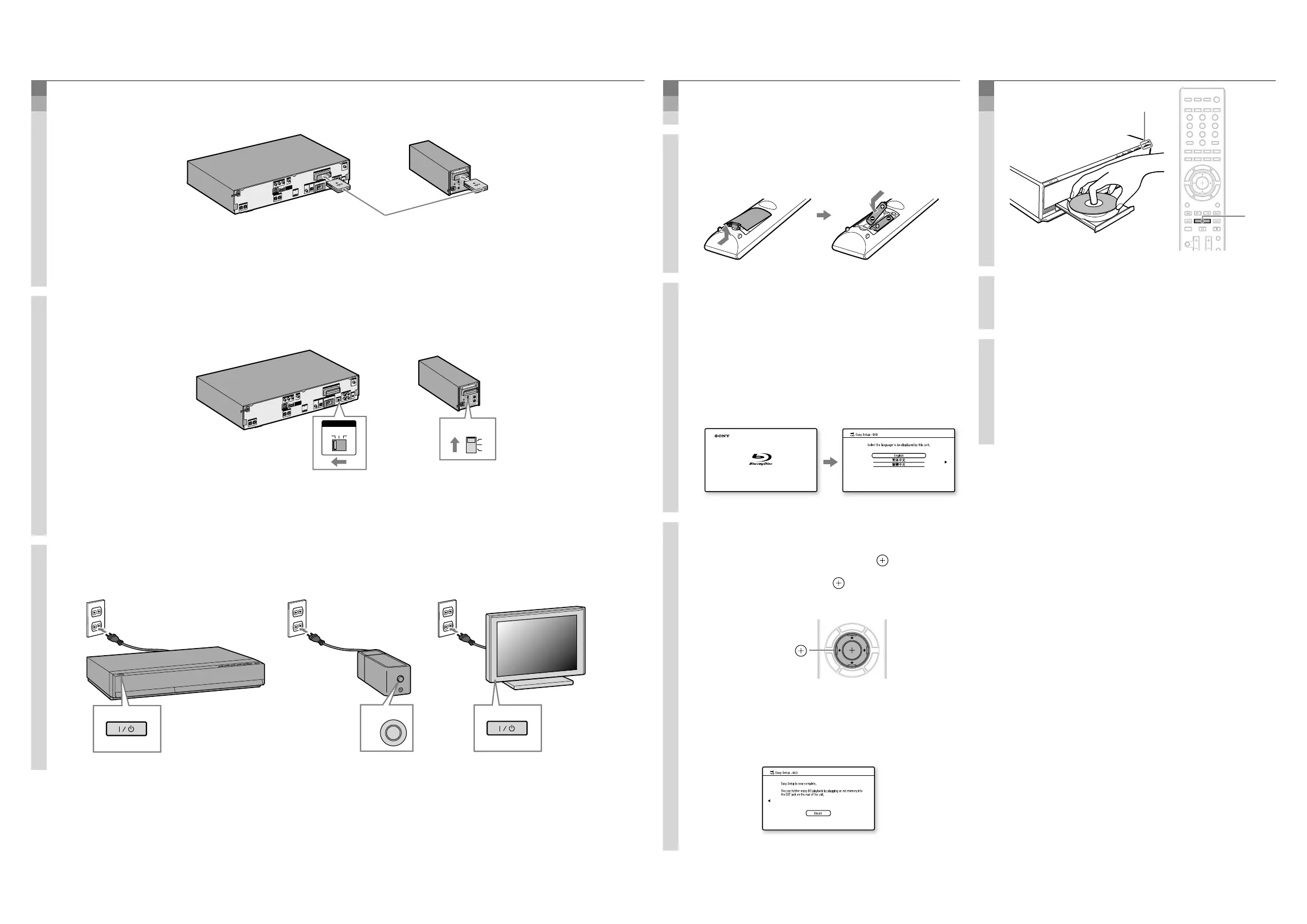
1. Insert the wireless transceivers into both the main unit and surround amplifier.
將無線收發器插入主機與環繞放大器。
ANTENNA
AUD
IO
DIGITAL IN
DMPORT
HDMI OUT
COMPON
ENT VIDE
O OUT
VIDEO OUT
S-AIR ID
AUDIO IN
AUDIO IN
A. CAL MIC
ECM-AC2
SPEAKER
Y
P
B
/ C
B
P
R
/ C
R
FM
COAXIAL
75
COAXIAL
OPTICAL
R
L
R
L
FRONT R
FRONT L
CENTER
SUBWOOF
ER
EXT
DC5V
700mA MAX
EZW-RT10
TV
TV
DIGITAL IN
SAT/CABLE
A
B
C
DC5V
500mA MAX
SPEAKER
LAN(100)
R
SURROUND SELECTOR
S-AIR ID
SPEAKER
SURROUND
PAIRING
C
B
A
SURROUND
BACK
L
EZW-RT
10
Insert securely until they click.
牢固地插入,直至聽到喀嗒聲。
2. Set the S-AIR ID switches to “A.”
將 S-AIR ID 開關設定為“A”。
R
SURROUND SELECTOR
S-AIR ID
SPEAKER
SURROUND
PAIRING
C
B
A
SURROUND
BACK
L
EZW-RT
10
ANTENNA
AUDIO
DIGITAL IN
DMPORT
HDMI OUT
COMPONEN
T VIDEO O
UT
VIDEO OUT
S-AIR
ID
AUDIO IN
AUDIO IN
A. CAL MIC
ECM-AC2
SPEAKER
Y
P
B
/ C
B
P
R
/ C
R
FM
COAXIAL
75
COAXIAL
OPTICAL
R
L
R
L
FRONT R
FRONT L
CENTER
SUBWOOFER
EXT
DC5V
700mA MAX
EZW-RT10
TV
TV
DIGITAL IN
SAT/CABLE
A
B
C
DC5V
500mA MAX
SPEAKER
LAN(100)
S-AIR ID
A B C
S-AIR ID
C
B
A
The S-AIR IDs on the main unit and surround amplifier are set to “A” at the factory.
主機與環繞放大器的 S-AIR ID 原廠設定為“A”。
3. Connect the AC power cords (
), and turn on the power (
).
連接交流電源線(
),然後打開電源(
)。
4
Perform “Easy Setup”/
執行“簡易設置”
Do not insert a disc before performing the “Easy Setup”.
執行“簡易設置”前,切勿插入光碟。
1. Insert batteries into the remote.
將電池裝入遙控器。
2. Switch the input selector on your TV
so that system screens like the ones
below appear on the TV screen.
切換電視機上的輸入選擇器,類似以下
畫面的系統螢幕會出現在電視機螢幕
上。
“Easy Setup” screen/
“簡易設置”畫面
Starting up/
啓動
3. Perform basic settings by following
the on-screen instructions in “Easy
Setup” using
/
/
/
and .
使用
/
/
/
和 ,依照“簡易設
置”中的畫面指示,執行基本設定。
/
/
/
,
[Easy Setup is now complete.] appears when “Easy
Setup” is complete.
“簡易設置”完成時,會出現 [現在簡易設置已
經完成。]。
5
Play a disc/
播放光碟
1. Press , and place a disc on the tray.
按
,然後將光碟放入托盤。
2. Press
to close the disc tray.
Playback starts. When playback does not start,
press
.
按 關閉光碟托盤。
開始播放。無法開始播放時,按
。
Enjoying more BD functions
Refer to “Enjoying BonusView/BD-Live” in the
Operating Instructions.
欣賞更多 BD 功能
請參閱使用說明書中的“欣賞 BonusView/BD-
Live”。



 To Previous Page