3
GB
GB
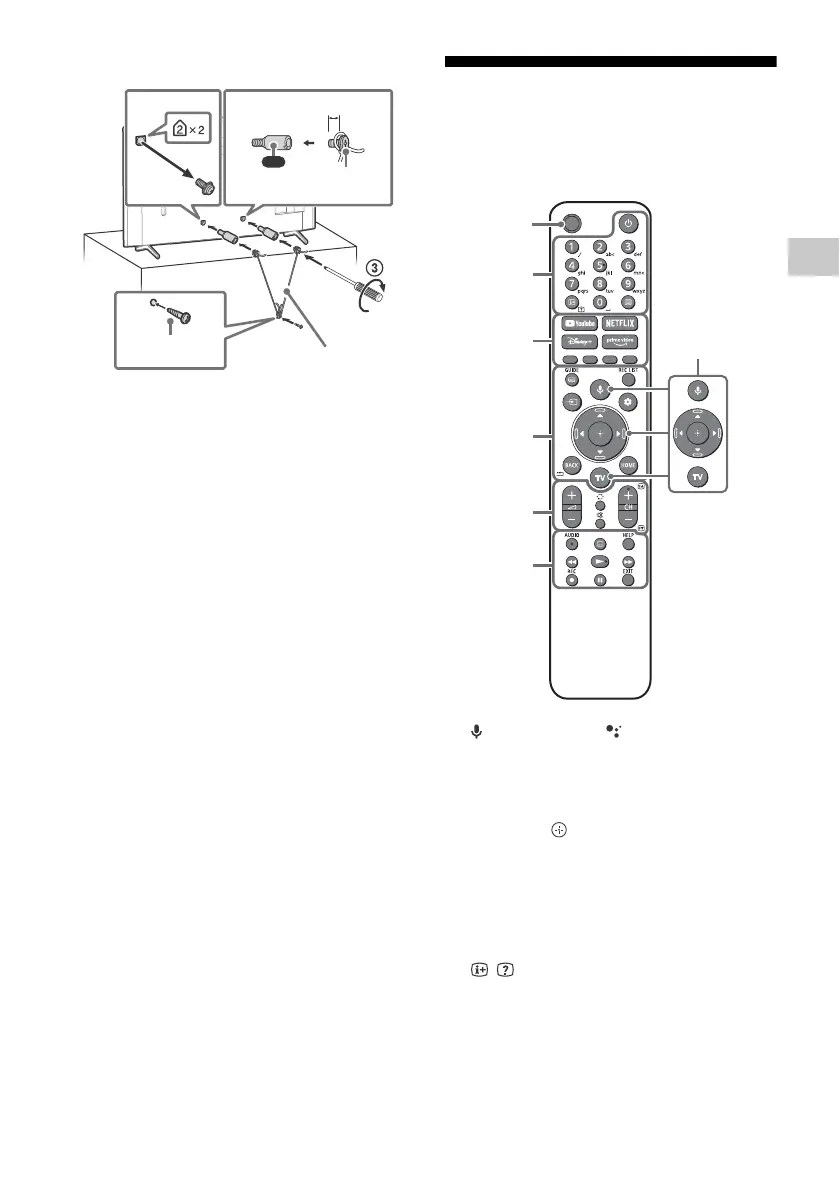
Topple prevention
Remote Control and TV
The remote control shape, layout, availability
and function of remote control buttons may
vary depending on your region/country/TV
model/TV settings.
(Microphone) / (Google Assistant):
Use Google Assistant*
1
*
2
or voice search*
2
.
For hints on how to control your TV, press
the microphone button on the remote
control and say “voice hints”.*
1
////: On screen menu navigation
and selection.
TV: Display TV channel list or switch to
input.
(Power)
Number buttons
/ (Info/Text reveal):
Display
information.
(Text): Display text information.
YouTube™ / NETFLIX / Disney+ /
Prime Video / Colour buttons
10 mm - 12 mm
M6 screw
(not supplied)
Screw
(not supplied)
Cord
(not supplied)
1.5 N·m
{15 kgf·cm}
(supplied)
MIC






 To Next Page