22
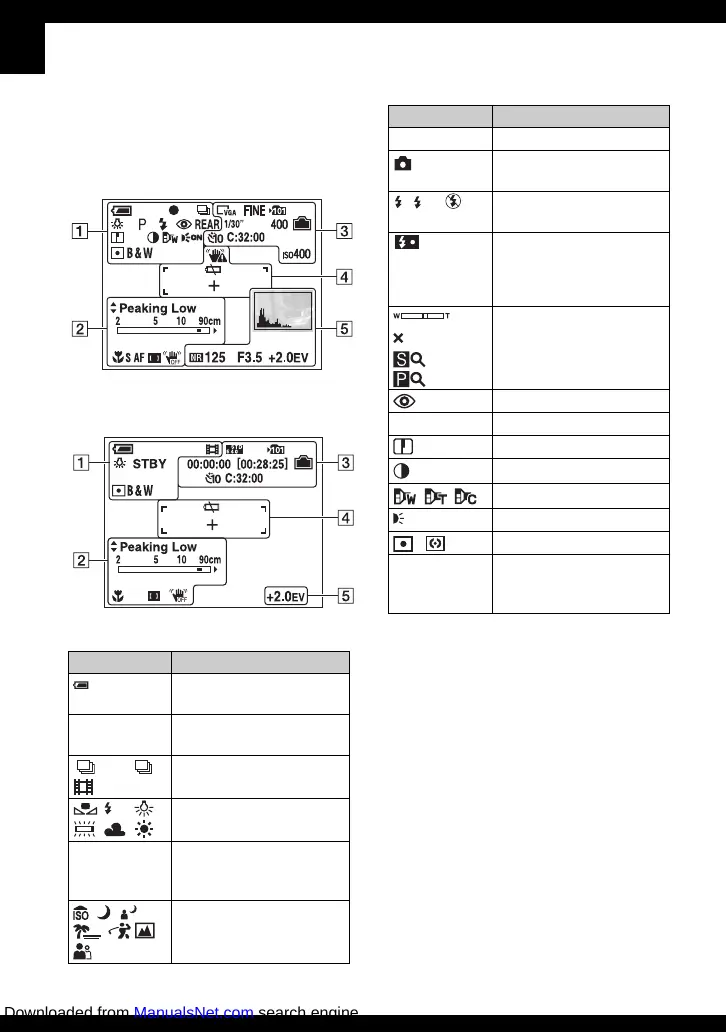
Indicators on the screen
See the pages in parentheses for details of
operation.
When shooting still images
When shooting movies
A
Display Indication
Battery remaining (t step
1 in “Read This First”)
z AE/AF lock (
t step 5 in
“Read This First”)
BRK Recording mode (33, 41)
White balance (46)
STBY
REC
Standby/Recording a movie
(
t step 5 in “Read This
First”)
Mode dial (Scene
Selection) (
t step 5 in
“Read This First”)
M
WB
P S A M Mode dial (33)
Camera mode (t step 5 in
“Read This First”)
Flash mode (
t step 5 in
“Read This First”)
Flash charging
• The LCD screen gets dim
while charging. (DSC-H5
only)
Zoom scaling (57, t step 5
in “Read This First”)
Red-eye reduction (58)
REAR Flash synchro (60)
Sharpness (48)
Contrast (48)
Conversion lens (61)
AF illuminator (59)
Metering mode (45)
VIVID
NATURAL
SEPIA B&W
Color mode (45)
Display Indication
SL
1.3
ON
Downloaded from ManualsNet.com search engine



 To Next Page
 Loading...