91
Connecting your camera to your TV
Connecting your camera to your TV
Viewing images on a TV screen
You can view images on a TV screen by
connecting the camera to a TV.
Turn off both your camera and the TV
before connecting the camera and the TV.
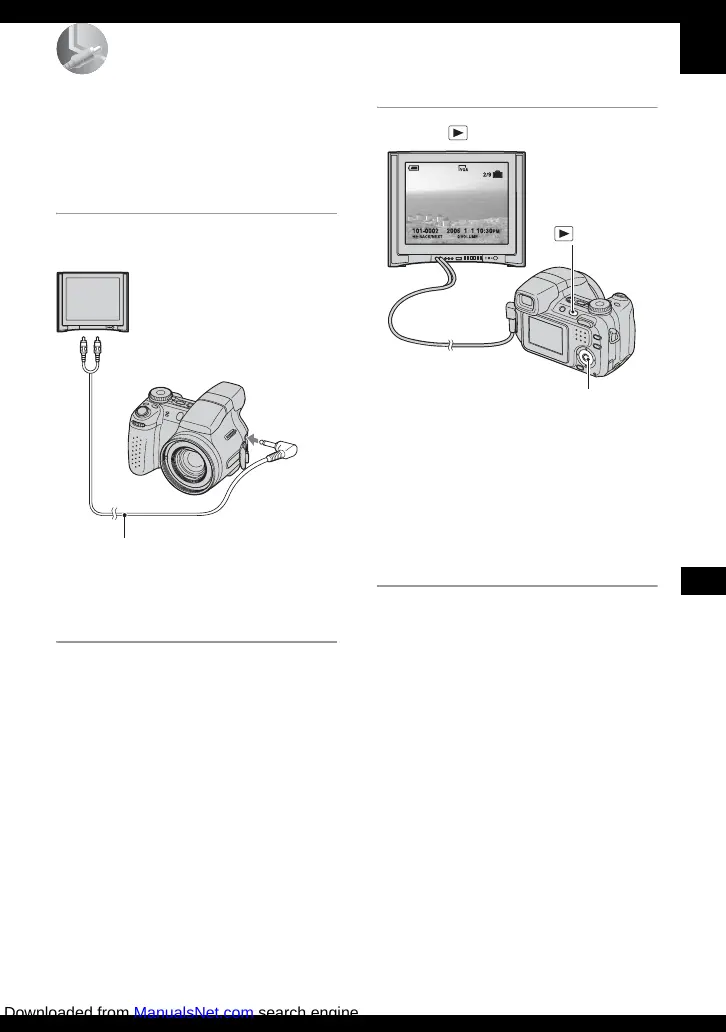
1 Connect the camera to the TV.
• If your TV has stereo input jacks, connect the
audio plug (black) of the A/V cable to the left
audio jack.
2 Turn on the TV and set the TV/
video input switch to “video.”
• For details, see the operating instructions
supplied with the TV.
3 Press to turn on the camera.
Images shot with the camera appear on
the TV screen.
Press b/B on the control button to
select the desired image.
• When using your camera abroad, it may be
necessary to switch the video signal output
to match that of your TV system (page 68).
A/V cable
1 To audio/video input jacks
2 To A/V
OUT jack
Control button
button
Downloaded from ManualsNet.com search engine



 To Next Page
 Loading...