1
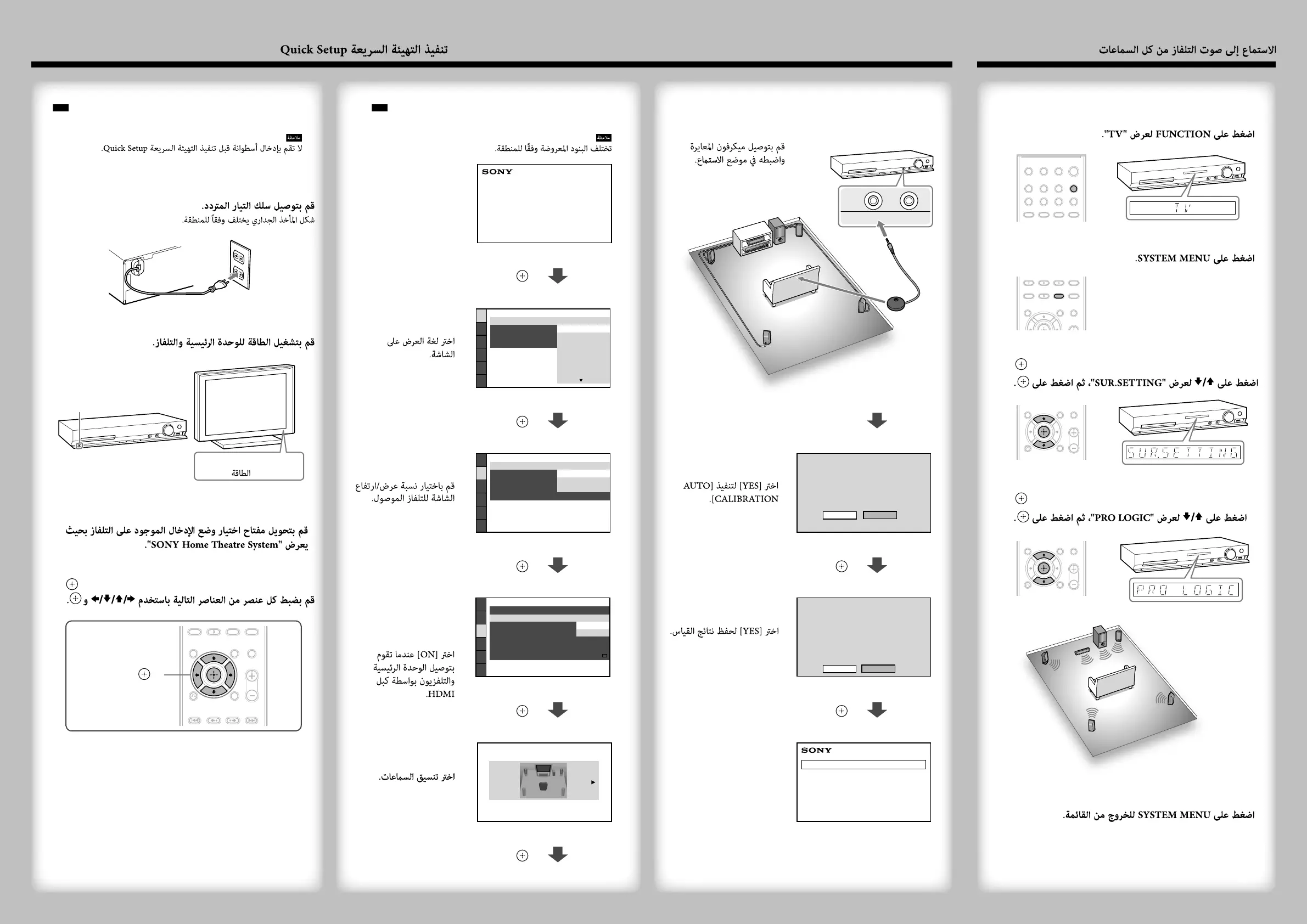
Press FUNCTION to display “TV.”
2
Press SYSTEM MENU.
3
Press / to display “SUR.SETTING,” then press
.
4
Press / to display “PRO LOGIC,” then press
.
5
Press SYSTEM MENU to exit the menu.
Displayed items vary depending on the area.
Select an on-screen
language.
LANGUAGE SETUP
MENU:
OSD:
AUDIO:
SUBTITLE:
ENGLISH
ENGLISH
FRANÇAIS
DEUTSCH
ITALIANO
ESPAÑOL
NEDERLANDS
DANSK
/,
Select the aspect ratio
of the connected TV.
VIDEO SETUP
PROGRESSIVE
(COMPONENT OUT)
:
TV TYPE:
4:3 OUTPUT:
COLOR SYSTEM
(VIDEO CD)
:
16:9
AUTO
PAUSE MODE:
16:9
4:3 LETTER BOX
4:3 PAN SCAN
/,
Select [ON] when you
connect the main unit
and the TV with an
HDMI cable.
HDMI SETUP
HDMI RESOLUTION:
AUDIO RETURN CHANNEL:
AUTO
(1920x1080p)
OFF
SD
YCBCR/RGB(HDMI):
VOLUME LIMIT:
YCBCR
JPEG RESOLUTION:
AUDIO(HDMI):
CONTROL FOR HDMI:
ON
ON
OFF
/,
Select the speaker
formation.
SPEAKER FORMATION
STANDARD
/,
Do not insert a disc before performing the Quick Setup.
1
Connect the AC power cord.
The shape of the wall outlet differs depending on the area.
CENTER
SPEAKERS
SUBWOOFER
FRONT R
FRONT L
2
Turn on the power of the main unit and TV.
/
/
(power/ )
3
Switch the input selector on your TV to display
“SONY Home Theatre System.”
4
Set each following item, using /// and
.
///,
(ENTER)
Connect the calibration
mic and set it at the
listening position.
Select [YES] to perform
[AUTO CALIBRATION].
NO
Connect calibration mic. Start
measurement?
AUTO CALIBRATION
YES
/,
Select [YES] to save the
measurement results.
FRONT L :
FRONT R :
CENTER :
SUBWOOFER :
SURROUND L :
SURROUND R :
If OK, unplug calibration mic and select
“YES”.
YES
YES
YES
YES
YES
YES
Measurement complete.
NOYES
/,
QUICK SETUP is complete.
Home Theatre System
Listening to TV sound from all speakers/
3 Performing the Quick Setup/



 To Previous Page