EasyManua.ls Logo

Sony DREAM MACHINE ICF-C243 - Page 3

Sony DREAM MACHINE ICF-C243
3 pages
Print Icon
To Previous Page IconTo Previous Page
Loading...
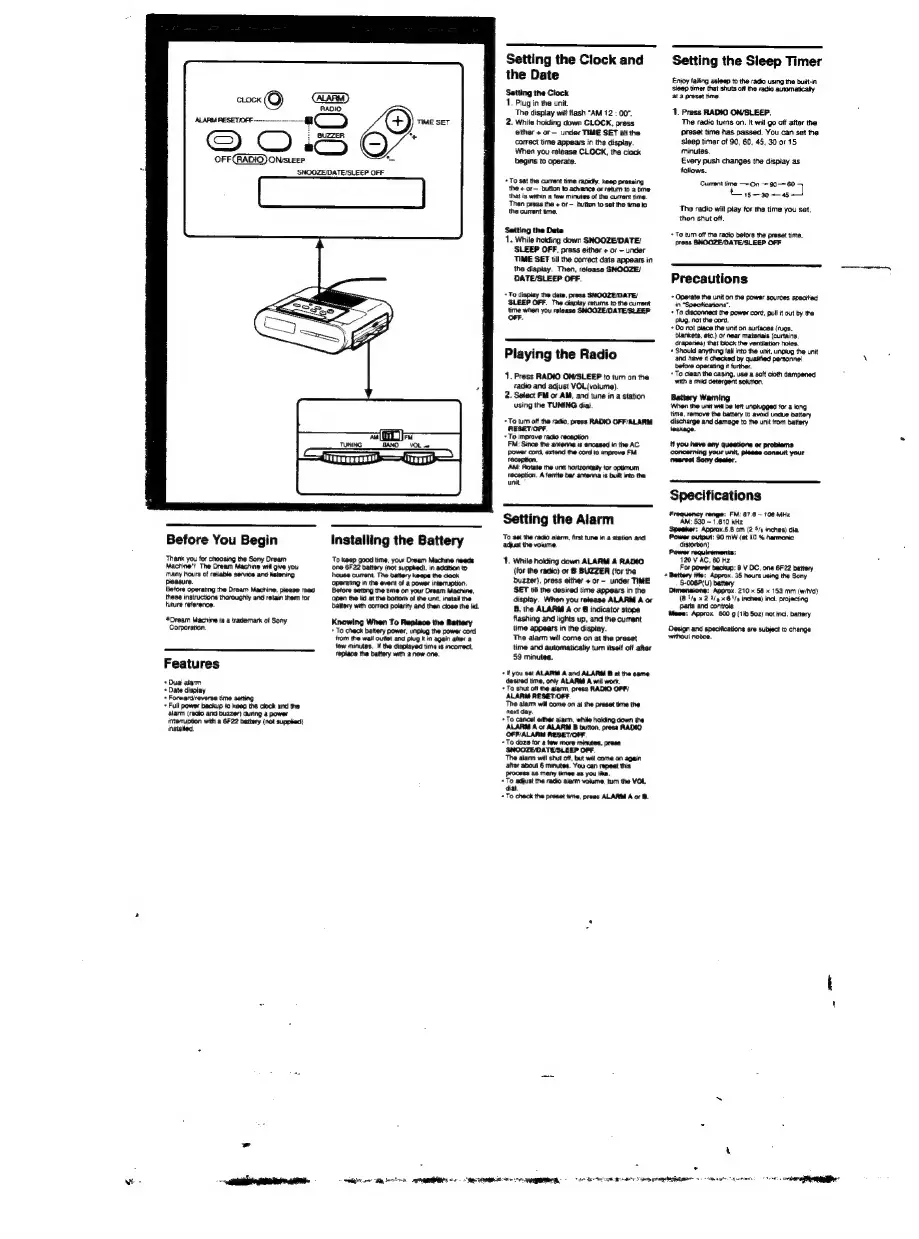
OFF
}ON/SLEEP
O
SNOOZE/DATE/SLEEP
OFF
ar
TUNING
BAN
VOL»
ao
poeee
7
=f
Before
You
Begin
Thank
you
for
choosing
the
Sony
Oream
Machine"?
The
Dream
Machine
will
give
you
many
hours
of
reliable
service
and
ketening
pleasure
Betore
operating
the
Dream
Machine.
please
read
these
instructions
thoroughly
and
retain
them
for
huture
reterence.
Dream
Machine
is
a
trademark
of
Sony
Corporation.
Features
+
Dual
alarm
+
Date
display
+
Forwardireversa
time
setting
+
Full
power
backup
to
keag
the
clock
and
the
‘alarm
(radio
and
buzzer)
during
a
power
interruption
with
a
GF22
battery
(not
supped)
instaled.
Installing
the
Battery
To
keep
good
time,
your
Dream
Machine
needs
‘one
6F22
battery
(not
supped),
in
addition
t
house
current.
The
battery
keapa
the
clack
battery
with
correct
potarity
and
then
close
the
lid.
Knowing
When
To
Replace
the
Battery
+
To
check
battery
power, unplug
the
power
cord
from
the
wall
outet
and
plug
it
m
again
alter
a
few
minutes.
if
the
displayed
time
is
mcorrect,
replace
the
battery
wih
a
new
one.
eRe
Ra
Sk
GEN
92
eT
RE
Setting
the
Clock
and
the
Date
Setting
the
Clock
1.
Plug
in
the
unit.
The
display
wit
flash
“AM
12
:
00",
2.
While
holding
down
CLOCK,
press
either
+
or—
under
TIME
SET
Gill
the
correct
time
appears
in
the
display.
When
you
release
CLOCK,
the
clock
begins
to
operate.
+
To
set the
current
tme
rapsdly,
keep
pressing
the
«or
button
to
advance
or
retum
to
a
bine
that
is
wathin
a
tew
minutes
of
the
current
time.
‘Then
press
the
+
or
~
button
to
set the
time
to
the
current
time.
Setting
the
Date
1.
While
nokling
down
SNOOZE/DATE/
SLEEP
OFF.
press
either
+
or
-
under
TIME
SET
till
the
correct
date
appears
in
the
display.
Then,
release
SNOOZE/
DATE/SLEEP
OFF.
+
To
display
the
date,
press
SNOOZE/DATE/
SLEEP
OFF.
The
display
retums
to
the
current
time
when
you
release
SNOOZE/DATE/SLEEP
OFF.
Playing
the
Radio
1.
Press
RADIO
ON/SLEEP
to
tum
on
the
radio
and
adjust
VOL(volume).
2.
Select
FM
or
AM,
and
tune
in
a
station
using
the
TUNING
dial.
+
To
tum off the
radio,
press
RADIO
OFF/ALARM
RESET/IOFF.
+
To
improve
racko
reception
FM:
Since
the
antenna
is
encased
in
the
AC
Power
cord,
axtend
the
cord
to
improve
FM
reception.
‘AM:
Rotale
the
unit
hortzontaity
for
optimum
reception.
A
ferrite
bar
antenna
is
buitt
into
the
unit
Setting
the
Alarm
To
set the
radio
alarm,
first
tune
in
a
station
and
adjust
the
volume.
1.
While
holding
down
ALARM
A
RADIO
{tor
the
radio)
or
8
BUZZER
(for
the
Duzzer),
press
either
+
or—
under
TIME
SET
till
the
desired
time
appears
in
the
display.
When
you
release
ALARM
A
or
B,
the
ALARM
A
or
B
indicator
stops
flashing
and
lights
up,
and
the
current
time
appears
in
the
display.
The
alarm
will
come
on
at
the
preset
time
and
automatically
tum
itself
off
after
‘59
minutes.
+I
you
set
ALARM
A
and
ALARM
B
at
the
same
desired
tima,
only
ALARM
A
wit
work.
+
To
shut
off the
alarm,
press
RADIO
OFF/
ALARM
RESET/OFF.
‘The
alarm
will
come
on
al
the
prasat
time
the
next
day.
+
To
cancel
ether
alarm,
white
holding
down
the
ALARM
A
or
ALARM
B
button,
presa
RADIO
OFF/ALARM
RESET/OFF.
+
To
doze
for
&
few
more
minutes,
presa
‘SNOOZE/DATE/SLEEP
OFF.
‘The
alarm
wil
shut
off,
but
will
come
on
again
after
about
6
mintes.
You can
repeat
this
process
as
many
tines
as
you
lika.
+
To
adjust
the
radio alarm
vokime,
tun
the
VO.
dal.
+
To
check
the
preset
time,
press
ALARM
A
or
B.
Setting
the
Sleep
Timer
Enjoy
faling
asleep
to
the
radio
using
the
built-in
sieep
timer
that
shuts
off
the
radio
automatically
at
a
preset
time.
1.
Press
RADIO
ON/SLEEP.
The
radia
tums
on.
It
will
90
off
after
the
Preset
time
has
passed.
You
can
set
the
sleep
timer
of
90, 60, 45,
30
or
15
eminutes.
Every
push
changes
the
display
as
follows.
Current
time
—-On
+
90-=
60
15-30
5
The
radio
will
play
for
the
time
you
set,
then
shut
off.
+
To
tum
off
the
radio
betora
the
preset
time,
pross
SNOOZE/DATE/SLEEP
OFF
Precautions
+
Operate
the
unit
on
the
power
sources
specitiad
in
“Soecttications”.
+
To
disconnect
the
power
cord,
pull
it
out
by
the
plug,
not
the
cord,
+
Do
not
place
the
unit
on
surfaces
(rugs,
blankets,
etc.)
or
near
matenais
(curtains,
draperies)
that
block
the
ventilation
holes.
+
Should
anything
fall
into
the
unit,
unplug
the
unit
and
have
it
checked
by
quatied
personne!
before
operating
it
further.
+
To
clean
the
casing,
use
a
soft
cloth
dampened
with
a
mild
detergent
sokition.
Battery
Warning
When
the
unit
willbe
katt
unplugged
for
a
long
time.
remove
the
battery
Ic
avoid
undue
battery
discharge
and
damage
to
the
unit
from
battery
leakage.
#1
you
have
any
questions
or
problems
concerning
your
unit,
please
conautt
your
nearest
Sony
dealer.
Specifications
Frequency
range:
FM:
87.6~
108
MHz
‘AM:
530
-
1,610
kHz.
‘Speeker:
Approx.6.6
cm
(2
5/s
inches)
dia.
Power
output:
90
mW
(at
10
%
harmonic
distortion)
Power
requirements:
120
V
AC,
60
Hz
For
power
backup:
9
V
OC,
one
6F22
battery
Battery
tte:
Approx.
35
hours
using
the
Sony
‘S-006P(U)
battery
3
Approx.
210
x
$8
x
153
mm
(wid)
(8
27/—
x
2
3/4
<6
'/p
inches)
incl.
projecting
controls
parts
and
Mese:
Approx.
600
9
(1b
Soz)
not
incl.
battery
Design
and
specifications
are
subject
to
change
without
nobce.

Related product manuals