EasyManua.ls Logo

Sony DREAM MACHINE ICF-C303 - Page 3

Sony DREAM MACHINE ICF-C303
8 pages
Print Icon
To Next Page IconTo Next Page
To Previous Page IconTo Previous Page
Loading...
Paynter
How
to
Set
the
Date
and
Time
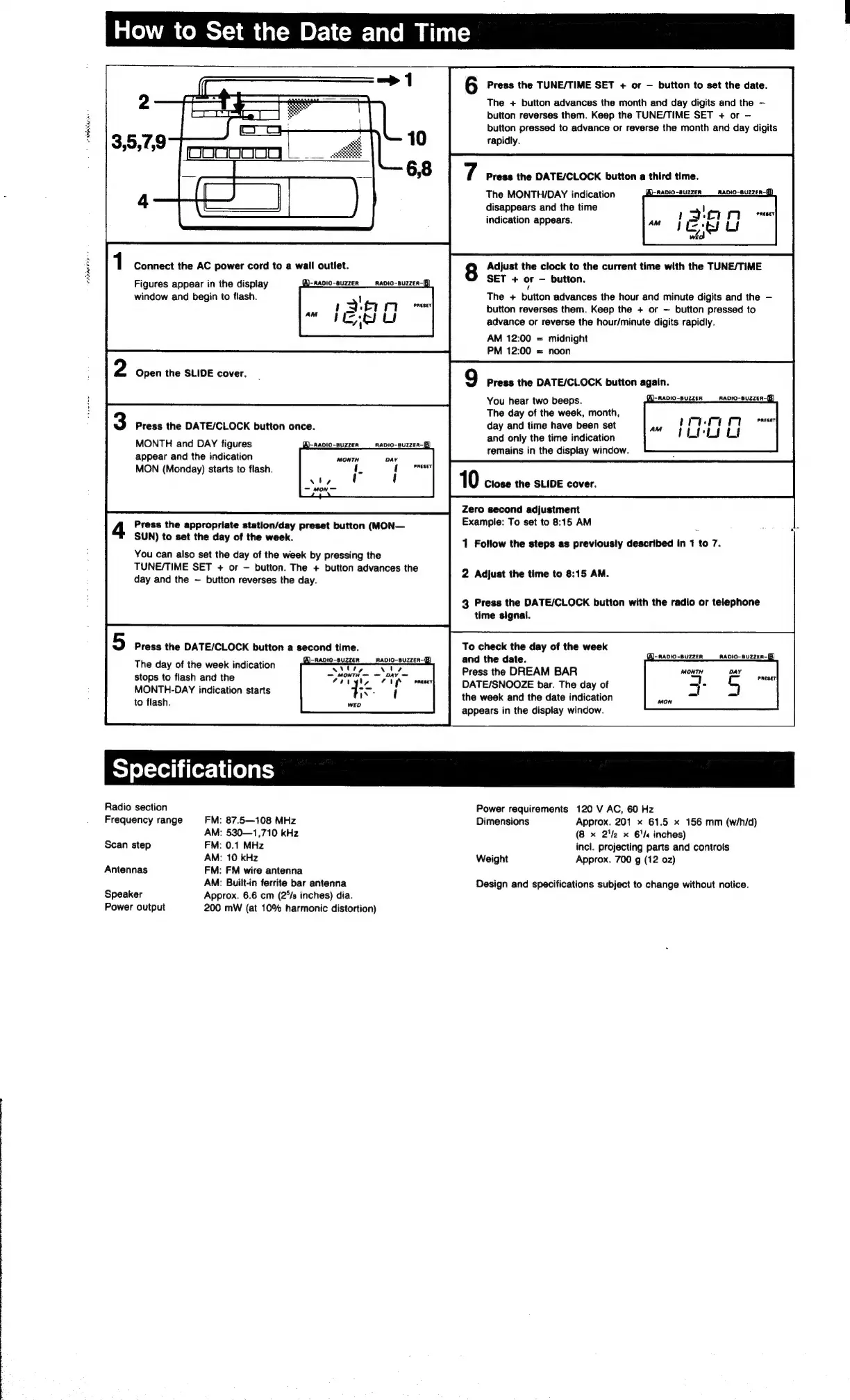
Connect
the
AC
power
cord
to
a
wall
outlet.
Figures
appear
in
the
display
A)-Ravio-suzzer
window
and
begin
to
flash.
Open
the
SLIDE
cover.
Press
the
DATE/CLOCK
button
once.
MONTH
and
DAY
figures
appear
and
the
indication
MON
(Monday)
starts
to
flash.
Press
the
appropriate
station/day
preset
button
(MON—
SUN)
to
set
the
day
of
the
week.
You
can
also
set
the
day
of
the
week
by
pressing
the
TUNE/TIME
SET
+
or
button.
The
+
button
advances
the
day
and
the
~—
button
reverses
the
day.
Press
the
DATE/CLOCK
button
a
second
time.
The
day
of
the
week
indication
stops
to
flash
and
the
MONTH-DAY
indication
starts
to
flash.
RADIO-BUZZER-|B
6
Press
the
TUNE/TIME
SET
+
or
button
to
set
the
date.
The
+
button
advances
the
month
and
day
digits
and
the
button
reverses
them.
Keep
the
TUNE/TIME
SET
+
or
button
pressed
to
advance
or
reverse
the
month
and
day
digits
rapidly.
Press
the
DATE/CLOCK
button
a
third
time.
The
MONTH/DAY
indication
A
naio-suzzen
disappears
and
the
time
indication
appears.
RADIO-BUZZER-
Adjust
the
clock
to
the
current
time
with
the
TUNE/TIME
SET
+
or
button.
The
+
button
advances
the
hour
and
minute
digits
and
the
button
reverses
them.
Keep
the
+
or
button
pressed
to
advance
or
reverse
the
hour/minute
digits
rapidly.
AM
12:00
=
midnight
PM
12:00
=
noon
Press
the
DATE/CLOCK
button
again.
(A)-RADIO-BUZZER
AADIO-BUZZER-B
You
hear
two
beeps.
The
day
of
the
week,
month,
day
and
time
have
been
set
ane
and
only
the
time
indication
remains
in
the
display
window.
mimi
rl
Preset
PiLOLs
ot
Zero
second
adjustment
Example:
To
set
to
8:15
AM
1
Follow
the
steps
as
previously
described
in
1
to
7.
2
Adjust
the
time
to
8:15
AM.
3
Press
the
DATE/CLOCK
button
with
the
radio
or
telephone
time
signal.
To
check
the
day
of
the
week
and
the
date.
Press
the
DREAM
BAR
DATE/SNOOZE
bar.
The
day
of
the
week
and
the
date
indication
appears
in
the
display
window.
Radio
section
Frequency
range
FM:
87.5—108
MHz
AM:
530—1,710
kHz
Scan
step
FM:
0.1
MHz
AM:
10
kHz
Antennas
FM:
FM
wire
antenna
AM:
Built-in
ferrite
bar
antenna
Speaker
Approx.
6.6
cm
(2°/s
inches)
dia.
Power
output
200
mW
(at
10%
harmonic
distortion)
Power
requirements
120
V
AC,
60
Hz
Dimensions
Approx.
201
x
61.5
x
156
mm
(w/h/d)
(8
x
22
x
61/4
inches)
incl.
projecting
parts
and
controls
Weight
Approx.
700
g
(12
02)
Design
and
specifications
subject
to
change
without
notice.

Related product manuals