EasyManua.ls Logo

Sony DREAM MACHINE ICF-C303 - Page 5

Sony DREAM MACHINE ICF-C303
8 pages
Print Icon
To Next Page IconTo Next Page
To Previous Page IconTo Previous Page
Loading...
Foliow
the
steps
2
to
5
described
in
“To
Set
the
ALARM
[A]
(time/mode)'’,
using
the
ALARM
[B]
TIME
and
ALARM
[B]
MODE
buttons.
The
ALARM
[8]
TIME
is
set
to
7:30
AM
at
the
factory.
When
you
choose
the
ALARM
[B]
RADIO
MODE,
you
wili
hear
the
Station
preset
for
the
WAKE
UP
STATION
[§]
button
at
the
preset
time.
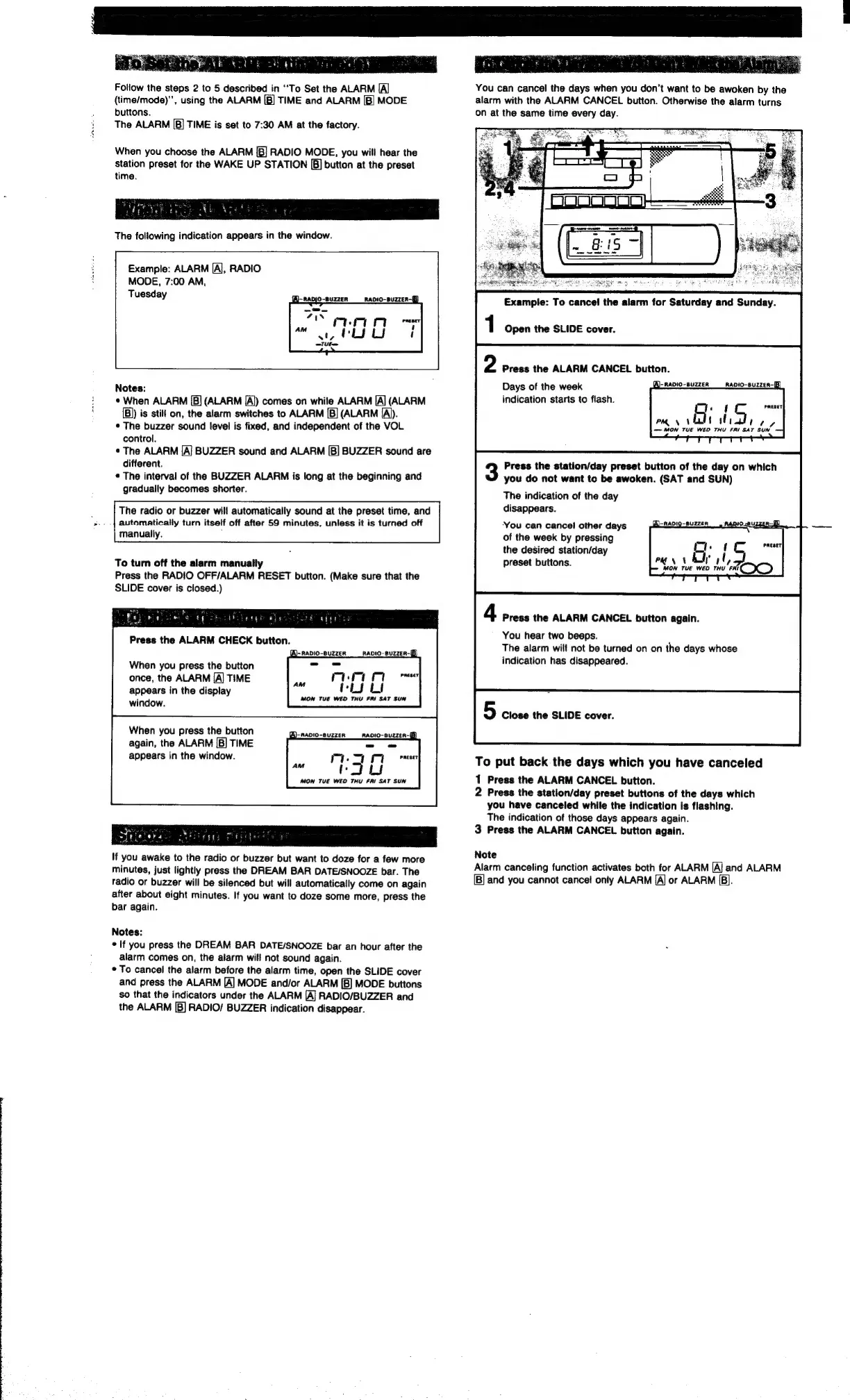
The
following
indication
appears
in
the
window.
Example:
ALARM
[A],
RADIO
MODE,
7:00
AM,
Tuesday
Notes:
*
When
ALARM
[5]
(ALARM
[A])
comes
on
while
ALARM
[A]
(ALARM
{B)
is
stilt
on,
the
alarm
switches
to
ALARM
[B]
(ALARM
[A)).
*
The
buzzer
sound
level
is
fixed,
and
independent
of
the
VOL
control.
¢
The
ALARM
[A/
BUZZER
sound
and
ALARM
[|B]
BUZZER
sound
are
different.
¢
The
interval
of
the
BUZZER
ALARM
is
long
at
the
beginning
and
gradually
becomes
shorter.
The
radio
or
buzzer
will
automatically
sound
at
the
preset
time,
and
automatically
turn
itself
off
after
59
minutes,
unless
it
is
turned
off
manually.
;
To
turn
off
the
alarm
manually
Press
the
RADIO
OFF/ALARM
RESET
button.
(Make
sure
that
the
SLIDE
cover
is
closed.)
When
you
press
the
button
once,
the
ALARM
[A]
TIME
appears
in
the
display
window.
When
you
press
the
button
again,
the
ALARM
[B]
TIME
appears
in
the
window.
MON
TUE
WED
THU
FRI
SAT
SUN
If
you
awake
to
the
radio
or
buzzer
but
want
to
doze
for
a
few
more
minutes,
just
lightly
press
the
DREAM
BAR
DATE/SNOOZE
bar.
The
radio
or
buzzer
will
be
silenced
but
will
automatically
come
on
again
after
about
eight
minutes.
If
you
want
to
doze
some
more,
press
the
bar
again.
Notes:
*
If
you
press
the
DREAM
BAR
DATE/SNOOZE
bar
an
hour
after
the
alarm
comes
on,
the
alarm
will
not
sound
again.
*
To
cancel
the
alarm
before
the
alarm
time,
open
the
SLIDE
cover
and
press
the
ALARM
[A]
MODE
and/or
ALARM
[B]
MODE
buttons
so
that
the
indicators
under
the
ALARM
[A]
RADIO/BUZZER
and
the
ALARM
[B]
RADIO/
BUZZER
indication
disappear.
You
can
cancel
the
days
when
you
don't
want
to
be
awoken
by
the
alarm
with
the
ALARM
CANCEL
button.
Otherwise
the
alarm
turns
on
at
the
same
time
every
day.
Example:
To
cance!
the
alarm
for
Saturday
and
Sunday.
Open
the
SLIDE
cover.
Press
the
ALARM
CANCEL
button.
A)-
RADIO-BUZZER
RADIO-8UzzER-B
A
ore
PRESET
PM
\
anf
ity
tery
=
MON
TUE
WED
THU
FRI
SAT
SUN
Days
of
the
week
indication
starts
to
flash.
Press
the
station/day
preset
button
of
the
day
on
which
you
do
not
want
to
be
awoken.
(SAT
and
SUN)
The
indication
of
the
day
disappears.
You
can
cance!
other
days
of
the
week
by
pressing
the
desired
station/day
preset
buttons.
‘of
ea
se
PRESET
MON
TUE
WED
THU
FI
ICO
Press
the
ALARM
CANCEL
button
again.
You
hear
two
beeps.
The
alarm
will
not
be
turned
on
on
the
days
whose
indication
has
disappeared.
5
Close
the
SLIDE
cover.
To
put
back
the
days
which
you
have
canceled
1
Press
the
ALARM
CANCEL
button.
2
Press
the
station/day
preset
buttons
of
the
days
which
you
have
canceled
while
the
indication
is
flashing.
The
indication
of
those
days
appears
again.
3
Press
the
ALARM
CANCEL
button
again.
Note
Alarm
canceling
function
activates
both
for
ALARM
[A]
and
ALARM
B]
and
you
cannot
cancel
only
ALARM
[A]
or
ALARM
[B].

Related product manuals