Enlargingimages
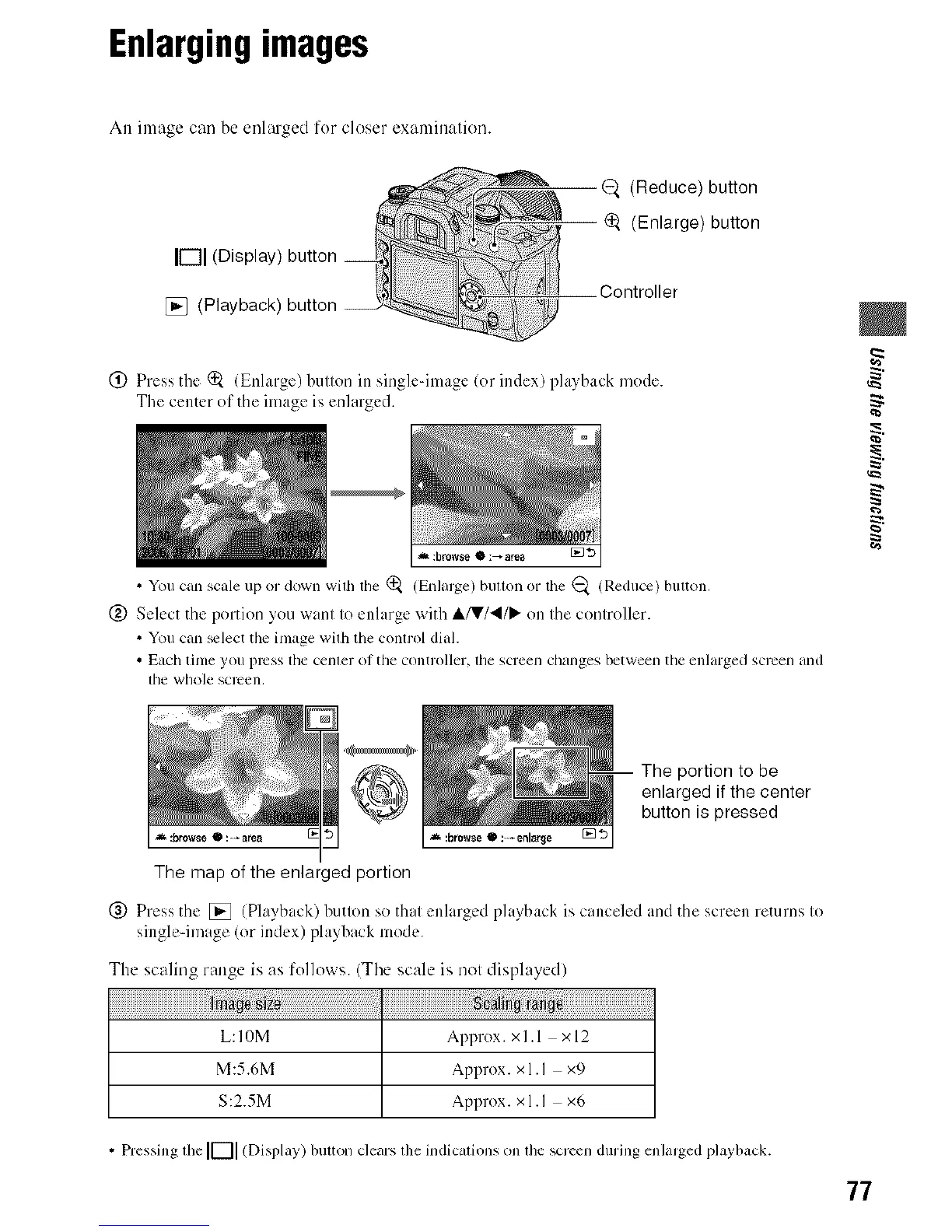
An image can be enlarged for closer examinalien.
IF-II(Display)
[] (Playback)
@. (Reduce) button
_. (Enlarge) button
Controller
(_) Press the (_ (Enlarge) butlon in single-image (or index) playback mode.
The center of the ilnage is enlarged.
,=_:browse Q :_ area [] *D
• You can scale up or down with the (_ (Enlalge) button or the (_ (Reduce) button.
@ Select the portion you want to enlarge with ,,Ik/V/41/_ on the controller.
• You can +lect the image with the control dial.
• Each time you press the center of the controller, the screen changes between the enlarged screen and
tile whole SCl-Cen,
The portion to be
enlarged if the center
button is pressed
_ :browse • : *anna _ :browse • : _enlar_e []'3
The map of the enlarged portion
(_) Press the [] (Playback) butlon so thai enlarged playback is canceled and the screen returns Io
single-image (or index) playback mode.
The scaling range is as follows. (Tbe scale is nol displayed)
L:IOM A1)pl-ox. xl.l x12
M:5.6M Approx. xl.I x9
S:2.5M Approx. xl.I x6
• Pressing tim IF-I] (Display) button clears the indications on the screen during enlarged playback.
77



 To Next Page
 Loading...












