2-16
DSLR-A300_L2
2-3. IMAGER INCLINATION ADJUSTMENT
Checking Method
1. Use the copy stand or place a mirror on the wall, and adjust the accuracy so that the camera is opposed to the mirror.
2. Use the AE master lens as an inspection lens.
3. Obtain the inclination angle with the Photoshop, and perform as follows according to the angle:
• For the angle above ± 0.90 degree, be sure to repair the camera.
• For the angle above ± 0.5 degree and below ± 0.90 degree, repair the camera according to the user's requirement level.
• For the angle below ± 0.5 degree, check again the angle to satisfy the specified value.
Adjusting Method
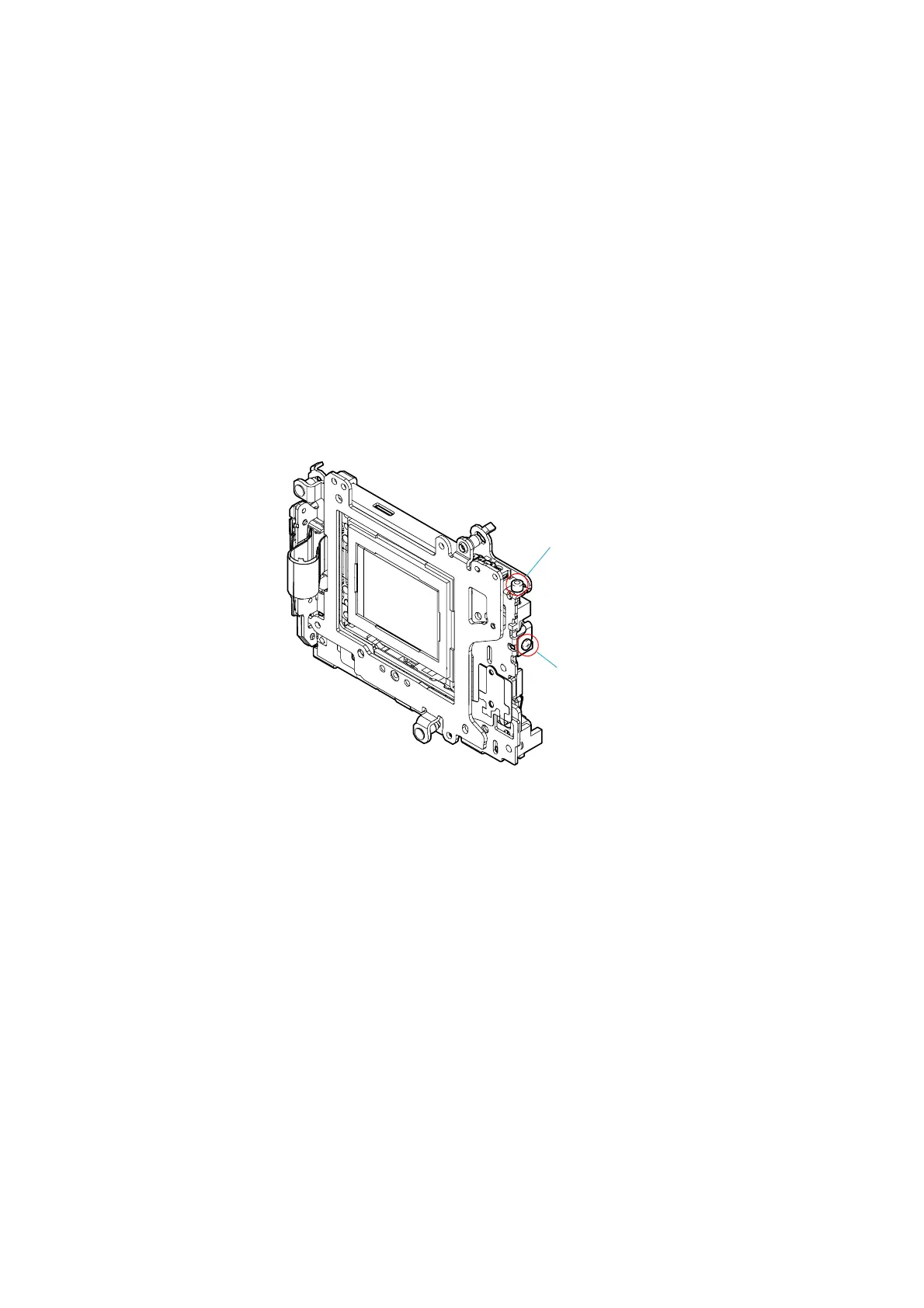
1. Loosen the fixed screw.
2. Adjust the inclination with the adjusting screw.
• For an image that tilts to the right, rotate the screw clockwise.
• For an image that tilts to the left, rotate the screw counterclockwise.
3. Tighten the fixed screw.
Imager Inclination Adjusting Screw
AdjustingScrew
FixedScrew



 To Next Page
 Loading...








