– 5 –
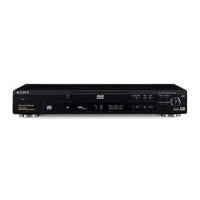
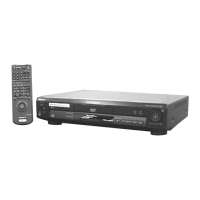
3. HOW TO SERVICE MB-86 BOARD
1) Remove the case from the set. (Refer to 2-1)
2) Remove the mechanism deck. (Refer to 2-6)
3) Remove the MB-86 board. (Refer to 2-9)
4) Set the CK-MD board as shown in Fig. 2.
Fig. 2
5) Set the MB-86 board as shown in Fig. 3.
Fig. 3
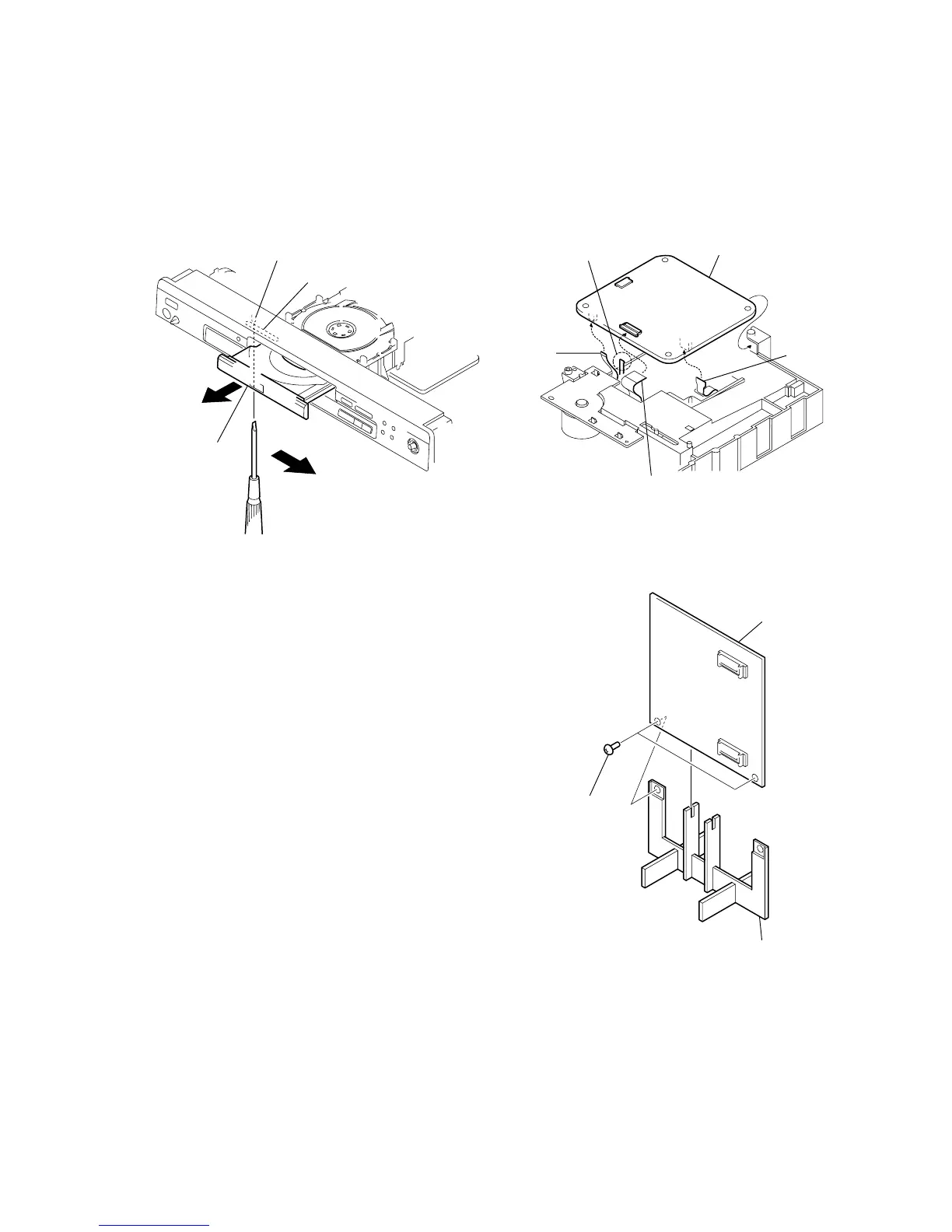
2. DISC REMOVAL PROCEDURE
(at POWER OFF)
1) Insert a tapering driver into the aperture of the unit bottom,
and move the lever of chuck cam in the direction of the arrow
A. (See Fig. 1)
2) Draw out the tray in the direction of the arrow B, and remove
a disc. (See Fig. 1)
Fig. 1
B
A
Lever of chuck cam
Aperture
Tray
5 CK-MD board
4 Claw
1 Flexible board
(CN005)
3 Flexible board
(CN002)
2 Flexible board
(CN001)
1 MB-86 board
3 Two ground point
screws
2 STAND


 To Next Page