15
Basic Functions
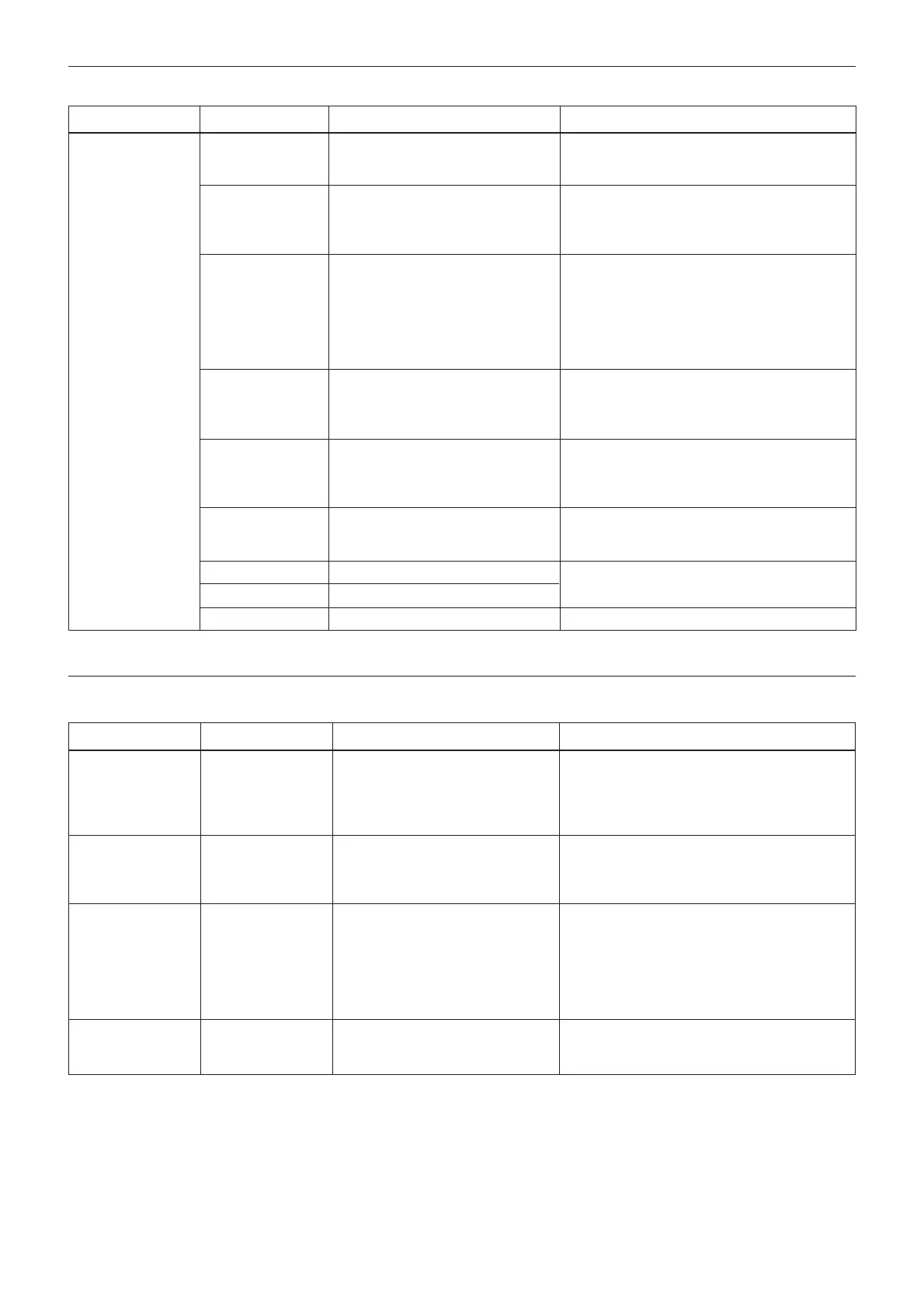
Privacy Zone Setting Command List
Command Set Command
Command Packet Comments
CAM_PrivacyZone
SetMask
8x 01 04 76 mm nn
0r 0r 0s 0s FF
Setting Mask(Size)
See “mm: mask setting list”, “nn: setting”, and
“rr: w, ss: h” in “Parameters” on page 16.
Display
8x 01 04 77 pp pp pp pp FF
Setting Mask Display On/Off
See “pp pp pp pp: Mask bit” in “Parameters”
on page 16.
pp pp pp pp: Mask setting (0: OFF, 1: ON)
SetMaskColor
8x 01 04 78 pp pp pp pp qq rr FF Setting Color of Mask
See “pp pp pp pp: Mask bit” and “qq, rr: Color
code” in “Parameters” on page 16.
qq: Color setting when setting the Mask bit
to 0
rr: Color setting when setting the Mask bit
to 1
SetPanTiltAngle
8x 01 04 79 0p 0p 0p 0q 0q 0q FF
Setting Pan/Tilt Angle
See “Setting pan/tilt angle” in “Parameters” on
page 16.
ppp: Pan angle, qqq: Tilt angle
SetPTZMask
8x 01 04 7B mm 0p 0p 0p
0q 0q 0q 0r 0r 0r 0r FF
Setting the direct position of PTZ
mm: See “mm: mask setting list” and “Setting
pan/tilt angle” in “Parameters” on page 16.
ppp: Pan , qqq: Tilt , rrrr: Zoom
Inquiry Command Command Packet Inquiry Packet
Comments
CAM_Privacy
DisplayInq
8x 09 04 77 FF y0 50 pp pp pp pp FF
Inquiry about the status of Setting Mask
Display On/Off
See “pp pp pp pp: Mask bit” in “Parameters”
on page 16.
1:On, 0:Off
CAM_PrivacyPan
TiltInq
8x 09 04 79 FF y0 50 0p 0p 0p 0q 0q 0q FF
Inquiry about the pan/tilt position currently set
See “Setting pan/tilt angle” in “Parameters” on
page 16.
ppp: Pan, qqq: Tilt
CAM_Privacy
PTZInq
8x 09 04 7B mm FF y0 50 0p 0p 0p 0q 0q 0q 0r 0r
0r 0r FF
Inquiry about pan/tilt/zoom position at the mm
Mask setting
See “mm: Mask setting list” and “Setting pan/
tilt angle” in “Parameters” on page 16.
ppp: Pan Position,
qqq: Tilt Position
rrrr: Zoom Position
Grid On
Non_InterlockMask
Privacy Zone Inquiry Command List
8x 01 04 7C 02 FF
Grid Off
8x 01 04 6F mm
0p 0p 0q 0q 0r 0r 0s 0s FF
Setting non-interlocking the mask to pan/tilt
See “mm: mask setting list” and “pp: x, qq: y,
rr: w, ss: h” in “Parameters” on page 16.
Setting Grid Display On/Off
8x 01 04 7C 03 FF
CenterLineOn
8x 01 04 7C 04 FF
Setting the center line On
CAM_Privacy
MonitorInq
8x 09 04 6F FF
y0 50 pp pp pp pp FF
Inquiry about the mask currently displayed
See “pp pp pp pp: Mask bit” in “Parameters”
on page 16.



 To Next Page