E:\SONY TV\SY23_APRB_UC_RG_121\5054425121\5054425121_01EN.fm master page: Right
FW-85EZ20L / 75EZ20L / 65EZ20L / 55EZ20L / 50EZ20L / 43EZ20L
5-054-425-12(1)
5
EN
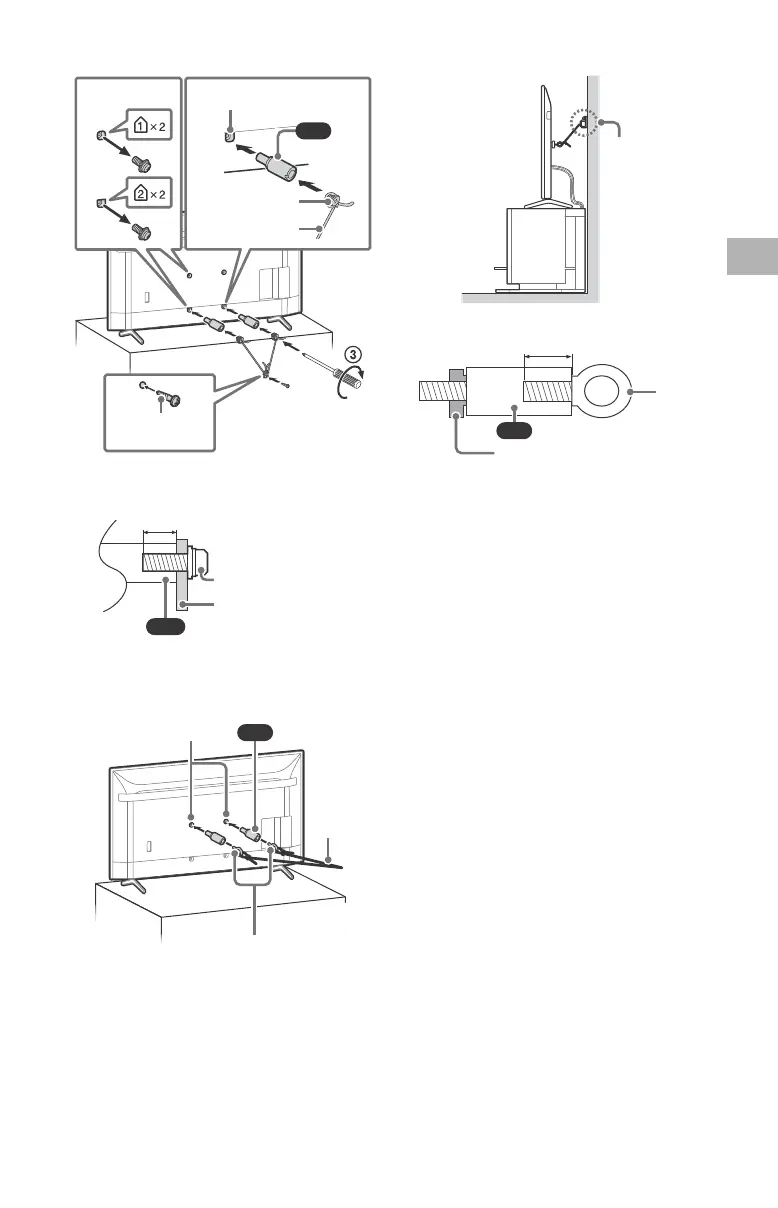
FW-65EZ20L / 55EZ20L / 50EZ20L / 43EZ20L
The length of the M6 machine screw differs depending
on the rope or chain diameter. Please refer to below
illustration.
3 Anchor the LCD Display to the wall by using bolts, wall
anchor and chain (or rope).
FW-65EZ20L / 55EZ20L / 50EZ20L / 43EZ20L
Please refer to below illustration for M6 eye bolt length.
Note
• Your LCD Display is shipped with screws attached to the
rear of the LCD Display depending on the LCD Display
model. (They are fastened in the screw holes for wall
mounting.) Be sure to remove the upper two screws prior
to anchoring the LCD Display to a wall.
• Securing the LCD Display to the Stand without securing
the LCD Display and the Stand to the wall provides
minimum protection against the LCD Display toppling
over. For further protection, be sure to follow the three
measures recommended.
1.5 N·m
{15 kgf·cm}
M6 machine screw
(not supplied)
Rope or chain (not
supplied)
Screw (not supplied)
Screw hole on the rear cover
(supplied)
VS
10 – 12 (mm)
Screw (M6)
Rope or chain
Wall-mount holes
Rope or
chain (not
supplied)
M6 eye bolts (not supplied)
(supplied)
Wall-anchor
(not supplied)
VS
10 – 12 (mm)
LCD Display’s rear cover
M6 eye
bolt


 To Next Page
 Loading...