73
Using a Computer
A Folder containing image files recorded
by other camcorders without the folder
creation function (for playback only).
B Folder containing image files recorded
by your camcorder when no new folders
have been created, only [101MSDCF] is
displayed.
C Folder containing movie data recorded
by other camcorders without the folder
creation function (for playback only)
ssss are numbers between 0001 and
9999.
For Macintosh users
Double-click the drive icon, then drag and
drop the desired picture file onto the hard
disk of your computer.
For Windows users
If [USB CONNECTING] appears on the
LCD screen, follow the procedure below to
disconnect the USB cable.
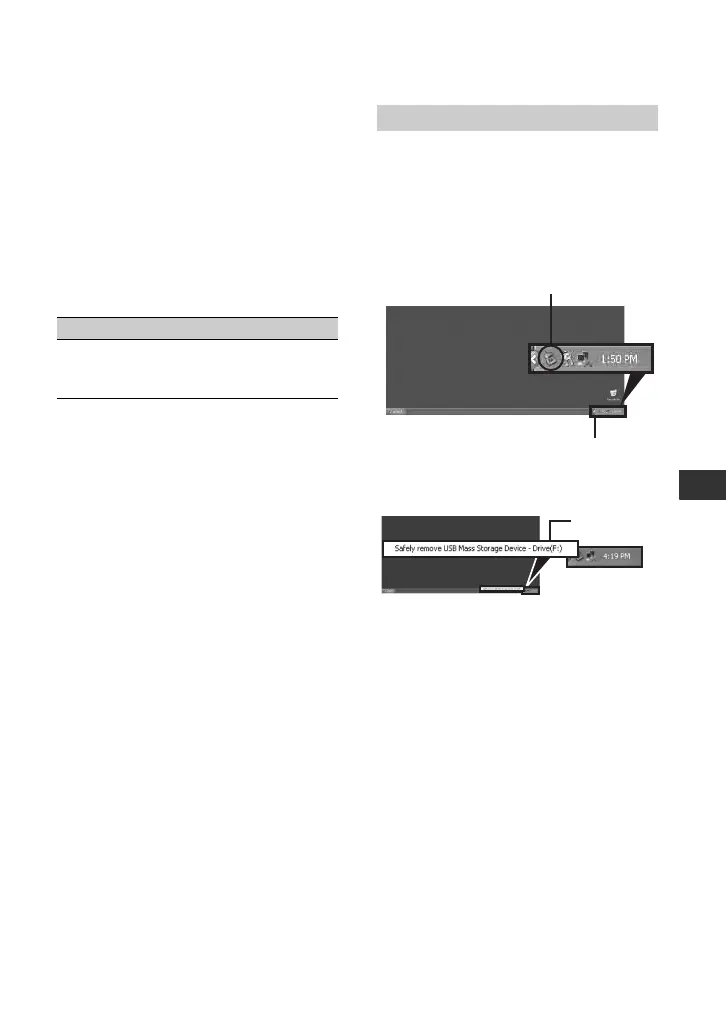
1 Click the [Unplug or eject hardware]
icon on the task tray.
2 Click [Safely remove USB Mass
Storage Device-Drive].
3 Click [OK].
4 Disconnect the USB cable from the
camcorder and computer.
If [USB CONNECTING] does not appear
on the LCD screen, do only step 4.
b Notes
• Remove the USB cable according to the correct
procedure, otherwise files in the “Memory Stick
Duo” may not be updated correctly. Also, this
may cause a malfunction of the “Memory Stick
Duo.”
Folder File Meaning
101MSDCF
(up to 999
MSDCF)
DSC0ss
ss.JPG
Still image file
Disconnecting the USB cable
Click this icon.
Task tray
Click here.
Continued ,


 To Next Page