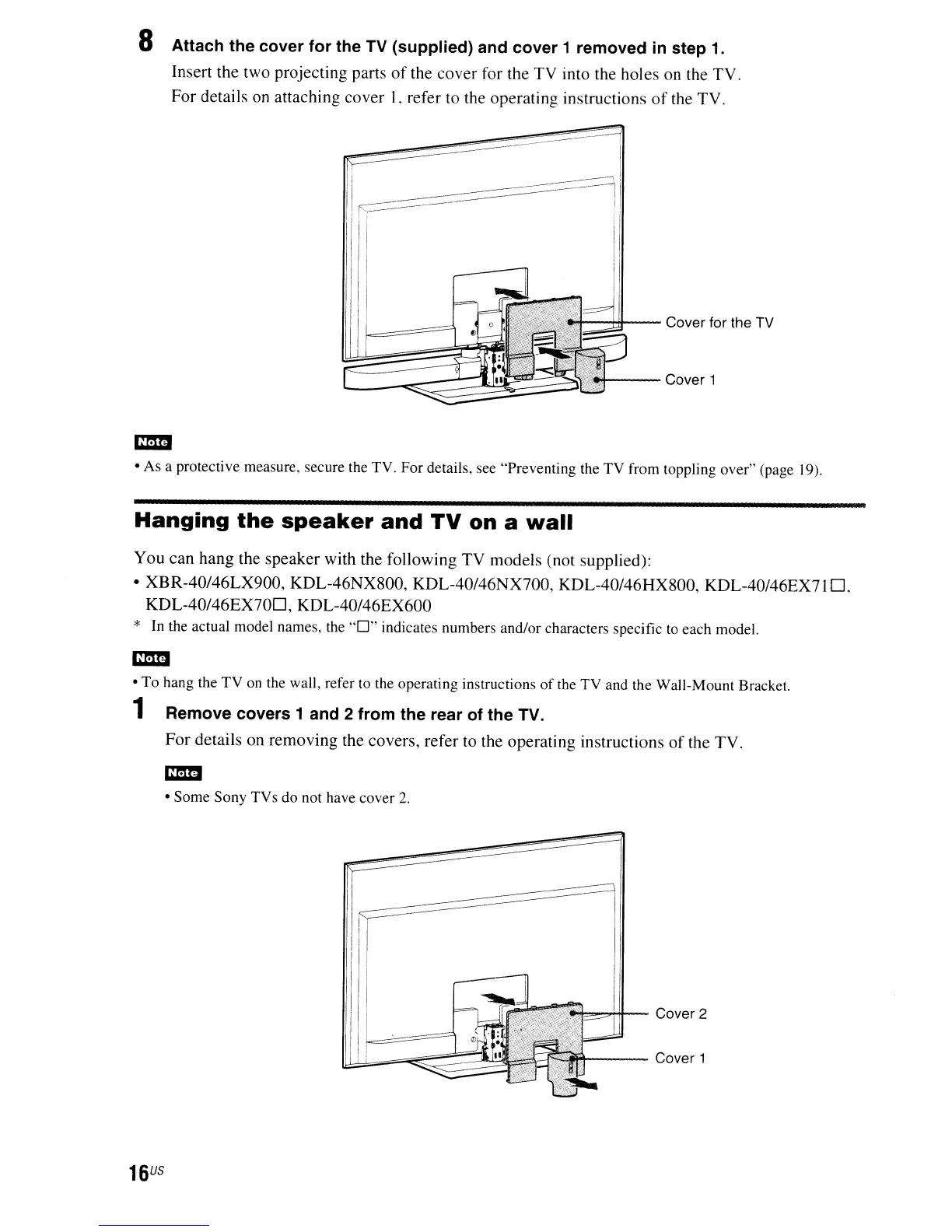
8 Attach the cover for the TV (supplied) and cover 1 removed
in
step
1.
Insert the two projecting parts
of
the cover for the TV into the holes on the TV.
For details
on
attaching cover L refer to the operating instructions
of
the TV.
--Hil---
Cover for the
TV
---Cover
1
• As a protective measure, secure the TV. For details, see "Preventing the TV from toppling over" (page 19).
Hanging
the
speaker
and
TV
on
a
wall
You can hang the speaker with the following TV models (not supplied):
• XBR-40/46LX900, KDL-46NX800, KDL-40/46NX700, KDL-40/46HX800, KDL-40/46EX7l
D.
KDL-40/46EX70D,
KDL-40/46EX600
*
In
the actual model names, the
"0"
indicates numbers and/or characters specific to each model.
• To hang the TV
on
the wall, refer to the operating instructions
of
the TV and the Wall-Mount Bracket.
1 Remove covers 1 and 2 from the rear of the TV.
For details on removing the covers, refer to the operating instructions
of
the
TV
.
• Some Sony TVs do not have cover
2.
""....,,,.H+-
Cover 2
't----
Cover 1
16
US


 To Next Page